
Kajabi Email Strategy: How to Use Broadcasts and Sequences Effectively
Learn how to use Kajabi email broadcasts and sequences effectively to engage subscribers, nurture leads, onboard students, and support course launches.
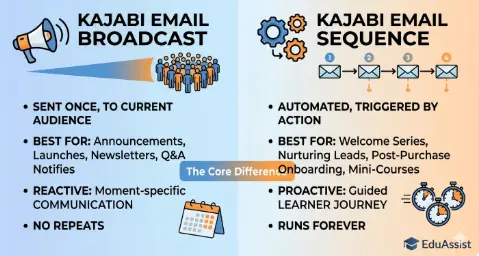
Table of Contents ▼
Quick Answer
This guide explains how Kajabi email broadcasts and sequences work, their key differences, common use cases, and how course creators can combine both tools for effective email marketing. It covers broadcasts for time-sensitive announcements, promotions, newsletters, and launches, while sequences are used for automated welcome, onboarding, nurture, and post-purchase campaigns.
If you’ve been inside your Kajabi dashboard staring at the Email section, you’ve probably asked yourself: Should I send a broadcast or set up a sequence?
It’s one of the most common questions course creators, coaches, and online educators face. Choosing the wrong option can lead to poorly timed emails, inconsistent communication, and lower engagement.
The good news is that once you understand how each tool works and why it exists, the decision becomes much easier.
This guide explains the difference between a Kajabi email broadcast and an email sequence in simple terms, with practical examples for educators, coaches, course creators, and online businesses.
What Is a Kajabi Email Broadcast?
A Kajabi email broadcast is a one-time email you send to a specific group of subscribers immediately or at a scheduled time. Think of it like a company-wide announcement.
Broadcasts are best for time-sensitive or moment-specific communication. Something is happening, and you want your audience to know about it.
Common uses for Kajabi broadcasts
You can use a broadcast for:
- Announcing a new course or product
- Promoting a limited-time discount
- Sharing a new blog post or YouTube video
- Notifying students about a live webinar or Q&A
- Sending a weekly newsletter
- Sharing community updates
- Announcing an important change or event
Broadcasts do not repeat automatically. Once the email is sent, it is finished. Someone who joins your list tomorrow will not automatically receive the broadcast you sent today.
If you want new subscribers to receive similar information automatically, you can turn the concept into an email sequence.
What Is a Kajabi Email Sequence?
A Kajabi email sequence is a series of pre-written emails that are delivered automatically according to a schedule or trigger.
For example, a subscriber might receive the first email immediately after signing up, another email two days later, and another several days after that.
Sequences are particularly useful when you’re building a structured customer or learner journey. If you’re still setting up your Kajabi account, our Kajabi Account Setup Guide for Beginners can help you understand the basic platform setup before creating your email system.
Common uses for Kajabi sequences
Sequences can be used for:
- Welcome emails for new subscribers
- Lead magnet delivery
- Course onboarding
- Post-purchase follow-ups
- Lead nurturing
- Free email courses
- Membership onboarding
- Re-engagement campaigns
The biggest advantage of a sequence is consistency. You create the emails once, and they can continue working automatically for people who enter the sequence later.
Broadcast vs. Sequence: The Core Difference
The easiest way to understand the difference is to look at timing, purpose, audience, personalization, and effort.
| Feature | Kajabi Broadcast | Kajabi Sequence |
|---|---|---|
| Timing | Sent at a specific time | Triggered and scheduled automatically |
| Purpose | Announcements, updates, promotions | Nurturing, onboarding, education |
| Audience | Existing subscribers or selected segments | People who enter the sequence |
| Automation | Mostly manual | Automated |
| Setup | Quick to create | More setup required |
| Repetition | One-time | Multiple emails |
| Best for | Time-sensitive communication | Ongoing customer journeys |
Neither tool is automatically better than the other. A strong Kajabi email strategy usually uses both broadcasts and sequences together.
When to Use a Kajabi Email Broadcast
1. You Have Time-Sensitive News
If something is happening right now, a broadcast is usually the better choice.
For example:
- Your sale ends tonight
- A webinar starts tomorrow
- You published a new lesson
- A new product is available
- You have an important community announcement
These situations depend on a specific date or event, so sending a one-time broadcast makes sense.
2. You’re Running a Course Launch
Kajabi broadcasts can be useful during a course launch because launch communication often depends on specific dates.
You might send:
- A launch announcement
- A valuable educational email
- An objection-handling email
- A student success story
- A deadline reminder
Each email can be scheduled around the launch calendar.
If you are also working on your course website and funnel, you may want to read our guide on how to create a course on Kajabi for additional setup guidance.
3. You Want to Stay Connected With Your Existing Audience
Broadcasts are also useful for regular newsletters, weekly tips, new content, and community updates.
For example, you could send a monthly email highlighting:
- New lessons
- New blog posts
- Upcoming events
- New resources
- Student success stories
This keeps your existing audience informed without putting everyone into an automated sequence.
When to Use a Kajabi Email Sequence
1. You Have a Lead Magnet or Opt-In
When someone downloads a free checklist, guide, template, or other resource, a welcome sequence can automatically introduce them to your brand.
A simple sequence might include:
Day 0: Welcome and resource delivery
Day 2: Helpful tip related to the resource
Day 4: Educational content
Day 6: Your story or expertise
Day 8: Introduction to a relevant paid offer
The exact timing depends on your audience and offer, but the important point is that the journey happens automatically.
2. After Someone Buys a Course or Joins a Membership
Post-purchase sequences can help students understand what to do next.
For example:
Day 0: Welcome and access instructions
Day 2: Where to start + quick-win lesson
Day 5: Community invitation and support resources
Day 10: Progress check-in and encouragement
This type of onboarding can be especially useful if you have spent time building a structured course experience.
If you’re comparing Kajabi with other learning platforms, you can also explore LearnWorlds vs. Kajabi to understand how the platforms differ.
3. You’re Nurturing Cold Leads
Not every subscriber is ready to purchase immediately.
A nurture sequence can provide useful information over several days or weeks. Instead of repeatedly asking for a sale, you can use the sequence to answer common questions, demonstrate expertise, and explain how your product or course works.
This is where Kajabi’s automation features become particularly useful. For a deeper look, see our guide to Kajabi automation workflows.
4. You Want to Deliver a Free Email Course
A free email course can also be delivered through a sequence.
For example, you could create a seven-day mini-course:
- Day 1: Introduction
- Day 2: Basic concept
- Day 3: Practical exercise
- Day 4: Common mistakes
- Day 5: Advanced tip
- Day 6: Case study
- Day 7: Next steps
Every new subscriber can start the same journey regardless of when they join your list.
Combining Broadcasts and Sequences
The most practical approach is not choosing between broadcasts and sequences. Instead, use each one for the job it handles best.
Here is a simple example.
Someone discovers your content through search or social media and signs up for a free checklist.
Sequence:
Welcome email → free resource → educational emails → soft introduction to your paid offer
If they don’t purchase immediately, your regular broadcasts can continue the relationship.
You might send:
- Weekly educational tips
- New blog posts
- Product updates
- Webinar invitations
- Limited-time promotions
When you launch a new product, you can then use broadcasts for the time-sensitive launch communication.
This creates a simple system:
Sequences handle the automated journey. Broadcasts handle ongoing communication and time-sensitive events.
Kajabi Email Segmentation
Sending every email to your entire list is not always the best approach.
Where appropriate, segment your audience based on factors such as:
- Products purchased
- Offers
- Tags
- Subscriber behavior
- Course enrollment
- Customer status
For example, someone who has already purchased your course may not need an email promoting the same introductory offer.
This is where your broader Kajabi customer-management setup matters. You can learn more about managing leads and students in our Kajabi CRM guide.
How Kajabi Automations Fit Into the Picture
Sequences and broadcasts can become even more useful when combined with automation.
For example:
Trigger: Someone purchases a course
↓
Action: Add a tag
↓
Action: Start onboarding sequence
↓
Action: Send course-access email
↓
Action: Follow up with learning resources
For more advanced workflows, see our guide to Kajabi Advanced Automations.
The exact workflow you build depends on your audience, products, and customer journey.
Quick Tips for Better Kajabi Email Engagement
Segment Your Broadcasts
Don’t automatically send every email to your entire database. Use relevant audience segments when appropriate so subscribers receive content that matches their interests or relationship with your business.
Write Natural Subject Lines
Your subject line should make the reader understand why the email is worth opening.
Avoid relying too heavily on excessive capitalization, emojis, or artificial urgency.
A simple subject such as “A quick update about your course” can be more natural than a subject line packed with promotional language.
Keep Sequences Focused
Each sequence email should have a clear purpose.
One email might deliver a lesson. Another might answer a common question. Another might encourage the learner to take the next step.
Avoid putting too many unrelated ideas into one email.
Test Before Going Live
Before activating a sequence, send test emails to yourself.
Check:
- Links
- Formatting
- Images
- Personalization
- Timing
- Calls to action
- Mobile readability
A small testing process can prevent avoidable mistakes.
Track Your Results
Pay attention to metrics such as:
- Open rate
- Click rate
- Unsubscribe rate
- Conversion rate
- Engagement over time
If one email consistently performs differently from the others, review its subject line, content, timing, and call to action.
FAQs
Can I convert a broadcast into a sequence email?
You can repurpose the content of a broadcast for a sequence email. However, you should review the message first because a broadcast may contain date-specific information that would not make sense in an automated sequence.
How many emails should a welcome sequence have?
A practical starting point is 3–5 emails over approximately 7–10 days. You can adjust the number and timing based on your audience and results.
A basic welcome sequence can introduce your brand, deliver the promised resource, provide useful information, and introduce the next relevant step.
Does Kajabi support conditional logic in sequences?
Kajabi provides automation capabilities that can help you create different actions based on subscriber activity. For more complex workflows, review the platform’s current automation capabilities and structure your tags, offers, and sequences carefully.
What is a good open rate for Kajabi emails?
There is no single open-rate benchmark that applies to every Kajabi business. Results can vary based on audience quality, industry, list age, subject lines, email frequency, and whether the email is automated or broadcast.
Rather than focusing on one universal number, compare your own campaigns over time.
Should I use Kajabi Email or a separate tool like ConvertKit?
For many Kajabi users, the built-in email features can be sufficient, particularly when you want your course, contacts, offers, and email workflows in one platform.
As your business becomes more complex, you can compare Kajabi with dedicated email marketing platforms and choose based on the features your workflow actually requires.
If you’re still evaluating Kajabi’s usability, you can also read Is Kajabi Easy to Use? for a beginner-focused overview.
Can sequences and broadcasts be sent to the same subscriber?
Yes. A subscriber can receive both automated sequence emails and manual broadcasts.
However, pay attention to email frequency. Sending too many messages within a short period can create a poor subscriber experience and increase unsubscribes.
Final Thoughts
Kajabi gives course creators two useful email tools, but they serve different purposes.
Broadcasts are ideal for announcements, launches, newsletters, promotions, and other time-sensitive communication.
Sequences are better suited to automated journeys such as welcome campaigns, lead nurturing, course onboarding, and educational email courses.
The most effective setup is often a combination of both.
Use sequences to automate the parts of your customer journey that repeat, and use broadcasts when you need to communicate something relevant to your audience at a specific moment.
If you’re also working on your Kajabi website, content strategy, and organic traffic, our guide to Kajabi keyword research can help connect your email strategy with your broader content efforts.
For businesses looking for more advanced organic growth support, you can also explore Kajabi SEO services.
References
Sources & References
Frequently Asked Questions
QCan I convert a broadcast into a sequence email?
You can repurpose the content of a broadcast for a sequence email. However, you should review the message first because a broadcast may contain date-specific information that would not make sense in an automated sequence.
QHow many emails should a welcome sequence have?
A practical starting point is **3–5 emails over approximately 7–10 days**. You can adjust the number and timing based on your audience and results.A basic welcome sequence can introduce your brand, deliver the promised resource, provide useful information, and introduce the next relevant step.
QDoes Kajabi support conditional logic in sequences?
Kajabi provides automation capabilities that can help you create different actions based on subscriber activity. For more complex workflows, review the platform's current automation capabilities and structure your tags, offers, and sequences carefully.
Q What is a good open rate for Kajabi emails?
There is no single open-rate benchmark that applies to every Kajabi business. Results can vary based on audience quality, industry, list age, subject lines, email frequency, and whether the email is automated or broadcast.Rather than focusing on one universal number, compare your own campaigns over time.
QShould I use Kajabi Email or a separate tool like ConvertKit?
For many Kajabi users, the built-in email features can be sufficient, particularly when you want your course, contacts, offers, and email workflows in one [platform.As](http://platform.As) your business becomes more complex, you can compare Kajabi with dedicated email marketing platforms and choose based on the features your workflow actually requires.If you're still evaluating Kajabi's usability, you can also read [Is Kajabi Easy to Use?]([https://www.theeduassist.com/blog/is-kajabi-easy-to-use/](https://www.theeduassist.com/blog/is-kajabi-easy-to-use/)) for a beginner-focused overview.
QCan sequences and broadcasts be sent to the same subscriber?
Yes. A subscriber can receive both automated sequence emails and manual broadcasts.However, pay attention to email frequency. Sending too many messages within a short period can create a poor subscriber experience and increase unsubscribes.