
How To Create a Course on kajabi: beginners Guide
Learn how to create a course on Kajabi, from planning modules and lessons to customizing, testing, pricing, and launching your course.
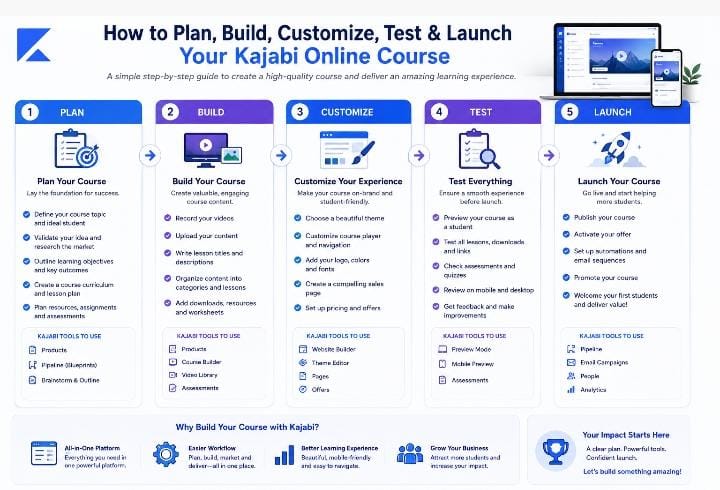
Table of Contents ▼
Quick Answer
This beginner-friendly guide explains how to create a course on Kajabi, including course planning, module and lesson creation, content selection, customization, engagement, testing, pricing, and launch preparation.
How to Create a Course on Kajabi: Beginner Guide
Introduction
Creating an online course involves much more than recording a few videos and uploading them to a platform. You need to decide what learners should achieve, organize the curriculum, create useful lessons, choose the right content formats, and thoroughly test the learning experience of the user before launch.
The demand for digital learning also makes course creation increasingly relevant. U.S. The National Center for Education Statistics indicates that “54.7% of students at degree-granting postsecondary institutions took at least one distance education course in fall 2024”. UNESCO also reported that the number of learners enrolled in MOOCs reached over “220 million in 2021”.
For creators who want to build an online course, Kajabi provides an all in one workplace to build course products, organizing modules and lessons, uploading learning materials, managing access, and setting up offers.
If you want to know how to create a course on Kajabi, this beginner-friendly guide walks you through the process from planning your course to testing and launching it.
What You Need Before Creating a Kajabi Course
Before opening your Kajabi dashboard, define what you want learners to achieve.
Start with three questions:
- Who is the course for?
- What problem will it solve?
- What should learners be able to do after completing it?
For example, instead of creating a broad, vague course like “Digital Marketing,” you could create a beginner course that teaches learners how to develop their first SEO content strategy.
Your course topic should be specific enough to give learners a clear direction. Before spending significant time creating the course, it is also useful to validate whether your intended audience needs the problem you are trying to solve.
If you are developing a course from an instructional design perspective, you can also explore this guide on instructional design and practical solutions for learner problems.
Core Pre-launch Checklist
- Course topic
- Target audience
- Learning outcomes
- Course modules
- Individual lessons
- Video, audio and written materials
- Worksheets or downloadable resources
- Quizzes or assessments
- Pricing strategy and access rules
Plan Your Kajabi Course Structure
Once your learning goals are defined, create a simple outline.
Think of your course as a roadmap: “Modules” represent the major stages, while “lessons” cover the smaller concepts and activities within each stage.
For example:
- Module 1: Content Writing Fundamentals
- Module 2: Audience and Topic Research
- Module 3: Creating SEO Content
- Module 4: Editing and Optimization
- Module 5: Publishing and Measuring Results
This structure gives learners a clear progression instead of presenting them with a large collection of unrelated lessons.
A useful course outline should also show what learners will do at each stage. Your course structure should support the learning outcome rather than simply increase the number of lessons.
For another example of course creation and LMS management, see this practical guide to creating online courses with Thinkific.
How to Create a Course on Kajabi
After planning your curriculum, you can build the course inside Kajabi.
The basic process is:
- Login into your Kajabi dashboard.
- Go to “Products”.
- Create a new product or course.
- Choose an appropriate course template.
- Add your course title and description.
- Build your modules or categories.
- Add individual lessons or posts.
- Upload your learning materials.
- Customize the student experience.
- Test the course before launch.
After creating the product, establish the major modules before adding individual lessons. This keeps the course organized and makes it easier for students to understand where they are in the learning journey.
(Note: Kajabi periodically updates its dashboard layout. If specific buttons look slightly different in your account, refer to Kajabi’s official documentation for interface updates.)
If you are comparing Kajabi with another course platform, you can also read LearnWorlds vs. Kajabi to understand how the two platforms differ.
How to Create Modules in Kajabi
Modules serve as the main chapters that organize related lessons into larger sections.
When figuring out how to create modules in Kajabi, think of each module as one stage of the learner’s journey. A module should have a clear purpose and contribute to the overall course outcome.
For example, a beginner SEO course might use:
- Module 1: SEO Fundamentals
- Module 2: Keyword Research
- Module 3: Content Optimization
- Module 4: Technical SEO
- Module 5: Measuring Results
Avoid creating modules simply to make the course look larger. A clean, concise number of logical sections can be easier for learners to navigate.
How to Add Lessons to a Kajabi Course
After creating your modules, add your individual lessons. (which Kajabi calls “Posts”)
Depending on the lesson, you can use video, audio, written content, downloadable resources, PDFs, quizzes, and other materials.
When deciding “how to add lessons to a Kajabi course”, keep each lesson focused on a single, bite-sized learning objective instead of creating one long lesson
For example:
Module: Keyword Research
- Lesson 1: What Is Keyword Research?
- Lesson 2: How Search Intent Works
- Lesson 3: Finding Relevant Keywords
- Lesson 4: Evaluating Keywords
- Lesson 5: Creating a Keyword List
This makes the learning path easier to follow and gives learners a clear idea of what they should accomplish.
Choose the Right Content for Each Lesson
Not every lesson needs to be a long video. Varying your delivery method keeps learners engaged and caters to different learning styles:
Video Walkthroughs & Screen Shares: Best for software demonstrations and visual tutorials.
Written Guides & Summaries: Ideal for quick reference notes, links, and code snippets.
Downloadable Templates & PDFs: Perfect for action plans, cheat sheets, and practical exercises.
Quizzes & Assessments: Great for testing retention at the end of a module.
For creators interested in using video as part of their course content, this guide on e-learning videos for students and teachers provides another useful resource.
For example, a software tutorial may work better as a screen recording, while a planning activity may be more useful as a downloadable worksheet.
The goal is not to use as many formats as possible. Choose the format that delivers the lesson easier to understand and apply.
How to Customize a Kajabi Course
Course customization should support the learning experience rather than distract from it.
Kajabi provides customizable course templates (Product Themes) that let you align the student portal with your brand identity.
Best Practices for Customization
Typography: Use clean, readable fonts with strong contrast against the background.
Branding: Apply consistent brand colors across headers, buttons, and menus.
Navigation: Keep menu options simple so students can easily jump between lessons or return to the main dashboard.
Thumbnails: Design uniform image thumbnails for every module and lesson to keep the layout polished.
How to Make Your Kajabi Course More Engaging
Uploading information is not the same as creating an engaging course.
Break complicated subjects into manageable lessons and give learners opportunities to use what they have learned.
You could include:
- Knowledge-check quizzes
- Short practical tasks
- Examples
- Worksheets
- Reflection questions
- Real-world scenarios
A useful question to ask yourself while developing every lesson is:
What should the learner be able to do after completing this lesson?
If you can answer that clearly, it becomes easier to decide what information belongs in the lesson and what can be removed.
For more ideas on improving learner participation, explore proven ways to improve student engagement.
You can also learn why certain design elements may interrupt the learning experience in this guide on why learners skip pop-ups.
How to Set Up and Test Your Kajabi Course
Before launching, go through the course as if you were a student to catch technical glitches or broken links.
Check:
- Can you access every module?
- Do the videos play correctly?
- Do downloadable files work?
- Are lesson instructions clear?
- Are quizzes working?
- Is navigation easy to understand?
- Does the course display properly on the devices your learners will use?
- Does the checkout process work?
You should also consider common e-learning design problems that can affect learner retention. This guide to e-learning design mistakes and learner retention can help when reviewing your course experience.
You can also decide whether students should receive all content immediately or whether lessons should be released gradually. Kajabi supports “drip content”, which allows creators to schedule access to lessons or modules.
How to Launch a Course on Kajabi
Once your course has been created and tested, you can prepare it for launch.
Kajabi uses “Offers” to connect a product with pricing and the purchasing experience. An Offer controls the pricing, checkout page, payment gateway, and access terms.
Before launching, make sure your sales page clearly explains:
- Who the course is for
- What learners will learn
- What outcome they can expect
- What is included
- How much the course costs
- How learners can enroll
Then promote the course through channels that fit your audience, such as email, social media, webinars, communities, or existing customers.
If you want to learn more about the sales side of course creation, see how to sell online courses that actually convert.
Common Kajabi Course Creation Mistakes
1. Creating too much content
A longer course does not equate to a better course. Focus on the knowledge and activities learners need to achieve the intended outcome.
2. Recording before planning
Filming videos before building an outline can leave you with disconnected content. Plan your modules and lessons first.
3. Ignoring the learner experience
Even useful content can become frustrating when navigation is confusing or resources do not work. Test everything before launch.
4. Making every lesson too long
Breaking complex topics into focused lessons when doing so makes the material easier to understand and apply.
5. Skipping course validation
Before investing heavily in production, confirm that your intended audience actually needs the problem you are trying to solve.
Kajabi Course Creation Tips for Beginners
If this is your first course, start small.
Focus on:
- One specific audience
- One clear problem
- One measurable learning outcome
- A logical course structure
- Focused lessons
- Useful learning activities
- A simple student experience
You can improve the course after launch by collecting learner feedback. Ask which lessons were useful, where learners became confused, and what additional resources they needed.
You can then use this feedback to improve future versions rather than trying to make the first version perfect.
Conclusion
Learning how to create a course on Kajabi becomes easier when you separate curriculum planning from production.
Start by clarifying your target audience, topic, and core learning goals. Then create your course outline, build modules, add focused lessons, upload the appropriate resources, customize the learning experience, and thoroughly test everything before launch.
Kajabi provides the tools for building and delivering the course, but the quality of the learning experience still depends on the course structure and instructional decisions behind it.
The goal is not to create the biggest course possible. It is to create a clear learning experience that helps the right learners achieve a specific outcome.
Frequently Asked Questions
1. How do I create an online course on Kajabi?
Start by creating a new course product in Kajabi. Choose an appropriate template, create your modules, add lessons, upload your content, customize the student experience, and test the course before launch. You can then create an Offer to connect the course with pricing and checkout.
2. How many modules should a Kajabi course have?
There is no fixed number that works for every course. The number depends on the topic, audience, and learning outcome. Organize the curriculum into logical stages instead of adding modules simply to make the course longer.
3. Can I add videos, PDFs, and quizzes to a Kajabi course?
Yes. Kajabi supports video, audio, written content, downloadable resources, quizzes, and other course materials. These formats can be combined to create lessons that suit different learning needs.
4. Can I release Kajabi course content gradually?
Yes. Kajabi supports drip or scheduled content, allowing creators to control when particular course content becomes available. This can be useful for cohort programs, challenges, and courses where learners should follow a particular pace.
5. How do I launch a course on Kajabi?
Complete and test your course, create an Offer with your preferred pricing structure, connect it to checkout, prepare your sales page, and promote the course to your audience. Testing the entire enrollment and learning journey before launch can help identify problems before students encounter them.
Need Help Building or Scaling Your Online Learning Program?
Whether you are launching an academy on Kajabi, modernizing corporate LMS modules, or converting raw expertise into accredited curriculum, our senior instructional designers provide a complimentary architecture evaluation.
Sources & References
- How to Create an Online Course on Kajabi - Kajabi
- How to Create an Online Course - Kajabi
- How to Build an Online Course on Kajabi - Kajabi
- 2023 - 2024 Digest of Education Statistics, Table 311.15 - National Center for Education Statistics
- Technology in Education - UNESCO Global Education Monitoring Report
Frequently Asked Questions
QHow do I create an online course on Kajabi?
Start by creating a new course product in Kajabi. Choose an appropriate template, create your modules, add lessons, upload your content, customize the student experience, and test the course before launch. You can then create an Offer to connect the course with pricing and checkout.
QHow many modules should a Kajabi course have?
There is no fixed number that works for every course. The number depends on the topic, audience, and learning outcome. Organize the curriculum into logical stages instead of adding modules simply to make the course longer.
QCan I add videos, PDFs, and quizzes to a Kajabi course?
Yes. Kajabi supports video, audio, written content, downloadable resources, quizzes, and other course materials. These formats can be combined to create lessons that suit different learning needs.
QCan I release Kajabi course content gradually?
Yes. Kajabi supports drip or scheduled content, allowing creators to control when particular course content becomes available. This can be useful for cohort programs, challenges, and courses where learners should follow a particular pace.
QHow do I launch a course on Kajabi?
Complete and test your course, create an Offer with your preferred pricing structure, connect it to checkout, prepare your sales page, and promote the course to your audience. Testing the entire enrollment and learning journey before launch can help identify problems before students encounter them.
