
Kajabi CRM: How to Manage Leads and Students in One Place
A practical guide to Kajabi CRM for online course creators. Learn how Kajabi manages contacts, leads, students, automation, and email marketing, and how it compares with traditional CRM platforms such as HubSpot.
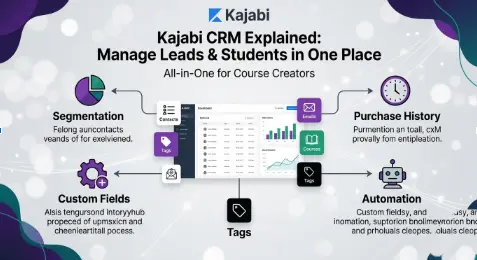
Table of Contents ▼
Quick Answer
This guide explains how Kajabi CRM works for online course creators, including contact management, tagging, segmentation, purchase history, automation, and email engagement. It also compares Kajabi with traditional CRM platforms and explains when creators may need additional CRM functionality.
Key Takeaways
- Kajabi includes built-in contact management rather than offering CRM as a separate product.
- Creators can organize contacts using tags, segments, custom fields, and automation.
- Kajabi CRM works well for course businesses with relatively simple sales processes.
- Dedicated CRMs can provide more advanced pipeline and lead-management features.
- Kajabi's built-in system can reduce the need for separate CRM software for many small course businesses.
Running an online course business in the USA usually means juggling a dozen tools. One app for email. Another for student logins. A third just to keep leads organized. It gets messy fast, and it gets expensive too.
Kajabi tries to fix that problem. It bundles course hosting, email marketing, and contact tracking into a single dashboard. So instead of paying for a separate CRM, you can manage leads and students right where you already work.
This article breaks down what Kajabi CRM actually does, how it compares to dedicated CRM platforms, and whether it is enough for your business. We will also answer the most common questions creators ask before switching.
What Is Kajabi CRM, Exactly?
Kajabi CRM is not a separate product. It is a built-in contact management system inside the main Kajabi platform. Every person who joins your email list, buys a course, or signs up for a webinar becomes a contact automatically.
From there, you can tag people, track purchase history, and see how they engage with your emails. You get a clear picture of who is a cold lead, who is an active student, and who has gone quiet.
It is simple by design. Kajabi built this for course creators, not for sales teams running complex pipelines. That distinction matters, and we will get into why shortly.
Core Features of Kajabi Contacts
The Kajabi contacts dashboard gives you a few key tools. Each one plays a role in keeping your audience organized without outside software.
- Segmentation and tagging. Tag contacts by actions they take, such as opening an email or completing a lesson. Segment your list and send targeted messages.
- History of purchase and engagement. Every contact profile shows what they bought, when, and how often they log in. This helps you spot students who might need a nudge to finish a course.
- Custom fields. Add fields for job title, location, or how a lead found you. This keeps your data organized as your list grows.
- Automation triggers. Tags and actions can trigger automated sequences. A new student tag, for example, can trigger a welcome email series right away.
For a deeper look at these triggers, our guide to Kajabi automation workflows walks through practical setups step by step.
Kajabi CRM vs Traditional CRM: Which Should You Choose?
This is probably the question many course creators ask before deciding whether they need another CRM. Let’s break it down.
A traditional CRM, like Salesforce or HubSpot, is built for sales teams. It includes lead scoring, deal stages, multi-step pipelines, and tools for long sales cycles with many touchpoints. These platforms are designed for businesses where sales teams manage prospects through several stages.
Kajabi CRM has a different purpose: helping course creators manage students and leads inside their content platform. It has features that align with the rest of Kajabi, but it lacks some advanced CRM functions such as pipelines, lead scoring, and forecasting tools.
Choose Kajabi CRM if…
You sell digital courses with a short sales cycle, and your leads typically buy within days or weeks of discovering you. It can be useful if you want everything in one dashboard without syncing data between separate tools.
Choose a Traditional CRM if…
You run a high-ticket coaching business with a dedicated sales team, and your deals close over a longer, multi-step buying journey. In this case, advanced pipeline and sales-management features may become more important.
For many solo creators and small course businesses in the USA, Kajabi’s built-in system covers the basic contact-management needs. Larger teams with complex sales processes may eventually need additional CRM functionality.
Can You Use Kajabi as a CRM?
Yes, and many creators use Kajabi this way. It makes managing contacts faster and more efficient, especially when contact actions can trigger automated workflows.
For example, you can automate the delivery of a free bonus to each person who attends your webinar, so that no one gets missed.
That said, there are limits worth knowing first. Kajabi’s main way of communicating with contacts is through email, and nurturing leads can be managed through broadcasts and automated sequences. If you want to improve this part of your strategy, our guide on Kajabi email strategy using broadcasts and sequences explains how to turn your contact list into ongoing engagement.
However, there is no dedicated pipeline feature that visually maps where leads sit in your customer journey.
You also will not find SMS or phone outreach tools built directly into the CRM. If text marketing is central to your strategy, you may need a third-party tool layered on top.
Contact limits vary by plan, so it helps to consider the size of your audience when selecting a plan.
Basic Plan
Includes up to 10,000 contacts. Best suited for new creators just starting out.
Growth Plan
Includes up to 25,000 contacts. Best suited for growing lists and teams.
Pro Plan
Includes up to 100,000 contacts. Best suited for larger, established audiences.
Your list size will eventually help determine which tier you need.
What Is the Best CRM for Managing Kajabi Leads and Students Without Extra Software?
If your goal is simplicity, the most straightforward option is Kajabi’s own built-in CRM. It already connects to your courses, emails, and checkout pages. No syncing is needed because everything lives in one place.
Think about what most creators actually need day to day. You want to know who joined your list, what they bought, and whether they are engaging with your content. Kajabi shows you this information without requiring another platform.
This becomes even more useful when you pair contact data with strong email habits.
And if lead generation is your bigger challenge right now, pairing your CRM efforts with better visibility matters too. Check our guide on increasing online course traffic with Kajabi SEO services to learn how SEO can help bring more relevant visitors and potential leads to your course business.
Kajabi CRM vs HubSpot CRM for Online Course Creators: Which Is Better?
HubSpot is one of the popular CRM platforms available to businesses, and it is free to start, which makes this comparison worth exploring.
Setup
Kajabi CRM is built in, so there is no separate CRM syncing process. HubSpot CRM is a separate platform that needs to be connected to your wider business workflow.
Pipeline Stages
Kajabi CRM does not offer the same type of dedicated pipeline stages found in traditional CRM platforms. HubSpot provides customizable pipeline stages for managing sales opportunities.
Lead Scoring
Kajabi CRM does not include the same advanced lead-scoring functionality available in dedicated CRM systems. HubSpot provides lead-scoring capabilities for qualifying prospects.
Best Fit
Kajabi CRM is designed around course businesses and digital products. HubSpot is designed for broader sales and customer-management workflows, including more complex B2B processes.
Cost
Kajabi CRM is included within the Kajabi platform. HubSpot offers a free starting option, with additional features and costs depending on usage and requirements.
There is no universal choice for every business. The right setup depends on how complex your sales process actually is and what you need your CRM to manage.
Is Kajabi’s Built-In CRM Enough for Managing Student Enrollments and Leads?
For many course businesses, yes. Kajabi creates a contact profile when someone enrolls, and that profile tracks their journey from there. You can review information such as completion activity, login behavior, and payment history.
Where it can become limited is scale. If you run multiple business lines or track a long B2B sales cycle, you may eventually need more advanced CRM functionality.
Kajabi’s CRM provides basic contact-management tools, but larger lists can make contact organization more difficult. Duplicate contacts and more complex customer journeys may require additional processes or external tools.
Still, for a typical solo creator or small team, the built-in system can remove the need for an additional CRM. You save setup time, reduce the number of tools you need to manage, and keep your course and contact data within the same platform.
If you are also comparing Kajabi against other all-in-one platforms, our detailed Kajabi vs ClickFunnels comparison covers how the platforms approach funnels, contacts, and conversions.
If you are still setting up your Kajabi account, you can also review our Kajabi account setup guide before building your course and contact-management workflow.
Tips to Get the Most Out of Kajabi Customer Management
A few small habits can make a big difference over time.
- Tag contacts consistently. Build a simple system early, before your list grows large. Something like “lead,” “trial,” and “paying student” keeps things clear.
- Clean your list regularly. Review duplicate or inactive contacts regularly to keep your database organized.
- Automate repetitive tasks. Let tags trigger welcome sequences, renewal reminders, or completion emails automatically. This saves time and keeps communication consistent. You can also learn more about Kajabi advanced automations for more complex workflows.
- Review engagement data monthly. Check who has not opened emails or logged in recently. A short re-engagement campaign can help bring inactive students back.
If you are new to the platform, it can also help to understand whether Kajabi is easy to use before building more advanced workflows.
Final Thoughts
Kajabi CRM will not replace a dedicated sales platform for every business. But for course creators, coaches, and membership site owners across the USA, it keeps leads, students, and content under one roof without forcing you to pay for, learn, and sync a separate CRM tool.
If your business runs on courses and digital products with a simple sales process, Kajabi’s built-in contact system may cover your core needs. If your sales cycle is longer and more complex, pairing Kajabi with a dedicated CRM might make sense down the line.
Either way, understanding what Kajabi can and cannot do helps you choose a setup based on your actual business requirements.
FAQs
Kajabi vs Traditional CRM: Which Should You Choose?
Kajabi is designed for course creators and businesses that want contact management connected directly to their courses, emails, and checkout. A traditional CRM may provide more advanced tools for businesses with sales teams and complex buying journeys.
Can You Use Kajabi as a CRM?
Yes. Kajabi includes built-in contact management, tagging, purchase history, and automation triggers. It can work well for course-based businesses, although it does not provide every advanced CRM feature found in dedicated platforms.
What is the best CRM for managing Kajabi leads and students without extra software?
Kajabi’s built-in CRM is the simplest option because it is already connected to your courses, emails, and checkout pages. This means you do not need to synchronize a separate CRM for basic contact management.
Kajabi CRM vs HubSpot CRM for online course creators, which is better?
HubSpot offers more advanced CRM features such as pipeline management and lead scoring. Kajabi focuses more on integrated contact management for course and digital-product businesses. The appropriate option depends on the complexity of the sales process.
Is Kajabi’s built-in CRM enough for managing student enrollments and leads?
For many solo creators and small teams, it can be enough. It tracks enrollments, purchases, and engagement within the Kajabi ecosystem. Larger businesses with more complex sales processes may eventually require additional CRM functionality.
Does Kajabi CRM support SMS or text marketing?
Kajabi focuses primarily on email-based communication. SMS marketing may require a separate third-party tool or integration.
How many contacts can I store in Kajabi?
Contact limits depend on the Kajabi plan. The available plan structure should be checked before choosing a subscription because limits and features can change over time.
References
SupplyGem — Can You Use Kajabi as a CRM?
Capterra — Kajabi Software Pricing, Alternatives & More
Mihael Cacic — Ontraport vs Kajabi: A Personal Review
Williams Advice — Is Kajabi Worth It? An Honest and Detailed Kajabi Review
Sources & References
Frequently Asked Questions
QKajabi vs Traditional CRM: Which Should You Choose?
Choose Kajabi if you sell courses or memberships with a short, simple buying journey. Choose a traditional CRM like Salesforce or HubSpot if you run a sales team handling long, multi step deals.
QCan You Use Kajabi as a CRM?
Yes. Kajabi includes built in contact management, tagging, purchase history, and automation triggers. It works well for course based businesses, though it lacks advanced pipeline and lead scoring tools.
QWhat is the best CRM for managing Kajabi leads and students without extra software?
Kajabi’s own built in CRM, since it is already connected to your courses, emails, and checkout pages. No extra software is required.
QKajabi CRM vs HubSpot CRM for online course creators, which is better?
HubSpot offers more advanced features like lead scoring and pipeline stages. Kajabi offers simpler, fully integrated contact management. Simple sales cycles usually suit Kajabi, while complex B2B sales often suit HubSpot.
QIs Kajabi’s built in CRM enough for managing student enrollments and leads?
For most solo creators and small teams, yes. It tracks enrollments, purchases, and engagement automatically. Larger businesses with complex lists may eventually need more advanced tools.
QDoes Kajabi CRM support SMS or text marketing?
No. Kajabi focuses on email as its primary channel. SMS marketing requires a separate third party integration.
QHow many contacts can I store in Kajabi?
This depends on your plan. Lower tiers support a few thousand contacts, while Pro supports up to 100,000.