
Kajabi vs. Thinkific vs. Teachable for Executive Coaches & Consultants
Compare Kajabi, Thinkific, and Teachable for executive coaches and consultants based on courses, marketing, automation, communities, payments, and customization.
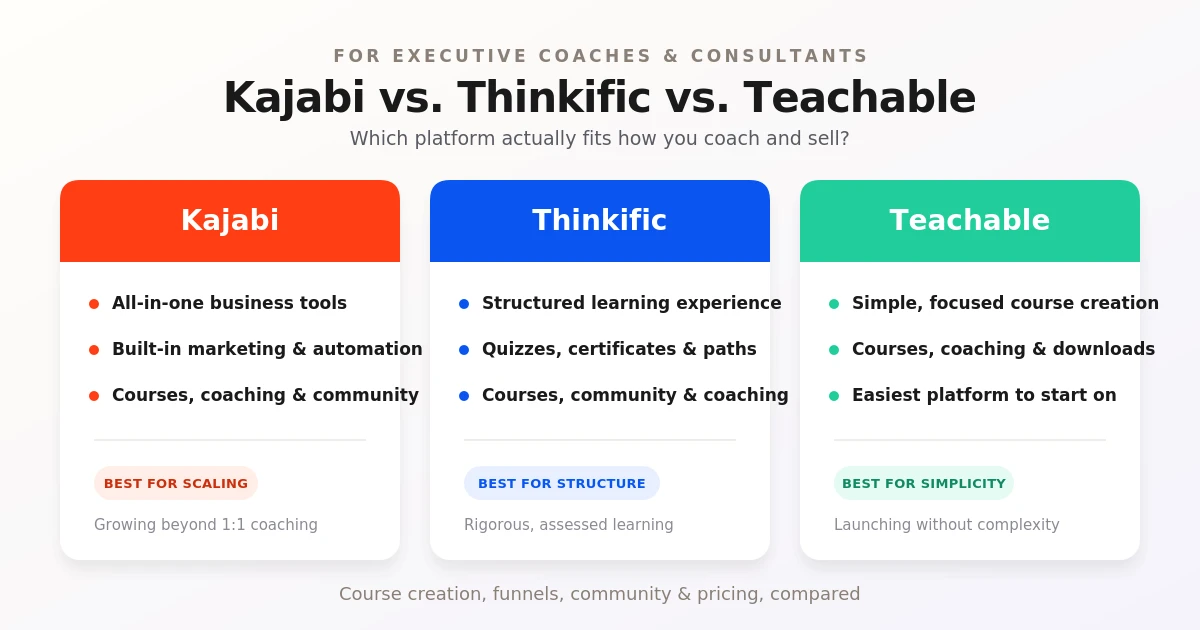
Table of Contents ▼
Quick Answer
This guide compares Kajabi, Thinkific, and Teachable for executive coaches and consultants. It looks at course creation, funnels and automation, community features, email marketing, design, checkout and payments, along with the advantages and limitations of each platform. The guide also explains what to consider when choosing a platform based on business needs, budget, marketing requirements, and plans for growth.
Key Takeaways
- Kajabi combines courses, marketing, automation, and other business tools, while Thinkific emphasizes structured learning and Teachable focuses on courses, coaching, and digital products.
- Kajabi has more marketing functionality built into the platform, while Thinkific and Teachable may require additional tools for certain advanced workflows
- Thinkific's learning-focused features may matter to coaches who need structured courses, assessments, and learner engagement, while Kajabi and Teachable offer different combinations of coaching, courses, memberships, and digital products.
- The right platform depends on what you sell, the tools you need, your budget, and whether you expect your online business to expand over time.
Quick Summary: Kajabi vs. Thinkific vs. Teachable
Choosing the right platform can be difficult when several options seem to offer similar features. Kajabi, Thinkific, and Teachable all let coaches and consultants share their knowledge online, but each platform approaches it a little differently.
Kajabi:
Kajabi is an all-in-one platform for many parts of an online business. You can use it to create courses and coaching programs, build a website, manage email marketing, create memberships, and build a community. For executive coaches and consultants who want to manage their courses, marketing, and other business activities in one place, Kajabi offers a wide range of tools.
Thinkfic:
Thinkfic puts a strong focus on creating and delivering online learning experiences. Along with courses, you can use the platform for communities, memberships, coaching, and live learning. It also includes learning features such as quizzes, assignments, and certificates, making it useful for coaches and consultants who want to provide a more structured learning experience.
Teachable:
Teachable is another platform that lets you sell courses and coaching programs online. IT also supports memberships and digital downloads, so you can offer different types of products to your audience. For coaches and consultants, this can be useful if you want to combine coaching with digital products such as courses, guides, or templates.
Kajabi vs. Thinkific vs. Teachable: Key Differences
Course Creation:
Kajabi:
- Lets you create and sell online courses, coaching programs, and memberships.
- Provides tools for organizing lessons, modules, and course content
- Courses can be connected with Kajabi’s marketing, email, and automation tools.
Thinkific:
- Provides tools for creating structured online courses and learning experiences.
- Supports features such as quizzes, assignments, certificates, and learning paths
- Also allows creators to combine courses with communities, memberships, coaching, and other learning products.
Teachable:
- Focuses strongly on creating and selling online courses.
- Supports different types of educational content, including videos, quizzes, and other learning materials.
- Also allows creators to offer coaching and digital products alongside their courses.
Funnels & Automation:
Kajabi:
- Built-in funnels and automation tools.
- Advanced automation can connect marketing activities and customer actions.
- Reduces the need for separate marketing tools.
Thinkific:
- Includes marketing and automation features, but has fewer built-in funnel capabilities compared with an all-in-one marketing platform.
- External tools may be needed for more advanced marketing workflows.
Teachable:
- Provides basic tools for selling and marketing products.
- More advanced marketing activities may require external tools for integrations.
Community
Kajabi:
- Strong community features
- Supports memberships and online communities
- Allows creators to bring courses, community, and other offers together.
Thinkific:
- Includes community-building features.
- Supports communities alongside courses and memberships
- Useful for creators who want to combine learning content with learner interaction
Teachable:
- Community features are available, but the platform is more centered around courses and coaching.
- May require additional tools for creators looking for a more extensive community experience.
Email Marketing:
Kajabi:
- Built-in email marketing
- Supports email campaigns and automated sequences.
- Helps creators manage marketing without relying heavily on external platforms.
Thinkific:
- Offers email and marketing integrations
- External email marketing platforms may be useful for more advanced campaigns and automation
Teachable:
- Provides email-related marketing tools, but more advanced email marketing may require external tools ot integrations
Design & Customization:
Kajabi:
- Clean and flexible design options
- Drag-and-drop editor makes it easier to customize pages.
- Supports custom domains
- Offers a branded mobile app option for eligible plans.
Thinkific:
- Includes a drag-and-drop website builder.
- Offers moderate customization for websites and course pages.
- Supports branding and customization options for an online learning business.
Teachable:
- Provides tools for creating and customizing course pages.
- Customization options are more limited compared with platforms that put greater emphasis on website building
Checkout & Payments:
Kajabi:
- Built-in checkout and payment tools
- Supports upsells to help increase the value of each purchase.
- Kajabi payments offer zero transaction fees on eligible transaction/plans.
Thinkific:
- Built-in payment options for selling courses and other products
- Zero Transaction fees on its plans, according to your research
- Payment features are more focused on selling educational products than building a complete marketing system.
Teachable:
- Simple checkout and payment setup.
- Integrated payment processing makes it easier to sell courses and coaching.
- Transaction fees can apply depending on the plan and payment method
What is Kajabi Best for?
Kajabi is a good option for executive coaches and consultants who want to manage different parts of their online business in one place. Instead of using one platform for your courses, another for email marketing, and another for building your website, Kajabi brings many of these tools together.
For example, an executive coach can use Kajabi to offer coaching sessions, create an online leadership course, build a membership, send emails to clients, and create a community. This makes it especially useful if you want to grow your business beyond one-on-one coaching.
Pros
- Everything in one place: You can manage your courses, coaching, memberships, community, website, and marketing from the same platform.
- Built-in marketing tools: Kajabi includes email marketing, landing pages, funnels, and automation, so you don’t have to depend on several different tools.
- Advanced automations: You can set up automations for things like welcoming new clients, sending follow-up emails, and promoting other offers. If you want to learn more about this feature, check out our guide on Kajabi Advanced Automations.
- Useful for coaching and community: You can combine coaching programs with courses, memberships, and community features instead of keeping them separate.
- Mobile access: Kajabi also gives your audience a way to access your content and community from their mobile devices. We cover the Kajabi mobile app’s features, limitations, and user experience in more detail.
- Easy to manage once you get used to it: Having your main business tools in one place can make things easier to manage. However, if you’re completely new to Kajabi, it can take some time to get familiar with all of its features. You can read more about whether Kajabi is easy to use for beginners to get a better idea.
Cons
- Higher price: Kajabi is more expensive than some platforms that mainly focus on course creation.
- Can take time to learn: Since there are so many tools available, beginners may need some time to understand how everything works.
- May have more features than you need: If you only want to sell a simple course, you may not need Kajabi’s full range of marketing, automation, and community features.
- More setup: Having access to advanced tools is useful, but you will need to spend some time setting up your emails, funnels, automations, and other features.
What is Thinkific best for?
Thinkific is a good option for executive coaches and consultants who want to turn their knowledge into structured online learning experiences. The platform focuses heavily on course creation, but you can also use it for communities, memberships, coaching, and webinars.
Pros
- Strong course creation tools: Thinkific’s course builder lets you organize lessons and add different types of content, including videos, text, PDFs, and quizzes. Its course creation process can also help you build ++**strong and engaging online courses**.++
- Good for structured learning: You can create self-paced courses and use features such as drip schedules, assignments, quizzes, and certificates. Thinkific also provides tools for course creation and LMS management, making it easier to organize and manage your learning content.
- Useful for communities: Thinkific lets you create communities where learners can interact, share ideas, and discuss course content. Communities can also be offered alongside a course or sold as a separate product.
- Supports different products: Beyond courses, you can offer coaching, webinars, memberships, digital downloads, and communities. This can be useful for executive coaches who want to offer different ways for clients to learn from them.
- Helpful for LMS management: Thinkific gives you tools to organize and deliver your learning products from one platform, making it useful if your business grows beyond a single course.
- Good for growing a learning business: You can combine courses, communities, and memberships, allowing you to expand your offerings as your business grows.
Cons
- Marketing may require more tools: Thinkific provides tools for selling and promoting learning products, but you may still need additional tools or integrations if you want a more advanced marketing setup.
- More focused on learning: Thinkific puts a strong emphasis on the learning experience. If you need extensive website, email marketing, funnels, and business automation features in one place, you may need additional tools.
- Can take time to learn: Thinkific has a wide range of course, community, and learning management features. If you’re new to the platform, it may take some time to understand how everything fits together.
- Some features depend on your plan: The features available to you can vary depending on the Thinkific plan you choose, so it’s worth checking what is included before making a decision.
What is Teachable best for?
Teachable is a good option for executive coaches and consultants who want to turn their knowledge into online products without making things overly complicated. You can use the platform to create courses, offer coaching, sell digital downloads, and build memberships from the same place.
Pros
- Easy to get started: Teachable is designed to make creating and selling educational products straightforward, which can be helpful if you don’t want to spend too much time figuring out complicated tools.
- Different ways to sell your expertise: You can offer online courses, coaching, memberships, and digital downloads instead of being limited to one type of product.
- Useful course features: You can add videos, quizzes, drip content, and completion certificates to create a more structured learning experience.
- Coaching support: Teachable allows you to offer both one-on-one and small-group coaching, with tools for scheduling and payment management.
- Flexible payments: You can offer different pricing options, including one-time purchases, payment plans, subscriptions, and free products.
- Built-in sales tools: Teachable includes features such as upsells, order bumps, coupons, abandoned-cart tools, and affiliate marketing features that can help with selling your products.
If you want to learn more about how the platform works, you can also check out our guide on How to Use Teachable.
Cons
- Marketing is not as all-in-one as Kajabi: Teachable has several sales and marketing features, but you may still need other tools depending on how advanced your marketing and automation needs are.
- Some features depend on your plan: Certain tools and lower transaction fees are tied to higher-tier plans, so it’s important to check what is included before choosing a plan.
- May not be enough for a complex business setup: If you want your website, advanced marketing automation, email campaigns, courses, coaching, and community all deeply connected in one system, you may need additional tools.
- Transaction fees can apply: Teachable’s current Starter plan has a 7.5% base transaction fee, while Builder, Growth, and Advanced have 0% base transaction fees when using the applicable payment setup. Standard payment processing fees may still apply.
How to Actually Choose the Right Platform
Choosing between Kajabi, Thinkific, and Teachable really comes down to what you need. Start by asking yourself what you’re selling: whether that be consulting, group coaching, online courses, memberships, or digital products. Then think about how much marketing you want built into the platform. Do you need email marketing, landing pages, funnels, and automations, or are you comfortable using separate tools?
It’s also worth thinking about the learning experience you want to create. Do you need advanced course structures, assessments, communities, or learner engagement features? Finally, look at your budget and where you want your business to go. If you’re only selling one product, your needs may be simple, but if you plan to add more courses, coaching programs, or memberships over time, choose a platform that can grow with your business.
Final thoughts:
Kajabi, Thinkific, and Teachable all offer useful tools for coaches and consultants, but they approach online businesses differently. Kajabi brings courses, coaching, marketing, memberships, and communities together; Thinkific focuses more on structured learning and learner engagement, while Teachable keeps things centered around courses, coaching, and digital products. The best fit depends on what you’re selling, the features you need, your budget, and how you see your business growing.
Sources & References
- How to Create a Thinkific Course: 7 Proven Steps
- Thinkific Course Creation and LMS Management: How to Create Online Courses 2026
- How to Use Teachable? Step-by-Step Guide for Beginners
- Kajabi Advanced Automations: A Complete Guide for 2026
- Kajabi Mobile Experience: Features, Limitations, and User Experience
- Is Kajabi Easy to Use? A Beginner’s Guide to Kajabi
- Kajabi vs. Teachable vs. Thinkific: Which Platform Is Right for You?
- Kajabi vs Teachable vs Thinkific in 2026 (Honest Comparison)
- Kajabi vs Teachable vs Thinkific Comparison: Which Course Platform Is Right for You?
Frequently Asked Questions
QCan I move my existing course from one platform to another?
Yes, but you'll usually need to migrate your course content and student information separately. The exact process depends on the platforms you're moving between.
QCan I use these platforms if I already have a website?
Yes. You don't necessarily have to replace your existing website. You can use the platform alongside your current site, depending on how you want to set everything up.
QWhat happens to my students if I switch platforms?
You'll usually need to move your student information and course content to the new platform. It's a good idea to check the migration options before making the switch.
QCan I connect these platforms to other tools?
Yes. You can connect your course platform with other tools for things like email marketing, automation, analytics, and customer management.