
Kajabi Mobile Experience: Features, Limitations, and User Experience
Discover how the Kajabi mobile app works, its key features and limitations, student experience, and how the branded mobile app compares
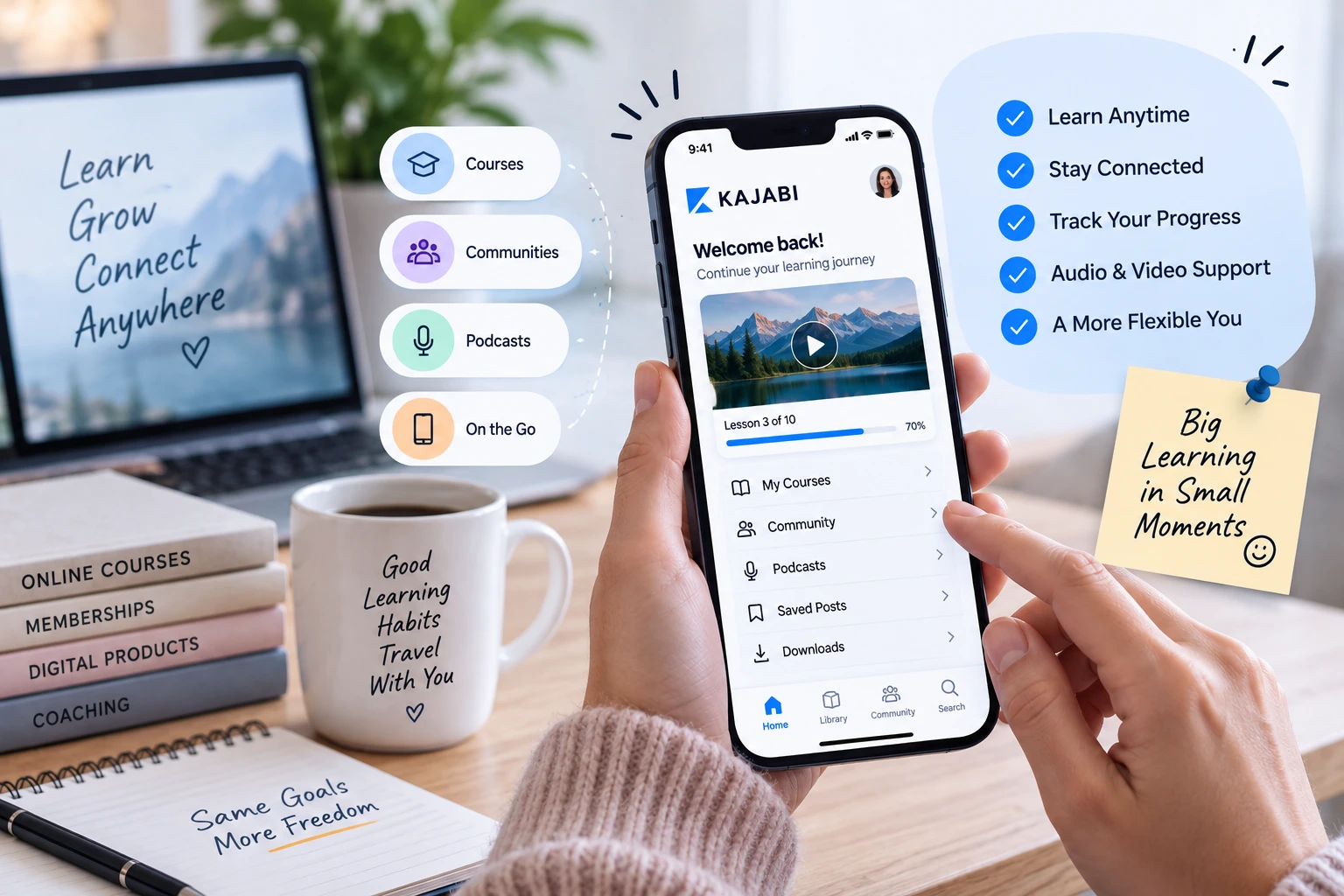
Table of Contents ▼
Quick Answer
The Kajabi mobile app provides customers with convenient access to courses, communities, podcasts, saved posts, and other educational content from mobile devices. This article examines its key features, including background audio, casting, search, and improved course navigation, while also covering technical limitations, user experience, student benefits, and the differences between the standard Kajabi app and the branded mobile app.
Key Takeaways
- The Kajabi mobile app makes course and community access more convenient, with features such as background audio, casting, search, saved posts, and improved navigation.
- The mobile experience has limitations, including the lack of creator administration tools and occasional reports of playback, loading, buffering, and navigation issues.
- Kajabi's branded mobile app offers greater customization, making it more suitable for established creators and businesses that want a dedicated, branded mobile experience.
If you sell online courses, coaching programs, memberships, or digital products, the mobile experience can make or break customer engagement. People increasingly expect to access what they purchased without sitting at a desk, and that is where the Kajabi mobile app comes in. Kajabi has continued updating its mobile experience, bringing courses, coaching, podcasts, and community features into a more unified mobile environment.
But is the app actually good for everyday learning? What can customers do inside it, where does it fall short, and how does it compare with using Kajabi through a website? This guide looks at the Kajabi app, its features, limitations, usability, and the separate Kajabi-branded mobile app option so you can decide whether it fits your business or learning needs.
What Is the Kajabi Mobile App?
The Kajabi mobile app is designed primarily for customers who purchase or receive access to content from Kajabi creators. Rather than opening a browser every time they want to study, users can access their Kajabi library from a mobile device. The current app supports access to courses and other content, product updates, community topics, saved posts, and content search.
This makes the experience particularly useful for people who consume educational content in short sessions throughout the day. A student can watch a lesson during a commute, listen while doing another activity, or check a community discussion without needing a laptop. Kajabi has also introduced improvements such as background audio, casting, faster loading, and better course navigation.
How the Kajabi App Works for Customers
The basic concept is simple: customers download the app, sign in, and access the Kajabi products connected to their account. Kajabi has historically used email-based login functionality to make accessing purchased libraries easier, and the current app is available through major mobile app stores.
One important distinction is that the standard app is primarily a customer-facing experience, not a replacement for the creator’s Kajabi administration dashboard. Kajabi states that the mobile app does not include administration features, meaning creators still need the main Kajabi platform for managing their business and content.
Kajabi Mobile App Features
The strongest part of the modern Kajabi mobile app features is convenience. Customers can access course material, search across their content, keep up with communities, and continue consuming educational material from a mobile device. Kajabi has also added features designed specifically around mobile consumption rather than simply shrinking a desktop website onto a phone.
Another useful improvement is background audio. Users can leave the app or lock their device while continuing to listen to supported course audio. Casting support also allows compatible content to be sent to devices such as Apple TV, Roku, and Chromecast. These features make Kajabi more practical for people who prefer audio learning or larger-screen viewing.
Course and Content Access
For online courses, the main attraction is straightforward access. Students can find their courses, browse lessons, search content, and consume videos or audio without repeatedly opening a browser. The app also provides a centralized library, which is especially helpful for customers enrolled in multiple Kajabi programs.
Kajabi has also worked on improving course navigation and loading speed. Its recent updates describe a faster interface and improvements intended to make course consumption smoother.
Community and Engagement Features
The mobile experience is not limited to passive course consumption. Community functionality allows members to explore discussions and interact with content, while newer updates have added features such as saved posts, improved comments, and different feed views. Kajabi’s April 2026 mobile release, for example, introduced saved posts and expanded community browsing options.
That matters because a successful membership isn’t only about watching lessons. Community interaction can be an important part of retention, accountability, and customer engagement.
Kajabi Mobile App User Experience
The Kajabi mobile app user experience is best described as convenient but dependent on the specific content and device experience. The official U.S. App Store currently shows a 4.3/5 rating from more than 7,400 ratings, which indicates that many users find the app useful overall.
However, public reviews also reveal that experiences can vary. Some users have reported problems involving video playback, loading, navigation, and crashes. These reviews should not be treated as universal experiences, but they are useful when evaluating the app realistically rather than relying only on promotional claims.
Navigation and Performance
Kajabi has clearly invested in improving performance. Its own product update highlights faster loading, a more responsive interface, background audio, casting, and improved course navigation.
Still, app-store reviews show that some users have experienced buffering, unexpected playback behavior, loading problems, or navigation frustrations. That creates an important takeaway: the Kajabi mobile app review depends heavily on what a particular creator has built, the user’s device, connectivity, and the current app version.
Kajabi Mobile App vs Website
When comparing the Kajabi mobile app vs website, neither option is automatically better for every task. The app is designed for convenient content consumption, while the website remains more flexible for accessing the broader Kajabi experience.
For a student who simply wants to watch lessons, listen to content, or participate in supported community experiences, the app can be much more convenient. For more complex interactions, administration, or features that aren’t supported natively, the browser can still be necessary.
When the Mobile App Is Better
The mobile app makes the most sense when convenience is the priority. If your customers regularly learn from their phones, having a dedicated app can remove friction between them and your content.
For creators, this can also make the learning experience feel more like a dedicated education product instead of simply another website. The trade-off is that the app cannot replace every function available through the full Kajabi website.
Kajabi Mobile App Limitations
The biggest Kajabi mobile app limitations involve functionality and occasional technical problems rather than the basic concept of mobile learning. The standard app is intentionally focused on customers, so creators should not expect it to function as a mobile version of their complete Kajabi administration environment.
There can also be situations where users need to return to the browser for certain actions. Public App Store reviews have specifically mentioned frustrations involving comments, content loading, video behavior, and other parts of the experience.
Common Kajabi Mobile App Problems
If you search for Kajabi app not working or Kajabi mobile app problems, you’ll find reports involving crashes, buffering, videos failing to load, and inconsistent playback. These are user reports rather than proof that every customer experiences the same problems, but they are worth considering when evaluating the platform.
The safest approach is to keep the app updated, check the device’s internet connection, restart the application when content fails to load, and use the browser when a feature isn’t available inside the mobile app.
Kajabi App for Students
The Kajabi app for students is most valuable for learners who want flexibility. Instead of treating education as something that happens only at a desk, students can fit lessons into smaller windows throughout the day.
That flexibility can be particularly useful for coaching programs and memberships where customers consume a mixture of video, audio, written resources, and community content. Background audio and casting support further expand the ways users can consume supported content.
Learning on the Go
Mobile learning works best when the experience gets out of the student’s way. The less friction there is between opening the app and reaching the next lesson, the easier it becomes to maintain a learning habit.
For creators, this means mobile optimization isn’t simply a technical feature. It is part of the overall customer experience and can influence whether buyers actually consume the product they purchased.
Kajabi Branded Mobile App
The Kajabi branded mobile app is a different proposition from the standard Kajabi customer app. Instead of placing your content inside Kajabi’s general mobile environment, a branded app can provide a more customized mobile destination associated with your own business.
Kajabi currently markets the branded app as a way to create a custom mobile experience with your branding, layout, design, and interface. It can also support customer engagement, product sales, and targeted push notifications.
Kajabi Mobile App Customization
Kajabi mobile app customization becomes particularly valuable when branding is central to your business. A custom app can make your digital product feel more like a standalone brand rather than another course hosted on a third-party platform.
This is more relevant for established creators, coaches, educators, and businesses that already have a significant customer base and want a more controlled mobile experience.
Kajabi Branded App Cost
The Kajabi branded app cost is an important consideration. Kajabi currently lists the Branded Mobile App as included with its Pro Plan or available as a $199/month add-on to other eligible plans.
Kajabi’s current pricing information also identifies the Branded Mobile App as part of the Pro-level offering. Because pricing and plan inclusions can change, creators should verify the current plan details before making a purchasing decision.
How to Use the Kajabi Mobile App
Learning how to use the Kajabi mobile app is relatively straightforward for customers. Download the app, sign in using the account associated with your Kajabi purchases or memberships, and locate the available courses or communities. From there, users can browse content, search through their library, and use supported mobile features.
Creators should also remember that the standard app isn’t intended to replace Kajabi’s administrative tools. Content creation, business management, and many creator-side tasks remain part of the main Kajabi platform.
Is the Kajabi Mobile App Worth It?
For customers who primarily want convenient access to courses and memberships, the Kajabi mobile app can be a useful part of the learning experience. Its current feature set is considerably more capable than a basic content viewer, with course access, community functionality, search, saved posts, background audio, and casting among the notable features.
For creators, the decision is more nuanced. The standard app can provide customers with a convenient mobile destination, while the branded option becomes attractive when customization, stronger brand identity, and mobile engagement are worth the additional investment.
Conclusion
The Kajabi mobile experience has evolved into an important part of the platform’s overall ecosystem. The Kajabi mobile app features make it easier for customers to access courses, communities, audio, and other content away from a desktop, while newer improvements continue to focus on speed, navigation, and engagement.
At the same time, potential users should understand the limitations. Some customers have reported technical and usability problems, and the mobile app does not provide every function available through the main Kajabi website.
For straightforward mobile course consumption, Kajabi is a strong option worth considering. For businesses that want a highly customized, branded experience, the Kajabi branded mobile app offers a more advanced route, although its additional cost needs to be justified by the value it creates.
Authored by: Hafsa Zahoor
Need Help Building or Scaling Your Online Learning Program?
Whether you are launching an academy on Kajabi, modernizing corporate LMS modules, or converting raw expertise into accredited curriculum, our senior instructional designers provide a complimentary architecture evaluation.
Sources & References
- Kajabi's improved mobile app features
- Kajabi online courses
- Kajabi Branded App
- Kajabi Branded App customization guide
- Kajabi Branded App pricing
- How to Create a Course on Kajabi
- LearnWorlds vs Kajabi
- How Many Students Can You Have on Kajabi
- 10 Best Learning Management Systems Compared
- Transformational curriculum
- How Many Students Can You Have on Kajabi
- instructional design
Frequently Asked Questions
QIs the Kajabi mobile app free?
The standard Kajabi customer app is available as a free download, while access to content depends on the products or memberships provided by individual Kajabi creators.
QIs Kajabi's mobile app good for online courses?
For many learners, yes. The app provides convenient course access and has gained additional features such as background audio, casting, improved navigation, search, and community functionality. However, public reviews also identify occasional technical and usability issues, so the experience isn't identical for every user.
QWhy is my Kajabi app not working?
Problems can result from connectivity, application issues, device-specific behavior, or content-loading problems. Updating the app, restarting it, checking your connection, and trying the website can help determine whether the problem is app-specific.
QWhat is the difference between the Kajabi app and a branded mobile app?
The standard Kajabi app provides a shared mobile environment for accessing Kajabi-powered content. A Kajabi branded mobile app gives eligible businesses a more customized app experience featuring their own branding, layout, and interface.
QCan students use Kajabi on their phones?
Yes. Students can use the **Kajabi app for online courses** and access supported courses and other content from compatible mobile devices. The app is specifically designed to make learning content available on the go.
