
How to Build Learning Modules in HiBob LMS in Australia?
Learn how to build learning modules in HiBob LMS in Australia. Create structured, engaging training programs that improve employee learning outcomes.
Table of Contents ▼
Quick Answer
HiBob LMS enables Australian organisations to create structured, role-based learning modules for compliance, onboarding, leadership, digital skills, and employee development. Effective module design involves defining clear learning outcomes, breaking content into micro-lessons, combining videos, PDFs, quizzes, and SCORM resources, assigning learning by role or lifecycle event, and using analytics to improve learner engagement and completion. Australian organisations can also localise modules for workplace regulations, accessibility, cultural context, and wellbeing needs.
Key Takeaways
- Start with clear learning outcomes and align modules with the learner's role, Australian regulations, or business competency requirements.
- Use micro-learning and varied media such as short videos, PDFs, quizzes, and SCORM packages to create focused learning experiences.
- Use role-based assignments and analytics to deliver relevant training and continuously improve module completion and learner performance.
HiBob (through its HiBob LMS module) is an integrated learning‑management system (LMS) embedded inside a modern HR platform, designed to deliver continuous, in‑flow‑of‑work learning for organisations ranging from mid‑sized businesses to multinationals. In Australia, where hybrid‑remote work, skills‑based hiring, and national digital‑education strategies are reshaping upskilling, a purpose‑built LMS like HiBob LMS becomes a strategic lever for learning and development (L&D).
For Australian HR and L&D teams, building effective learning modules in HiBob LMS means aligning locally‑relevant content (e.g., compliance with the Fair Work framework, psychological safety, and Indigenous‑inclusive workplaces) with robust instructional‑design principles from leading research in educational technology, distance education, and corporate learning.
What “learning modules” mean in HiBob LMS?
In HiBob LMS, a learning module is a structured unit of learning typically a course or a learning‑path segment composed of:
- A short title and clear objective
- A sequence of lessons (videos, PDFs, SCORM packages, embedded links to LinkedIn Learning, etc.)
- Assessments (quizzes, tasks, completion rules)
- Role‑ or milestone‑based assignment rules
Bob Learning also supports AI‑powered course generation, which lets admins auto‑populate initial modules from text prompts or external content, reducing manual authoring time.
This architecture aligns with how digital‑learning scholars define modular learning: discrete, reusable learning events that scaffold complex skills and can be reshuffled for different audiences.
Aligning HiBob modules with Australian compliance and strategy
Australia’s L&D environment is shaped by:
- Workplace relations and safety laws (Fair Work, Work Health and Safety, WHS)
- Digital‑work and cyber‑safety expectations
- Diversity, equity, and inclusion (DEI) policies, including Aboriginal and Torres Strait Islander cultural‑awareness requirements in many sectors
HiBob LMS enables you to map these into mandatory modules that are:
- Automatically assigned at onboarding or promotion
- Re‑assigned periodically as refreshers
- Tracked for completion and acknowledgement
Key steps for Australian organisations:
- Create a “Compliance & WHS” category with sub‑modules (e.g., “Code of Conduct”, “Cyber‑Safety”, “Mental Health & Wellbeing”).
- Use role‑based assignment rules so that, for example, managers are auto‑assigned “People Leadership & Psychological Safety” modules, while call‑centre staff receive “Customer Data & Privacy” modules.
This layered approach reflects research in distance education and organisational learning that shows stronger retention when compliance is contextualised to job roles and repeated at lifecycle events.
Instructional design principles for HiBob learning modules:
1. Start with clear learning outcomes:
Before creating a HiBob module, define SMART learning outcomes (Specific, Measurable, Achievable, Relevant, Time‑bound). For example:
“By the end of this module, learners will be able to identify at least three risk factors in phishing emails and apply the organisation’s reporting procedure within 5 minutes.”
This aligns with evidence‑based design principles repeatedly emphasised in journals such as Educational Technology & Society and the Journal of Research on Technology in Education (JRTE), which show that explicit, outcome‑driven instruction improves completion and transfer.
2. Chunk content into micro‑lessons:
Break each module into micro‑lessons of 5 - 10 minutes, using:
- Short videos (recorded or embedded from YouTube/AI‑generated clips)
- Downloadable job‑aids (PDFs, checklists)
- Interactive quizzes
ScienceDirect‑ and Springer‑linked research on online learning and multimedia learning indicates that short, focused segments reduce cognitive load and increase engagement, especially in workplace‑integrated learning.
In HiBob, you can:
- Upload a 7‑minute video plus a 2‑page PDF guide as two separate lessons.
- Add a 5‑question quiz at the end of the sequence.
Bob Learning’s analytics then show completion rates and time‑on‑task, helping you refine subsequent modules.
3. Use a variety of media formats:
HiBob allows you to mix:
- Native video uploads
- Embedded YouTube or LMS‑compatible links
- PDFs and SCORM packages
- LinkedIn Learning‑integrated courses (via the “Deep Integration” API‑driven sync)
The Internet and Higher Education and British Journal of Educational Technology (BJET) literature emphasise richness of media and learner choice as key predictors of engagement in online environments. For Australian learners, who often juggle work and family commitments, flexible media options support asynchronous, self‑paced learning.
Step‑by‑step: Building a HiBob learning module in Australia
Here is a practical workflow you can follow in HiBob’s Bob Learning module, tailored for Australian organisations.
Step 1: Define module purpose and audience:
Ask:
- Which Australian regulation, policy, or competency does this module address?
- Who is the audience (e.g., new hires, team leads, customer‑service staff)?
- What behavioural change must occur (e.g., “all employees will report cybersecurity incidents within 24 hours”)?
This aligns with best‑practice L&D frameworks in ATD and Harvard Business Review (HBR), which stress that learning initiatives must be tied to business outcomes and clearly defined audiences.
Step 2: Create categories and structure:
In HiBob:
- Go to Learning → Courses and create a Course Category (e.g., “AU Compliance”, “Leadership”, “Digital Skills”).
- Within each category, create 3 - 6 modules that collectively build a learning path (e.g., “New Manager Journey”).
ERIC‑ and DOAJ‑aligned studies on learning journeys show that modular, progressive paths improve motivation and completion compared with isolated, one‑off courses.
Step 3: Build the module using the HiBob course builder
Key actions in Bob Learning’s course builder:
- Add a title and description that state the learning outcome in plain language.
- Enable AI‑powered course generation (if available) to auto‑generate a first‑draft structure from a prompt such as:“Create a 3‑lesson induction module for Australian new hires on company values, ICT security, and wellbeing.”
Then refine by:
-
Uploading or embedding resources (e.g., a company‑specific WHS policy PDF, a short video explaining RTO‑recorded training requirements, or a LinkedIn Learning course on “Cybersecurity Awareness”).
-
Arranging lessons in a logical sequence:
Awareness (what this is)
Application (how to do it)
Assessment (quiz or task)
Step 4: Add assessments and completion rules
In HiBob, you can:
- Insert quizzes after key lessons.
- Set pass‑mark thresholds (e.g., 80% correct answers).
- Require learners to view all materials or complete tasks (e.g., submit an acknowledgement form) before marking the module as complete.
Research in Distance Education and Journal of Research on Technology in Education indicates that frequent, low‑stakes assessments improve knowledge retention and performance transfer.
Step 5: Assign modules by role, milestone, or event
Bob Learning supports:
- Role‑based assignments (all sales staff, all managers)
- Lifecycle‑triggered assignments (onboarding, promotion, probation review)
This mirrors in‑the‑flow‑of‑work learning concepts explored in Educational Technology & Society and Internet and Higher Education, where learning is embedded into daily workflows rather than delivered as separate “events.”
For Australian HR teams, examples include:
- Assigning a “Australian Workplace Relations” module when an employee is promoted to manager.
- Auto‑assigning a “Annual WHS Refresher” module every 12 months.
HiBob also tracks completion and engagement (e.g., number of views, time‑on‑task, quiz scores), which you can export or view in dashboards to demonstrate compliance and ROI to executives.
Integrating LinkedIn Learning with HiBob modules
LinkedIn Learning’s deep integration with Bob Learning allows you to:
- Synchronise over 20,000 LinkedIn Learning courses into HiBob’s course catalog automatically via API.
- Map LinkedIn categories (e.g., “Leadership”, “Data & Analytics”) to HiBob categories.
Process overview:
- In LinkedIn Learning admin, enable the HiBob integration.
- Configure category mapping so LinkedIn courses appear under “Leadership” or “Digital Skills” in HiBob.
- In Bob Learning, create Learning Paths that combine:
LinkedIn Learning courses (e.g., “Managing Remote Teams”)
Internal HiBob modules (e.g., “Remote Work Policy - AU Edition”)
This blended‑content strategy aligns with research in corporate‑learning technology reports (e.g., Gartner, ATD) that advocate for “buy + build” models: purchase high‑quality external content and supplement with local, context‑specific modules.
Designing for Australian learners: Culture, accessibility, and policy
1. Localise language and examples
Australian learners respond better to:
- Everyday Australian English (including locally relevant idioms and workplace scenarios).
- Examples drawn from Australian industries (e.g., mining, healthcare, education, finance).
Journals such as Australasian Journal of Educational Technology (AJET) stress that contextualisation to local culture and industry improves engagement and relevance in digital‑learning environments.
Practical tips:
- Use local icons (e.g., NDIS, SafeWork NSW/WorkSafe WA) in slides and PDFs.
- Replace generic multinational examples with Australian‑based scenarios.
2. Ensure accessibility and mobile‑first design
HiBob’s mobile‑friendly design supports mobile‑first learning, which is important for frontline workers in Australia (e.g., retail, hospitality, logistics). To maximise accessibility:
- Use clear, large fonts and high‑contrast text in uploaded PDFs and slide decks.
- Provide captions for videos and avoid text‑only lectures.
- Keep navigation simple: one clear “Next” button per lesson.
DOAJ‑ and ERIC‑aligned research on inclusive e‑learning highlights that simple, accessible interfaces reduce dropout and support diverse learners, including those with disabilities or low digital literacy.
3. Embed wellbeing and psychological safety
Recent Australian workplace‑trends data (e.g., LinkedIn Workplace Learning Report, HR‑tech surveys) show that mental health and psychological safety are top‑of‑mind for employees. You can address this in HiBob modules by:
-
Creating a “Wellbeing & Psychological Safety” module with short videos on:
How to have respectful conversations
Recognising signs of stress
Accessing EAP or HR support
-
Assigning the module to all staff during onboarding and annually.
This reflects evidence from organisational‑learning research that links wellbeing‑integrated training to higher engagement and lower turnover.
Using HiBob analytics to improve module design
HiBob’s Learning Analytics enable you to:
- View enrollment, completion, and completion‑time for each module.
- Compare different cohorts (e.g., Sydney vs. Melbourne teams).
This aligns with evidence‑based HR analytics frameworks promoted by HBR and ATD, which advocate for “measure‑to‑learn” cycles: launch a module, review data, then refine the content or structure.
Practical iteration:
- If a module has low completion, shorten it or break it into two micro‑modules.
- If quiz scores are low on a specific lesson, enrich that lesson with a scenario‑based quiz or a short video explanation.
- If mobile‑view rates are high, ensure PDFs and videos render well on phones.
By treating module‑building as an iterative, data‑driven design process, you mirror the agile‑L&D approach championed in modern L&D literature (e.g., Training Industry, ATD, EdTech Journal Directory).
Aligning HiBob modules with national and global trends
Australia participates in global digital‑education and workforce‑skills initiatives, including UNESCO’s Digital Education and Future of Jobs reports from the World Economic Forum (WEF). These emphasise:
- Lifelong, modular learning
- Skills‑based hiring and reskilling
- AI‑augmented upskilling
HiBob’s AI‑assisted course builder and Personalized Learning Paths support these trends by:
- Automatically recommending next modules based on roles, skills gaps, and career‑milestones.
- Integrating with HR data (e.g., performance feedback, promotions) to trigger learning events.
Australian L&D teams can therefore frame HiBob not just as a compliance tool, but as a national‑skills strategy enabler, aligning organisation‑wide modules with broader national and global digital‑education agendas.
Case‑practice snapshot: Australian‑centric HiBob module design
Imagine an Australian financial‑services firm building a HiBob module called “Cyber‑Safety & Customer Data Protection AU Edition.” The module would likely include:
- A YouTube video explaining how phishing emails look in an Australian banking context.
- A PDF summarising key Australian‑specific obligations (e.g., Privacy Act, APRA cybersecurity standards).
- A LinkedIn Learning course on “Cybersecurity Fundamentals” integrated into the HiBob course catalog.
- A 5‑question quiz requiring 100% correct answers before completion.
- Auto‑assignment to all customer‑facing staff at onboarding and every 12 months.
This module structure resonates with:
- Empirical studies on multimedia learning (ScienceDirect, SpringerLink)
- Applied L&D research in Distance Education and Educational Technology & Society
- Industry‑practice reports from ATD, Training Industry, and LinkedIn Workplace Learning
Checklist: How to build HiBob learning modules in Australia
Use this checklist to operationalise your design:
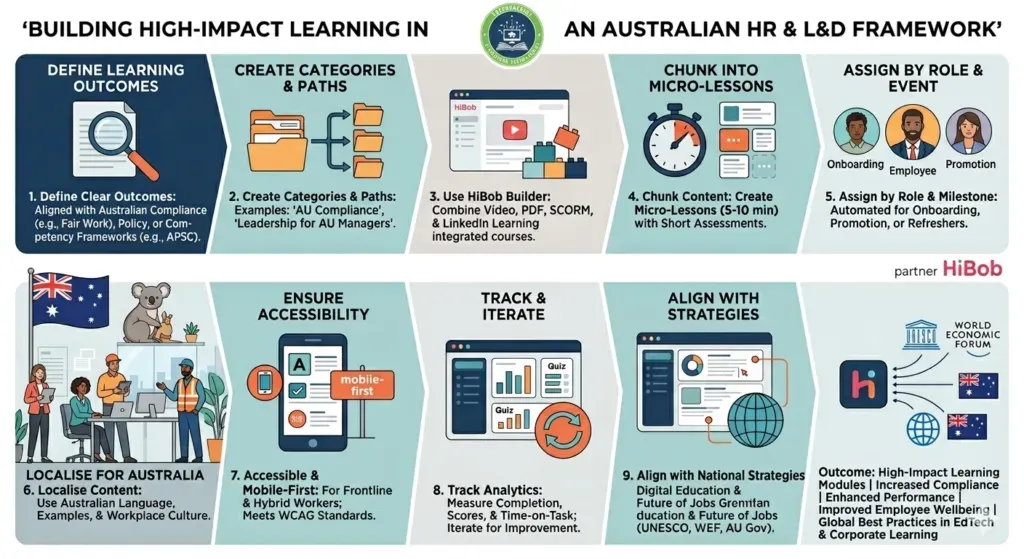
- Define clear learning outcomes aligned with Australian compliance, policy, or competency frameworks.
- Create course categories and learning paths (e.g., “AU Compliance”, “Leadership - AU Managers”).
- Use the HiBob course builder to combine videos, PDFs, SCORM, and LinkedIn Learning‑integrated courses.
- Chunk content into micro‑lessons (5 - 10 minutes) with short assessments.
- Assign modules by role, milestone, or lifecycle event (onboarding, promotion, refreshers).
- Localise language, examples, and icons to Australian workplaces and culture.
- Ensure accessibility and mobile‑first design for frontline and hybrid workers.
- Track completion, quiz scores, and time‑on‑task using HiBob analytics, then iterate.
- Align HiBob modules with national digital‑education and future‑of‑jobs strategies (UNESCO, WEF).
By following this research‑informed, practice‑grounded approach, Australian HR and L&D teams can build high‑impact learning modules in HiBob LMS that improve compliance, performance, and employee wellbeing all while aligning with global best‑practice research in educational technology and corporate learning.
Conclusion:
Building effective learning modules in HiBob LMS in Australia is not just about uploading content - it is about aligning local compliance, instructional‑design research, and in‑flow‑of‑work learning into a coherent strategy. By leveraging HiBob’s integrated Bob Learning module, AI‑assisted course generation, role‑based assignments, and analytics, Australian HR and L&D teams can create short, engaging, and measurable learning experiences that support Fair Work obligations, WHS requirements, DEI goals, and national digital‑education priorities.
When modules are designed with clear outcomes, micro‑lessons, multiple media formats, and data‑driven iteration, HiBob LMS becomes a scalable engine for continuous employee development, compliance assurance, and organisational performance. This positions Australian organisations to meet global workforce‑trends expectations around skills‑based hiring, psychological safety, and lifelong learning, all within a single, HR‑linked platform.
Authored By : Atiqa Sajid http://www.linkedin.com/in/atiqa-sajid-747b57137
Need Help Building or Scaling Your Online Learning Program?
Whether you are launching an academy on Kajabi, modernizing corporate LMS modules, or converting raw expertise into accredited curriculum, our senior instructional designers provide a complimentary architecture evaluation.
Sources & References
- Siragusa, L. (2006). Quality eLearning: An instructional design model for online learning in higher education.
- Al‑Fraihat, D. (2025). Exploring students’ perceptions of the design and use of Moodle for learning. ScienceDirect, Computers & Education: X Technology Enhanced Learning
- Abuhassna, H. et al. (2023). Instructional Design Made Easy! Instructional Design Models - A Systematic Literature Review.
- Peninsula Health & others (2008). Learning Management Systems - Instructional Design Guide. Devilee, A. (2008). Learning Management Systems (Master’s project, University of Sydney).
- HiBob (2025). “Your LMS Implementation Checklist - HiBob” (PDF guide). HiBob corporate resource on LMS setup, configuration, HR‑LMS integration, and data migration.
- Align HCM (2025). “Best Practices for Implementing HiBob: A Strategic Guide to Success”. Coaching / consultancy blog on HiBob implementation workflows and configuration.
- WorkRamp (2026). “13 LMS Best Practices for Successful Implementation”. General LMS‑best‑practices guide (goals, content curation, training, evaluation).
- LinkedIn Learning & HiBob Partnership Documentation (Microsoft Learn / LinkedIn Learning Integration Guides). Details the HiBob ↔ LinkedIn Learning “deep integration” for populating HiBob LMS with thousands of courses.
- HiBob‑branded overview of Bob Learning (onboarding, personalisation, integrations, dashboards).
- Instructional Design in Action: Practical Solutions for Learner Problems
- How to Create Engaging Educational Content for Online Platform 2026
- LMS Implementation Guide
Frequently Asked Questions
QWhat is HiBob LMS and how does it help Australian organisations?
**HiBob LMS** (via the **Bob Learning** module) is an integrated learning‑management system embedded in HiBob’s HR platform. It helps Australian organisations deliver structured, role‑based learning modules for onboarding, compliance, leadership, and digital skills, while tracking completion and engagement across distributed teams.
QWhere can I find more research‑based guidance on building learning modules in HiBob LMS?
Beyond HiBob’s own documentation and implementation guides, you can deepen your knowledge by: - Reviewing journal research in **ScienceDirect**, **SpringerLink**, **ERIC**, **Australasian Journal of Educational Technology**, and **Educational Technology & Society**. - Exploring **industry‑practice reports** from ATD, Training Industry, LinkedIn Workplace Learning, and Gartner. - Cross‑referencing open‑access studies via **DOAJ**, **ERIC**, and **PubMed Central** for evidence‑based instructional‑design principles.
QWhat is the best way to structure a learning module in HiBob LMS for Australian learners?
A research‑informed structure for a HiBob LMS module targeting Australian learners is: 1. **Awareness lesson** - short video or text explaining the topic. 2. **Application lesson** - step‑by‑step examples set in Australian workplaces. 3. **Assessment** - short quiz or task requiring application of the concept. This sequence supports **multimedia learning and micro‑learning principles**, which are shown to improve engagement and retention in Australian and global digital‑learning contexts.
QHow can I align HiBob LMS modules with national and global workforce trends?
To align HiBob LMS modules with national and global trends: - Map modules to **skills‑based hiring** and **lifelong learning** frameworks (e.g., WEF Future of Jobs, UNESCO Digital Education). - Use **AI‑assisted learning paths** to recommend next modules based on roles and skills gaps. - Integrate with HR data (promotions, performance) to trigger **continuous upskilling**. By treating HiBob LMS as a strategic learning platform rather than a compliance box‑ticking tool, Australian organisations can build a future‑ready workforce.
QHow can I use HiBob analytics to improve my learning modules?
HiBob LMS analytics help you: - Monitor **enrollment, completion rates, and quiz scores** for each module. - Compare performance across offices or roles (e.g., Sydney vs. Melbourne teams). - Identify modules with **low completion** or **low quiz scores** and refine their content or structure. Using an **iterative, data‑driven design cycle** (launch → measure → refine) ensures your HiBob LMS modules stay aligned with learner behaviour and business outcomes.
QHow do I make learning modules mobile‑friendly and accessible in HiBob LMS?
To make HiBob LMS modules accessible and mobile‑friendly: - Use **large, clear fonts** and high‑contrast text in PDFs and slide decks. - Provide **captions** for videos and avoid text‑only lectures. - Keep navigation simple with one **“Next” button** per lesson. - Test how modules render on mobile devices, especially for frontline workers. This approach aligns with inclusive‑e‑learning best practice and supports diverse Australian learners, including those with disabilities or low digital literacy.
QCan I integrate LinkedIn Learning with HiBob LMS modules?
Yes. LinkedIn Learning has a **deep integration** with HiBob’s Bob Learning, allowing you to: - Synchronise thousands of LinkedIn Learning courses into HiBob’s course catalog via API. - Map LinkedIn categories (e.g., “Leadership”, “Data & Analytics”) to HiBob categories. - Combine LinkedIn Learning content with internal HiBob modules into **Learning Paths**. This “buy + build” model lets you enrich HiBob LMS modules with high‑quality global content while keeping Australian‑specific context inside HiBob.
QHow can I use HiBob LMS for Australian compliance and WHS training?
HiBob LMS supports Australian compliance by: - Creating **mandatory modules** for Fair Work, WHS, privacy, and cybersecurity. - Using **role‑ and milestone‑based assignments** to auto‑assign modules at onboarding, promotion, or annual refresh dates. - Tracking **completion and acknowledgements** for audit and reporting purposes. This ensures that your organisation meets Australian regulatory expectations while embedding learning into everyday workflows.
QHow do I start building a learning module in HiBob LMS?
To build a learning module in HiBob LMS: 1. Define **clear learning outcomes** aligned with Australian regulations or competency frameworks. 2. Create a **Course Category** (e.g., “AU Compliance”) in HiBob’s Learning → Courses section. 3. Use the **HiBob course builder** to add a title, description, and sequence of lessons. 4. Optionally enable **AI‑powered course generation** to auto‑populate a draft structure. 5. Upload or embed content (videos, PDFs, quizzes) and set completion rules.
QWhat types of learning modules can I build in HiBob LMS?
In HiBob LMS you can build modules such as: - **Compliance & WHS modules** (e.g., Code of Conduct, Cyber‑Safety, Mental Health). - **Leadership & people‑management modules** (e.g., “People Leadership & Psychological Safety - AU Edition”). - **Technical and digital‑skills modules** (e.g., data literacy, software‑specific workflows). - **Wellbeing and inclusion modules** (e.g., cultural‑awareness, psychological safety). These modules can combine videos, PDFs, SCORM packages, and LinkedIn Learning‑integrated courses, making HiBob LMS highly flexible for Australian L&D contexts.
