
How to Create an AI Tutor Inside Your LMS
Learn how to create an AI tutor inside your LMS to provide personalized support, answer learner questions, and improve the online learning experience.
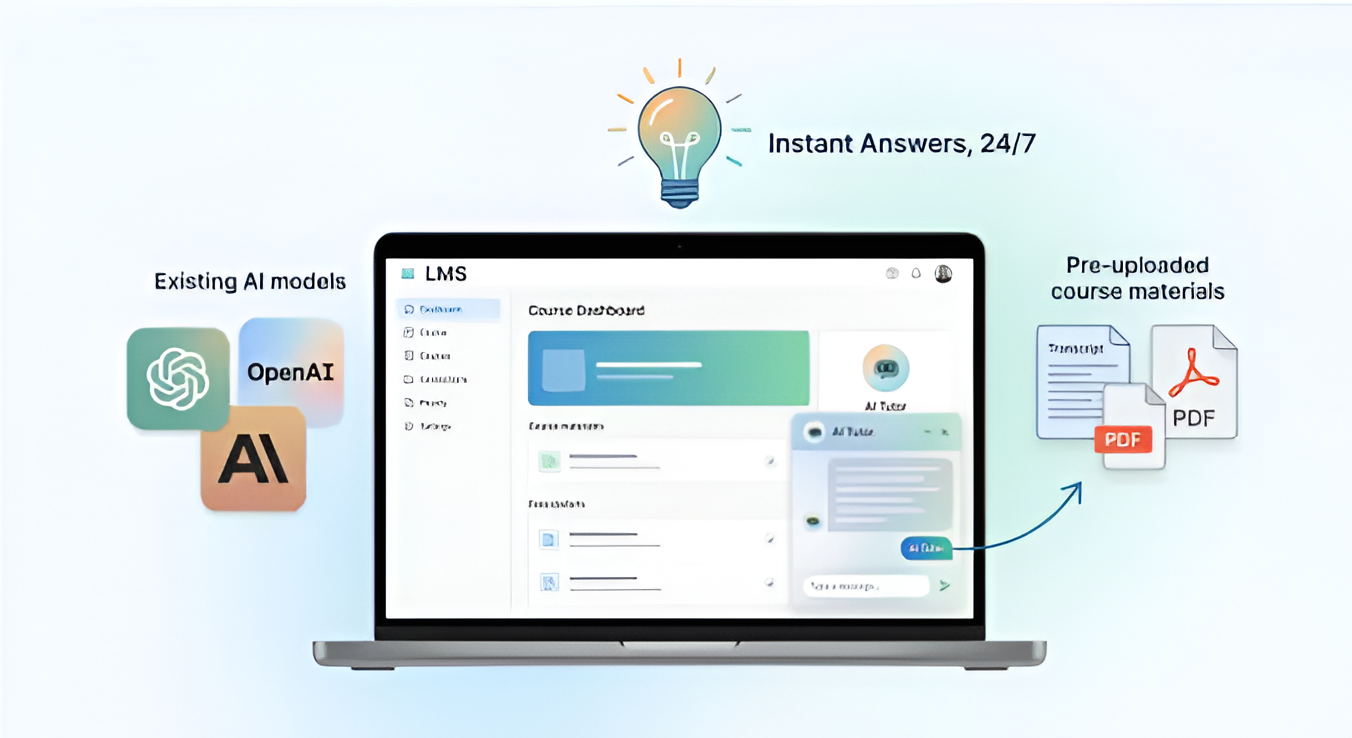
Table of Contents ▼
Quick Answer
An AI tutor inside an LMS can provide learners with personalized support, instant answers, and guidance throughout their courses. This article explains how AI tutors work, the key steps involved in building one, and how organizations can use them to improve learner engagement, support, and training outcomes.
Key Takeaways
- Course creators generally do not need to build an AI model from scratch; ready-made AI tools can be connected to an LMS through integrations, APIs, or embed codes.
- Costs vary significantly depending on the AI tool, usage, analytics, integrations, and whether the setup is custom-built.
- Start with a single course, monitor student questions, and continuously improve the tutor's knowledge base and instructions.
- An AI tutor LMS setup can give learners instant, on-demand support without requiring instructors to answer every question manually.
How to Create an AI Tutor Inside Your LMS (Without Building Your Own AI)
Online learners often quit a course the moment they get stuck. They wait hours for a reply from an instructor. Then they lose interest and never come back. This is where an AI tutor LMS setup can help. It gives learners instant answers, day or night, without forcing you to build a private AI model from scratch.
In this guide, you will learn what an AI tutor really is, why building your own AI model is not practical for most creators, and how to add one to your LMS in simple steps. We will also cover cost, tools, and best practices so your setup actually works for your students in the USA and beyond.
What Is an AI Tutor Inside an LMS?
An AI tutor is a chat-based assistant that lives inside your course. It answers student questions, explains difficult topics, and points learners back to the right lesson. Unlike a static FAQ page, it responds in real time. Unlike a live instructor, it never sleeps.
Most AI tutors today are built using existing AI models such as those from OpenAI or Anthropic. Instead of training a model from zero, you simply connect it to your course content. As a result, your students get personalized help while you keep your existing LMS setup.
Why Building Your Own AI Is Not Worth It
Some creators assume they need to build a custom AI model to offer this kind of support. In reality, that path is expensive, slow, and often unnecessary.
Here is why most creators should avoid it:
- Training a model from scratch requires large amounts of data, engineering time, and ongoing maintenance.
- Costs can run into thousands of dollars before you even launch.
- Pre-trained AI models already understand language, context, and reasoning far better than anything a solo creator could train alone.
- Updates and safety patches are handled by the AI provider, not by you.
Because of this, most course creators in the USA now rely on ready-made AI tools that plug directly into their LMS instead of building anything from the ground up.
Step by Step: Adding an AI Tutor Without Building Your Own AI
Step 1: Choose an LMS That Supports AI Integrations
Not every LMS makes this easy. Before you add anything, check whether your platform supports third party apps, custom code blocks, or API connections. Platforms like Kajabi, Thinkific, and Teachable each handle integrations differently, so it helps to compare them first.
If you are still deciding which LMS fits your business, our guide on the best Learning Management System of 2026 breaks down twelve popular platforms side by side, including which ones support automation and AI tools.
Step 2: Pick a Ready-Made AI Tutor Tool
Once your LMS is ready, you do not need to code an AI model. Instead, choose a service that already offers tutoring features, such as chat widgets powered by GPT or Claude. Many of these tools connect through a simple embed code or a native app inside your LMS marketplace.
Look for tools that let you:
- Upload your own course transcripts and materials
- Set a tone and personality that matches your brand
- Limit answers to your course content only, so the tutor stays on topic
This approach saves months of development time while still giving learners a smart, responsive assistant.
Step 3: Train the Tutor on Your Own Content
Even though you are not building the underlying AI, you still need to guide it. Feed it your lesson transcripts, PDFs, and quiz answers. This step, sometimes called grounding, ensures the tutor gives accurate answers based on what you actually teach, not generic internet knowledge.
If your course content lives across multiple formats such as video, worksheets, and email sequences, it helps to have a clear content strategy first. Our article on running Kajabi email campaigns successfully shows how structured content and automation work together, a principle that applies just as well to training an AI tutor.
Step 4: Set Guardrails and Test Thoroughly
An AI tutor without limits can wander off topic or give confusing answers. Before launch, set clear rules. For example, tell it to redirect off-topic questions back to your course, avoid giving medical or legal advice, and always cite the lesson it pulled information from.
Test the tutor yourself first. Ask it tricky questions. Try to confuse it. Then invite a small group of beta students to try it before rolling it out to everyone.
Step 5: Launch, Monitor, and Improve
After launch, keep an eye on the questions students ask most. This data tells you where your course content is unclear or missing. Many AI tutor tools include a dashboard for this, similar to how Kajabi automation workflows track student behavior and trigger follow-up emails based on activity.
Update your tutor’s training material every few months. As your course grows, so should the depth of your AI tutor’s knowledge base.
How Much Does It Cost to Add AI Tutoring to Your Online Courses?
Pricing varies depending on the tool you choose, but here is a general breakdown:
- Basic chat widgets with limited AI responses often start around twenty to fifty dollars per month.
- Full-featured AI tutor platforms with content training and analytics typically range from one hundred to five hundred dollars per month.
- Custom setups built by an agency or freelancer can cost a one-time fee of several hundred to a few thousand dollars, plus the monthly subscription for the AI tool itself.
Compare this to building your own model, which can cost tens of thousands of dollars in development and ongoing compute expenses. For most course creators, a ready-made tool is the far more practical choice.
Best AI Tutor Software That Works Inside Popular LMS Platforms
Several tools now specialize in plugging AI tutoring directly into existing course platforms. When comparing options, prioritize tools that offer no-code setup, direct LMS integration, and clear pricing tiers. Many creators also pair their AI tutor with strong lead management, similar to how a Kajabi CRM keeps student data organized in one place.
If you are also trying to grow your audience while rolling out new features like an AI tutor, pairing this launch with better visibility matters too. Our guide on increasing online course traffic with Kajabi SEO services can help more students discover your upgraded course in the first place.
Best Practices for a Smooth AI Tutor Setup
Keep these tips in mind as you roll out your tutor:
- Start small. Launch with one course before scaling across your whole catalog.
- Keep answers short and clear, since learners prefer quick help over long explanations.
- Always give students the option to reach a human if the AI cannot help.
- Review chat logs weekly during the first month to catch mistakes early.
- Combine the tutor with existing tools. For instance, platforms compared in our Kajabi vs ClickFunnels breakdown show how automation and AI features fit differently depending on your platform choice.
Because AI tutors work best with structured, well-organized courses, it also helps to review your overall instructional design before launch. Our guide on using AI tools for course design without losing quality walks through how to keep lessons clear and effective, which in turn makes your AI tutor more accurate.
Final Thoughts
Adding an AI tutor to your LMS does not require a data science team or a massive budget. With the right integration, clear training data, and a few guardrails, you can give your students round-the-clock support in a matter of weeks, not months. As more course creators in the USA adopt this approach, it is quickly becoming a standard feature rather than a rare bonus.
Need Help Building or Scaling Your Online Learning Program?
Whether you are launching an academy on Kajabi, modernizing corporate LMS modules, or converting raw expertise into accredited curriculum, our senior instructional designers provide a complimentary architecture evaluation.
Sources & References
Frequently Asked Questions
QCan I Add an AI Tutor to My LMS Without Building It From Scratch?
Yes. Most course creators use pretrained AI tools that connect to their LMS through an integration or embed code. You train the tool on your own content instead of building a model from the ground up.
QHow Much Does It Cost to Add AI Tutoring to Your Online Courses?
Costs typically range from twenty dollars a month for basic tools to several hundred dollars a month for advanced platforms with analytics and content training features. Custom builds cost far more and are rarely necessary.
QWhat's the Easiest Way to Add AI Tutoring Features to Your LMS?
Choose an LMS that supports third-party integrations, then connect a ready-made AI tutor tool through its native app or embed code. Train it on your course transcripts and set clear guardrails before launch.
QWhich LMS AI Tutor Solutions Offer the Easiest Setup Without Coding?
Platforms with app marketplaces or built-in automation, such as Kajabi, tend to offer the simplest no-code setup for AI tutoring tools compared to platforms that require custom development.
QWhat AI Tutor Software Works Seamlessly Inside Popular LMS Systems?
Look for AI chat tools built specifically for course platforms. These usually offer direct integration, content training options, and analytics dashboards designed for education, not generic customer support.
QWhat Are the Best AI Tutor Integration Platforms for LMS Without Custom AI Development?
The best options are AI tutoring tools that connect through APIs or app marketplaces, allowing you to train them on your own material while relying on an established AI model behind the scenes.
