
10 Best Learning Management Systems Compared
Compare the 10 best learning management systems based on features, pricing, usability, integrations, and use cases to find the right LMS for your needs.
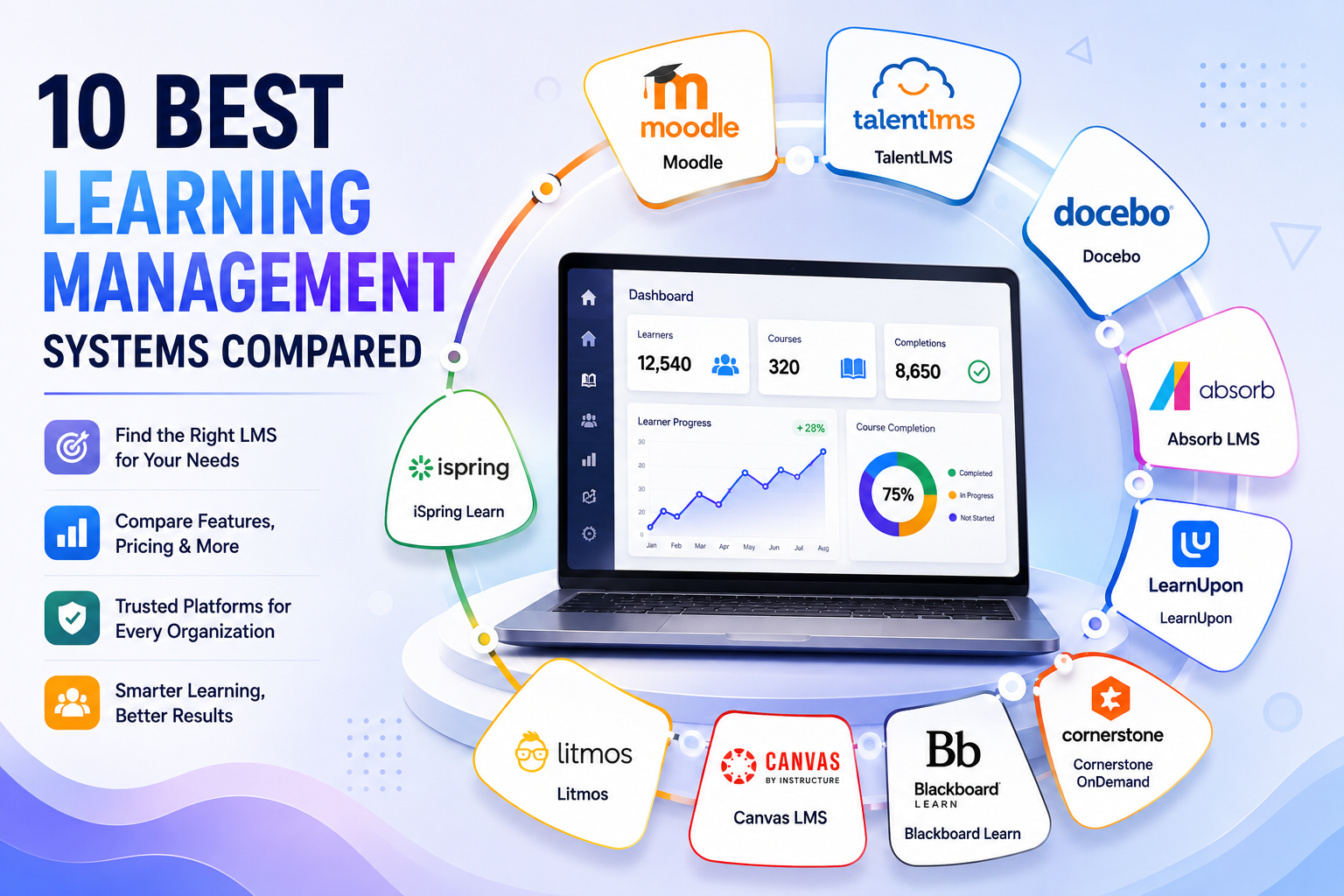
Table of Contents ▼
Quick Answer
This guide compares the 10 best learning management systems, including Moodle, TalentLMS, Docebo, Absorb LMS, LearnUpon, Cornerstone OnDemand, Litmos, Canvas LMS, Blackboard Learn, and iSpring Learn. It covers their key features, pros, cons, pricing, and ideal use cases to help organizations choose the right LMS.
Key Takeaways
- The best LMS depends on your goals, budget, and organization size.
- TalentLMS is a strong choice for small and growing businesses.
- Docebo and Cornerstone OnDemand suit large enterprise training needs.
- Moodle offers flexible, open-source learning with extensive customization.
- Canvas LMS and Blackboard Learn are well suited for schools and universities.
The top Learning Management Systems are more than just online courses. They boost learner engagement, facilitate learning, and foster sustainable development. But with the number of available LMS, it can seem daunting to select the right one. With evolving education and workplace training, organizations require an LMS that aligns with their objectives, budget, and growth plans.
This LMS comparison is an overview of the 10 best LMS. Includes features, pricing, usability, integrations, and use cases. As an educator, business owner, or course creator, you can confidently select the right LMS from this guide.
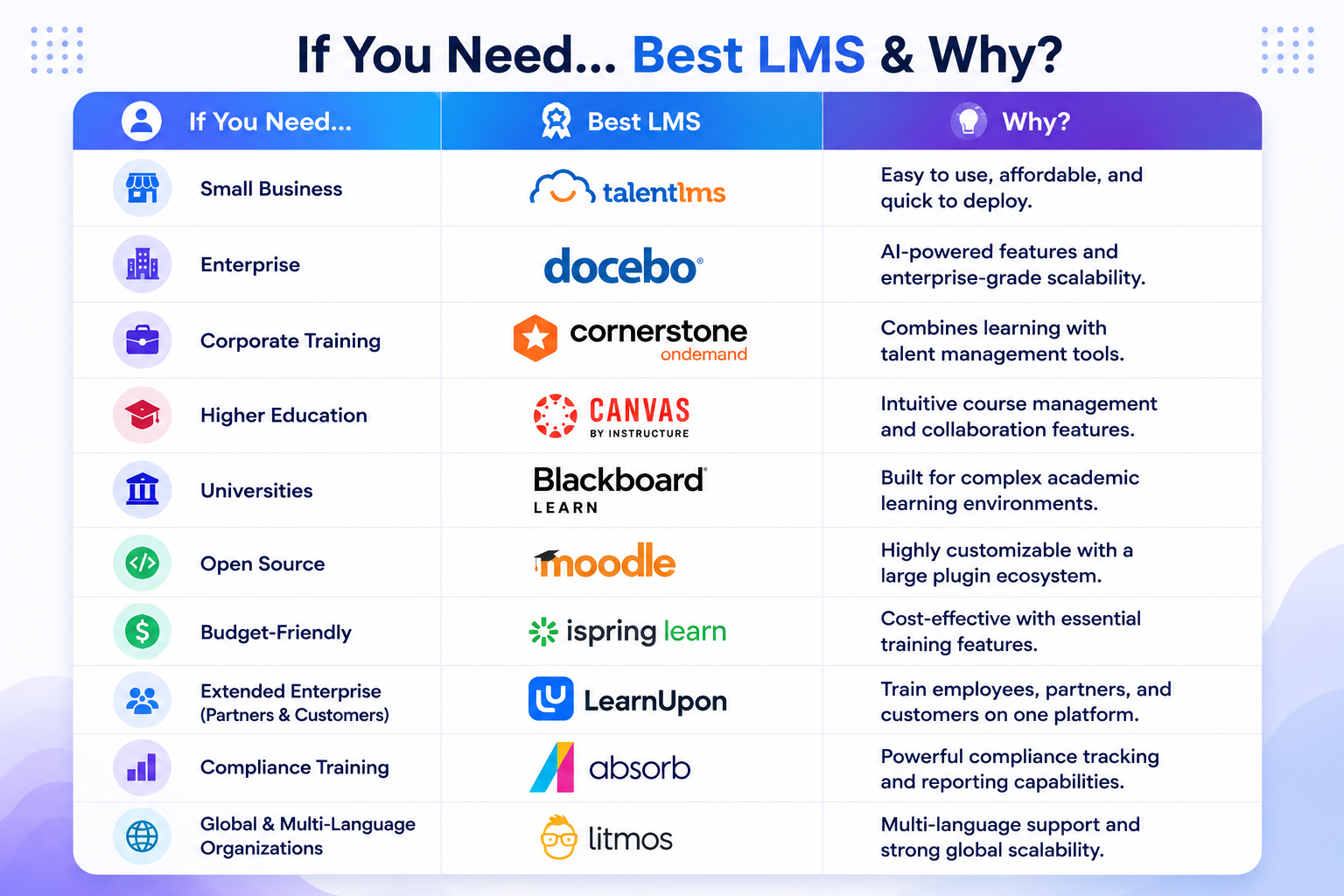
The most suitable LMS is the one that meets the requirements. TalentLMS is perfect for a small business, Docebo is suited for enterprises, Canvas LMS is great for education, and Moodle is the most popular open-source platform.
What Is a Learning Management System (LMS)?
A Learning Management System (LMS) is a virtual environment that enables organizations to develop, deliver, and manage learning programs. It also monitors the learner’s progress and keeps it in its central storage. It is an online learning platform that makes assessment, tracking, and reporting easier, as well as course delivery.
Modern LMS software can be used to train employees, educate students, complete compliance training, and help with professional development. Many platforms provide mobile access, automation, analytics, and integrations. These features aid in the learning process and help to improve learning efficiency.
The primary key factors that drive organizations to invest in LMS platforms are to enhance training efforts, lighten the workload, and provide uniform learning experiences. The rise of remote and hybrid work has also bolstered LMS usage. The shift to remote and hybrid working has also contributed to the growing adoption of LMS. An LMS makes training easy, increases efficiency, and monitors learner success.
How the Best LMS Platforms Were Evaluated
Each LMS was evaluated based on key criteria, including usability, course creation, AI features, analytics, integrations, pricing, customer support, scalability, and security. Insights from both G2 and Capterra were also reviewed to ensure accuracy, as well as insights from official LMS providers. This approach emphasizes the advantages, disadvantages, and best practices for each platform.****
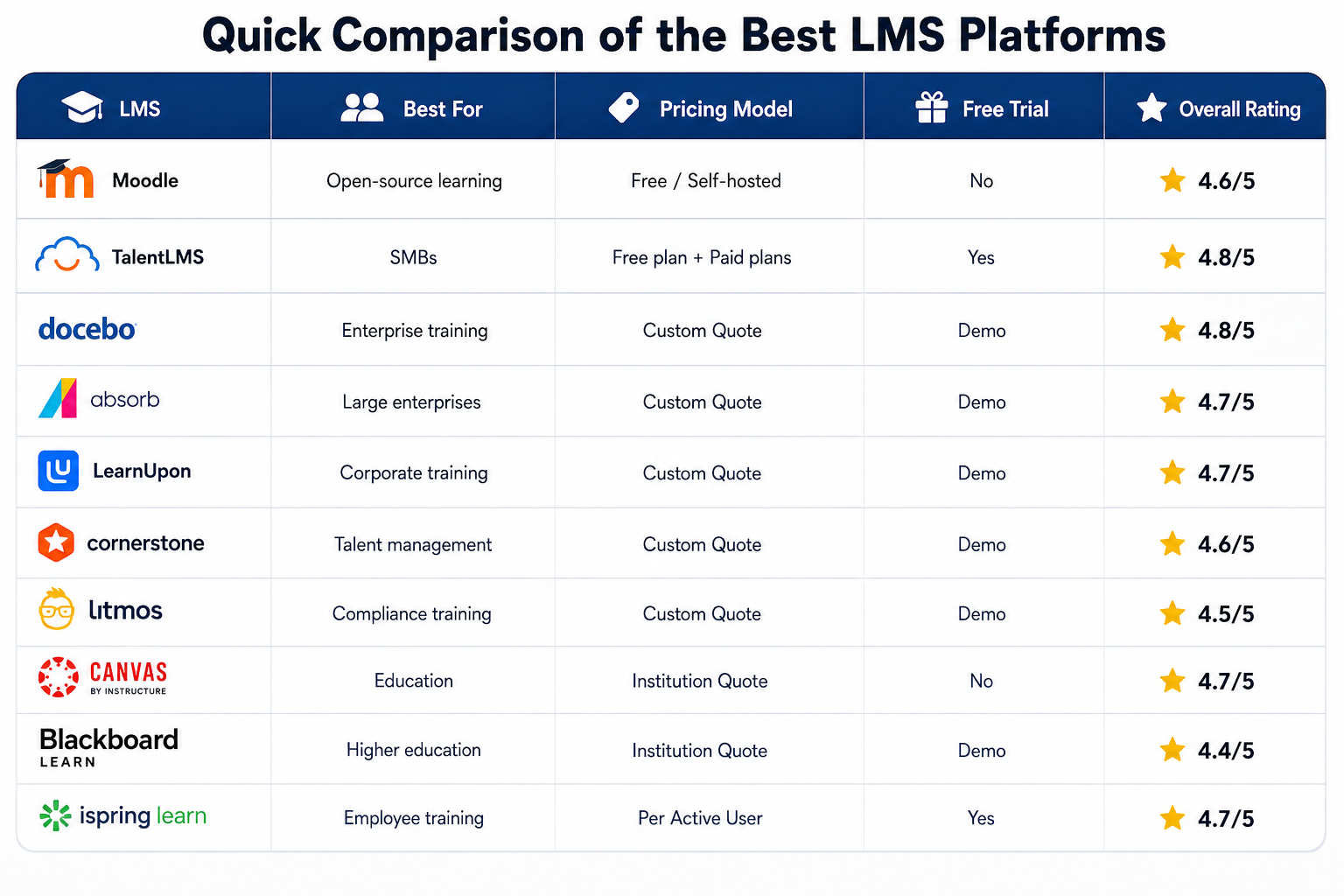
This comparison outlines the top LMS platforms for various use cases, pricing, trials, and performance. It enables you to make a rapid selection and decide which is the best option for you to learn.
Ratings are not based on just one review source, but are based on the overall reputation of the market, comments from users, features, ease of use, and scalability.
1. Moodle
Moodle LMS is a reputable open-source learning management system that is implemented by schools, universities, and organizations around the globe. The flexible design ensures that it is suitable for online education and training.
Key Features
- Customizable course builder
- Extensive plugin ecosystem
- Assessments and grading incorporated into the app.
Pros
- Easily customizable and scalable.
- Significant international community backing and funds
Cons
- Needs technical setup and maintenance
- Interface can seem like retro for novices
Pricing
- Free (self-hosted); paid hosting available.
Ideal for
- Schools and organizations that require a flexible LMS.
Moodle is a cost-effective, powerful, and customizable LMS.****
2. TalentLMS
TalentLMS is a small business-friendly LMS that is easy to use. Makes employee training and development easier. It offers intuitive UI and easily scalable options, which makes it a great option for expanding businesses.
Key Features
- Drag-and-drop course builder
- A set of inbuilt assessments and certifications.
- Built-in connections to popular business tools. Popular business tool integrations.
Pros
- Can be set up easily and used.
- Suitable for expansion as a business expands
Cons
- This is only a basic level of customization
- There are some premium features that need more expensive plans.
Pricing
- Has a free plan; paid plans start at $149/month.
Suitable for
- Small & medium-sized businesses.
TalentLMS is an easy LMS software for developing businesses.****
3. Docebo
Docebo is an AI-powered Learning Management System that is suitable for organizations that require personalized, scalable learning. It is a top enterprise LMS platform due to its automation, analytics, and integrations.
Key Features
- AI-driven content recommendations
- In-depth reporting and analytics
- Extensive third-party integrations
Pros
- Suitable for enterprise training – highly scalable.
- High level of automation and AI skills
Cons
- It can be costly to have custom pricing.
- May need some training for new administration
Pricing
- An additional custom price is available upon request.
Suitable for
- Companies with extensive enterprises, global organizations.
Overall, Docebo is an impressive AI-powered learning management system for businesses.****
4. Absorb LMS
Absorb LMS is a comprehensive corporate learning management system (LMS) that can be used to effortlessly manage employee learning and professional development. It has a user-friendly interface, automation options, and good reporting. This allows it to be used for various business requirements.
Key Features
- AI-assisted course management
- In-depth reporting and dashboards.
- Making learning more mobile and gamified. Learning made mobile and gamified.
Pros
- Easy to use and very expandable
- Very good reporting and automation capabilities.
Cons
- No transparency on Customized pricing.
- There may be advanced features to onboard
Pricing
- An additional custom price is available upon request.
Ideal for
- Companies with medium to high volume of users.
Absorb LMS**** is simple and yet offers robust training capabilities for growing businesses.****
5. LearnUpon
LearnUpon enables companies to provide employee, partner, and customer training on a single platform. It is a reliable corporate learning software solution with its user-friendly interface, automation features, and comprehensive capabilities.
Key Features
- Multi-portal training management
- Automated learning workflows
- In-depth reporting and analytics
Pros
- Helps train several training groups
- Simple to set up and maintain
Cons
- Limited customization options
- Some of the custom packages might not be ideal for smaller businesses.
Pricing
- Custom turnkey is available upon request.
Ideal for
- Employee, partner, and customer training in organizations.
- Businesses looking to get a comprehensive LMS solution with all the features they need can use LearnUpon.
LearnUpon is an all-in-one LMS solution that is scalable to businesses.****
6. Cornerstone OnDemand
Cornerstone OnDemand**** is a large organization LMS, created for enterprises. It is a combination of learning, talent management, and workforce development in a single platform. The system enables businesses to upskill their employees and promote business growth.
Key Features
- AI-powered personalized learning
- Transfer learning is the term used to describe skills and competency management.
- In-depth reporting and analytics
Pros
- All-in-one talent management solutions
- Ideal for global organisations for its high scalability.
Cons
- It takes a long time to become proficient in its use.
- It may be costly to have custom pricing.
Pricing
- Custom pricing.
Ideal for
- Companies with lots of staff with learning and talent needs.
Cornerstone OnDemand**** is the perfect solution for enterprise learning and talent management.
7. Litmos
Litmos is a cloud-based course management system for small, medium, and large businesses. It focuses on compliance training, professional learning, and employee development. It is an automated and simple interface business learning platform.
Key Features
- An integrated compliance course library.In-built compliance course library.
- Mobile learning support
- The use of automation and reporting tools.Use of automation and reporting tools.
Pros
- Easily installed and operated
- The strengths in compliance training are identified.
Cons
- Limited course customization
- The advanced features are only available in higher-tier plans.
Pricing
- Custom pricing.
Ideal for
- Businesses that are compliance-driven, new employee onboarding, and/or employee training.
Litmos is perfect for compliance and business learning.****
8. Canvas LMS
Canvas LMS is one of the most widely adopted education LMS solutions around the globe, adopted by schools, colleges, and universities. It is an education platform that is trusted by teachers and students in higher education because of its intuitive interface, flexible course tools, and collaboration features.
Key Features
- Drag-and-drop course builder
- Includes built-in quizzes and assignments.
- Integrates with mobile apps and third parties. Connect with mobile and third-party apps.
Pros
- User-friendly for teacher and student
- Good teamwork and communication skills
Cons
- Advanced features are only available on paid plans.
- Customization is less extensive than with open source LMS
Pricing
- Custom pricing.
Suitable for
- Schools, colleges, and higher education institutions.
Canvas LMS is a contemporary, easy-to-use education system.****
9. Blackboard Learn
Blackboard Learn**** is a university LMS for universities. It facilitates online, hybrid, and face-to-face learning. It provides collaboration tools, analytics, and interactive tools. A trusted academic learning platform that provides engaging educational experiences.
Key Features
- Interactive course management
- Online classrooms and conversations.
- Tools and methodologies for using learning analytics and assessments.
Pros
- A rich teaching and learning environment for collaboration.
- Works with methods of learning that are flexible.
Cons
- It is easy to get confused with the interface when using it for the first time.
- High-end functionality adds to the price tag.
Pricing
- Custom pricing.
Ideal for
- University students and higher education institutions.
Blackboard Learn is a modern University LMS.****
10. iSpring Learn
iSpring Learn is an easy-to-use, cloud-based learning management system (LMS) for rapid, effective employee training. It features user-friendliness and exceptional automation and reporting capabilities. It is a learning management software that makes it easy for organizations to deliver, monitor, and manage learning.
Key Features
- Rapid course deployment
- The reports and analytics are built-in.
- Mobile learning in an offline environment
Pros
- Simple to apply and use
- Very good integration with iSpring Suite.
Cons
- Limited advanced customization
- As the team grows in size, costs will also increase.
Scalability
- Customizable, scalable, and big data friendly.
Ideal For
- Small to medium-sized businesses, corporate training teams.
iSpring Learn**** is an easy, speedy, and scalable training LMS.****
Feature Comparison of the Best LMS Platforms
The table below contrasts the key features of the LMS that you can use to compare each LMS. This overview should help you compare the various LMS platforms according to their features, usability, and business needs before deciding.
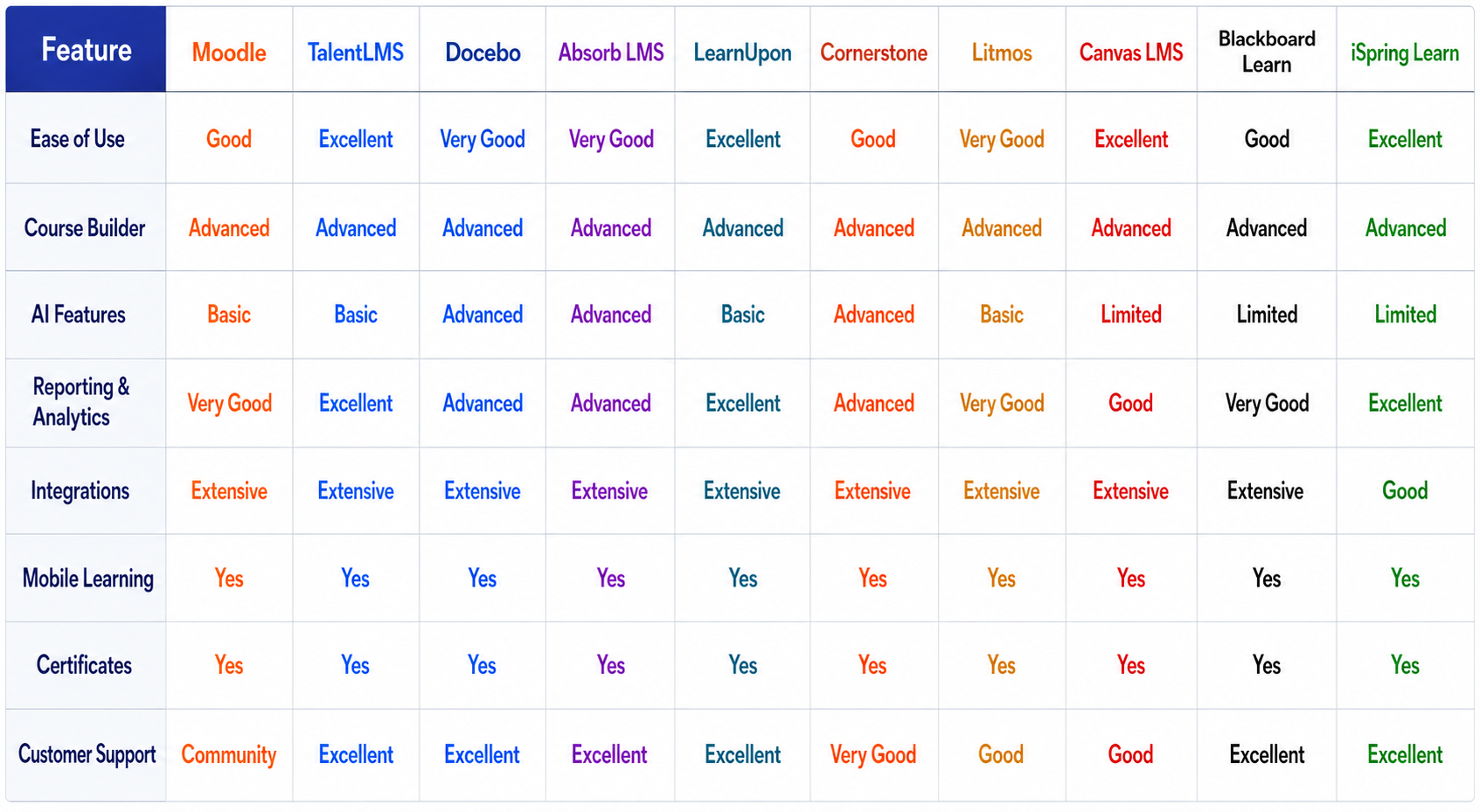
There are special advantages for each platform. AI and enterprise capabilities are the strengths of Docebo and Cornerstone OnDemand. TalentLMS and iSpring Learn are more user-friendly for expanding companies. Canvas LMS and Blackboard Learn are designed for education; Moodle provides open-source, flexible learning.
Which LMS Should You Choose?
The right LMS will vary based on your organization’s size, learning objectives, budget, and the most important features for you. G2 finds that satisfaction, usability, scalability, and integrations are key criteria used to measure LMS platforms.****
It depends on the goals, budget, and size of the organization you are looking for the best LMS. TalentLMS is suitable for small and medium businesses, Docebo is ideal for large enterprises, Canvas is perfect for schools, and Moodle is an open-source learning platform that can be customized.
LMS platforms that are scalable, automated, and provide analytics can enhance learning outcomes and return on investment for businesses investing in digital learning.
Final Verdict
The best Learning Management Systems provide more than just courses. They support organizations in providing interactive, scalable, and measurable learning experiences. Budget, feature requirements, organization size, and learning objectives all play a role in the selection of the appropriate LMS. Select an LMS that aligns with your objectives, financial resources, and expansion plans.
Sources & References
- What is an online learning platform?
- 19 Best LMS for Corporate Training of 2026: Top Picks Reviewed
- Best Learning Management Systems
- Moodle
- TalentLms
- Docebo
- Absorb LMS
- LearnUpon
- Cornerstone OnDemand
- Litmos
- Canvas LMS
- Blackboard Learn
- iSpring Learn
- Capterra - Learning Management System comparisons and ratings.
Frequently Asked Questions
QWhat is the best LMS?
The best LMS is based on your goals. Docebo is perfect for enterprises, while TalentLMS is great for small businesses, and Canvas LMS is suitable for education.
QWhich is the best LMS for small companies?
TalentLMS is one of the best LMS Software for small businesses. It is simple to use, inexpensive, and provides needed tools for employee training.
QWhich LMS is the optimum choice for universities?
Blackboard Learn and Canvas LMS are two examples of learning management systems (LMS). They offer course management, collaboration, assessments, and analytics solutions for the higher education sector.
QWhich is the best free LMS?
The most popular free, open source LMS is Moodle. It is customizable, has a wide array of plugins, and has a thriving community.
QIs an LMS flexible enough to facilitate remote learning?
Yes. The majority of today's LMS solutions enable remote learning via mobile, virtual classrooms, progress tracking, and interactive course materials.