
How to Create Downloadable Resources for Kajabi Students
Learn how to create downloadable resources for Kajabi students, upload files to course lessons, organize learning materials, and help students access resources on desktop and mobile devices.
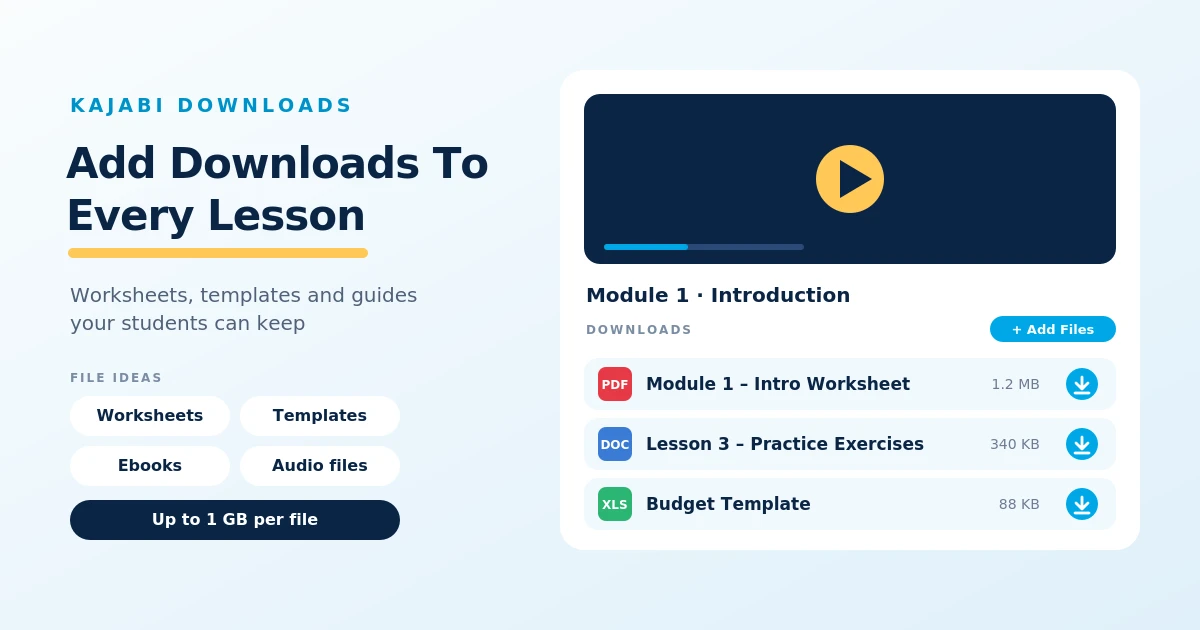
Table of Contents ▼
Quick Answer
This guide explains how Kajabi course creators can provide downloadable resources such as worksheets, PDF guides, templates, spreadsheets, and ebooks. It covers uploading files to course lessons, organizing resources for easy access, downloading materials on mobile devices, and troubleshooting common download problems.
Key Takeaways
- Creators can provide worksheets, PDF guides, templates, spreadsheets, presentations, and other supporting files.
- The Downloads section in the lesson editor allows creators to upload resources alongside relevant course content.
- Learners can download course materials through the Kajabi Mobile app or a creator's branded app, subject to device and app compatibility.
What Are Downloadable Resources in Kajabi?
These are files that course creators provide to students so they can save learning materials to their devices and access them whenever needed. In Kajabi, creators can add these files directly to course lessons through the Downloads section, allowing students to access supporting materials alongside video lessons, written content, and other learning activities.
What Types of Downloadable Resources Can You Offer?
PDF guides, worksheets, lesson notes, templates, spreadsheets, presentations, audio files, and ebooks. Learners can find these files within the relevant lesson and download them for later use. This gives learners additional materials to review, practice their skills, and follow along with course content at their own pace.
How to Create Downloadable Resources for Your Kajabi Courses
Kajabi allows course creators to add downloadable files directly to individual lessons, giving students access to additional learning materials alongside their course content. You can upload worksheets, templates, lesson notes, ebooks, and other supporting files.
Here are the steps to add downloadable resources to your course:
- Open Your Course: Log in to your Kajabi dashboard, go to Products and then the Courses section, and select the course you want to edit.
- Choose a Lesson: Open the lesson where you want to provide downloadable materials.
- Find the Downloads Section: Scroll down in the lesson editor until you reach the Downloads section.
- Upload Your Files: Click Add Files to open the upload window, then select the files you want to share with students.
- Review Your Resources: Once uploaded, check that the files appear correctly. You can also click the Edit icon to rename a file so students can identify it easily.
- Save Your Changes: Save the lesson after adding your resources. Make sure the lesson is published so students can access it.
Can Students Access and Download Course Materials on Mobile Devices?
Students can access Kajabi courses and download attached learning materials using their mobile devices. They can use the Kajabi Mobile app or a course creator’s branded app on whatever device they use, Apple or Android.
When a course lesson includes downloadable files, students can open the lesson, tap the Downloads section, select the files they need, and tap Download.
How to Organize Downloadable Resources for Easy Access
Organizing downloadable resources properly helps students find the materials they need without searching through multiple lessons. Kajabi allows creators to add files to individual course lessons, so you can arrange resources according to the topics they support.
Here are a few ways to keep your downloadable materials organized:
- Group resources by course module: Divide your course into modules based on different topics and add relevant worksheets, guides, and templates to the lessons where students need them.
- Use clear file names: Give each file a descriptive name, such as Module 1 – Introduction Worksheet or Lesson 3 – Practice Exercises, so students can easily identify its purpose.
- Place files alongside relevant lessons: Add a worksheet or reference guide to the lesson that explains how to use it, rather than making students search through unrelated sections.
- Use consistent file formats: Provide resources in commonly accessible formats, such as PDF, DOCX, or XLSX, so students can open them using compatible applications.
- Remove outdated materials: Review your course resources regularly and replace old versions when information changes. This helps prevent students from downloading incorrect or outdated files.
- Test the student experience: Preview your course and check that files appear in the correct lessons and can be downloaded successfully.
Kajabi organizes lessons within modules and submodules, making it easier to structure course content by topic. You can also use descriptive names for downloadable files to make each resource easier to recognize.
Common Issues Students May Face When Downloading Resources
Although Kajabi makes it easy for students to download course materials, they may occasionally experience problems accessing or saving files. These issues can be related to account access, file availability, device settings, or internet connectivity.
Here are some common problems students may encounter:
- Unable to find the download option: Students may not see the Downloads section if the lesson does not contain any attached files. Course creators should check that the files have been uploaded to the correct lesson.
- Lesson is not accessible: If a lesson is unpublished or restricted, students may not be able to access its downloadable resources. Creators should check the lesson’s publishing status and course access settings.
- Download link is not working: Kajabi requires students to be logged in to access downloadable course files. It generates a temporary download link when a student clicks the download option. If the link expires, students can simply click Download again while logged in.
- File is not downloading on a mobile device: Students may need to select a save location or open the downloaded file through their device’s file manager. On iPhones and iPads, they can use the Save to Files option, while Android devices generally save files to the Downloads folder.
- Unsupported or oversized files: Kajabi only accepts specific file formats for course downloads, and each file must be no larger than 1 GB. Creators should check the file format and size before uploading.
- Unable to open a downloaded file: Some files require compatible applications. For example, students may need a PDF reader, spreadsheet application, or ZIP file extractor to open certain resources.
To prevent these problems, course creators should test downloadable files before publishing lessons, use supported file formats, and make sure students can access the relevant course content.
Final Thoughts
Downloadable resources are a useful way to support students and make online courses more practical and engaging. Kajabi allows creators to add worksheets, templates, guides, and other learning materials directly to course lessons, making them easy for students to access on their computers and mobile devices. By organizing files clearly, using descriptive names, and checking that downloads work properly, you can create a smoother learning experience and help students get more value from your course content.
Need Help Building or Scaling Your Online Learning Program?
Whether you are launching an academy on Kajabi, modernizing corporate LMS modules, or converting raw expertise into accredited curriculum, our senior instructional designers provide a complimentary architecture evaluation.
Sources & References
Frequently Asked Questions
QCan I replace or update a downloadable file in a Kajabi lesson?
Yes. You can edit a course lesson and replace outdated downloadable materials with updated versions. After making changes, save the lesson and check that the correct file is available to students.
QCan students download Kajabi course materials more than once?
Generally, students can return to an accessible course lesson and download its attached resources again. They should be logged in and have the necessary course access to retrieve the files.
QAre Kajabi downloadable resources available after a student's course access expires?
Access depends on the student's course enrollment and the access settings configured by the creator. If a student's course access expires or is revoked, they may no longer be able to access lesson downloads through Kajabi. Files already saved to their personal devices may remain available.
