
Can You Offer Payment Plans for Kajabi Courses?
Learn how to offer payment plans for Kajabi courses, customize installment amounts and billing intervals, manage failed payments, and understand the difference between payment plans and subscriptions.
Quick Answer
This guide explains how Kajabi payment plans work and how course creators can set them up through Offers. It covers supported billing intervals, installment limits, trial periods, setup fees, failed payments, cancellations, refunds, and the differences between payment plans and subscriptions. It also explains how to manage customer payment plans and make course pricing more flexible.
Key Takeaways
- Course creators can split a course's total price into smaller payments through the Offers feature.
- You can choose installment amounts, billing intervals, and the number of payments to suit your course pricing.
- Kajabi can retry unsuccessful charges and notify customers, but creators should monitor past-due transactions and access changes.
- Payment plans end after a fixed number of installments, while subscriptions continue until canceled or otherwise terminated.
How Do Kajabi Payment Plans Work?
Kajabi Payment plans allow course creators to split the cost of a course into smaller installments instead of requiring students to pay the full price upfront. You can set a fixed payment amount, choose how often customers are charged, and decide how many payments they need to make before the plan ends.
What Payment Options Does Kajabi Offer?
Kajabi lets you configure payment plans weekly, monthly, ot yearly billing intervals. You can also add an optional trial period or setup fee, depending on your pricing preferences. Once a customer purchases an offer, they can access the includes course or other products according to yout access settings. Payments continue until the specified number of installments has been collected, unless the plan is cancelled earlier.
How to Create a Payment Plan for Your Kajabi Course
Kajabi allows you to create payment plans through its Offers feature, letting students pay for your course in installments rather than paying the full price upfront. Before setting up a payment plan, make sure you have connected a supported payment provider, such as Kajabi Payments, Stripe, or PayPal.
Follow these steps to create a payment plan:
- Open Sales: Log in to your Kajabi dashboard and navigate to Sales → Pricing.
- Select an Offer: Choose an existing Offer for your course or click + New Offer to create one.
- Open Pricing: Go to the Pricing section of the Offer editor.
- Choose Payment Plan: Under Payment Type, select Payment Plan.
- Set your payment details: Enter the amount customers will pay per installment, select the currency, specify the number of payments, and choose a billing interval.
- Configure additional options: If needed, add a trial period or setup fee and select the payment providers you want to accept.
- Save your changes: Click Save to apply your payment plan settings.
- Review your checkout page: Preview the checkout page to ensure the pricing and payment details are clear to customers before sharing your Offer.
Can You Customize Payment Amounts and Billing Intervals?
Yes, Kajabi allows you to customize payment amounts and billing intervals to suit your course pricing and your students’ budgets. When creating a payment plan, you can set the amount customers pay per installment, choose the number of payments, and select how frequently they are charged.
Kajabi supports the following billing intervals for payment plans:
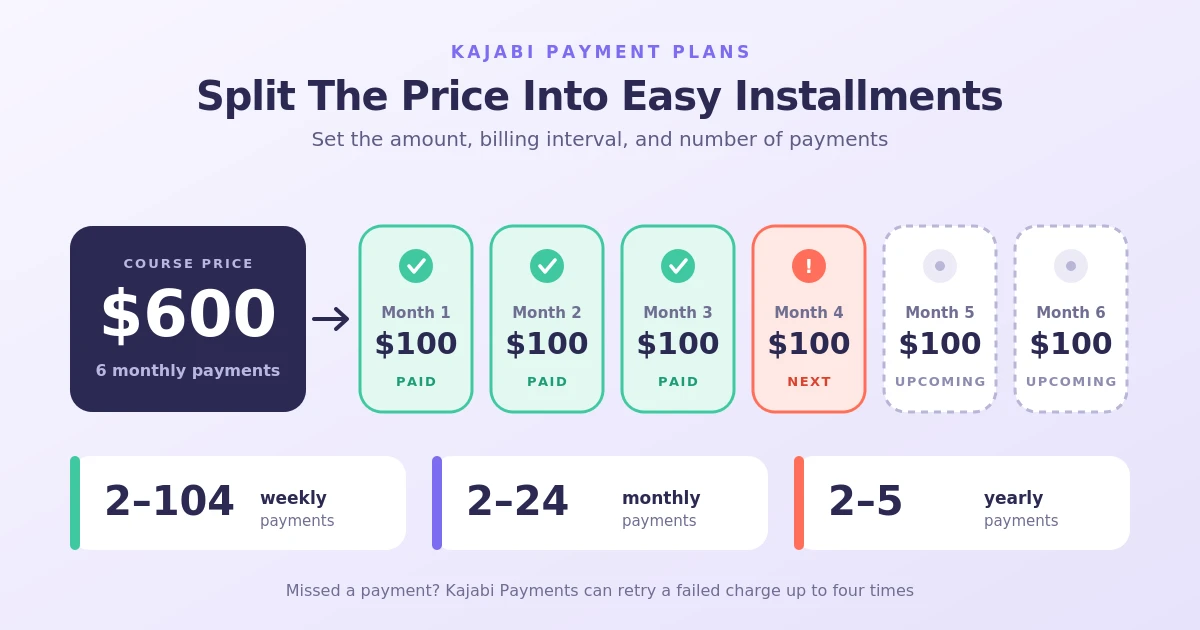
- Weekly: Set up between 2 and 104 weekly payments.
- Monthly: Offer between 2 and 24 monthly payments.
- Yearly: Set up between 2 and 5 annual payments.
To customize these settings, open Sales, then go to the Pricing section in your Kajabi dashboard, select your Offer, and navigate to the Pricing section. Choose Payment Plan under Payment Type, enter your payment amount and number of installments, and select your preferred billing interval. Click Save when you’re finished.
These options allow you to create payment plans that fit different budgets while spreading course payments over a defined period. Keep in mind that the billing interval and number of installments determine how long customers will be charged.
What Happens When a Student Misses a Payment?
When a student’s payment fails, Kajabi marks the transaction as Past Due and may automatically retry the charge, depending on the payment provider. With Kajabi Payments, the system can retry failed payments up to four times and email the student asking them to update their payment details. If all retry attempts fail, the payment plan may be canceled and the student’s course access revoked. You can monitor failed transactions in your dashboard and contact students to help resolve payment issues.
How to Manage and Cancel Kajabi Payment Plans
Kajabi allows you to view, manage, update, pause, and cancel customer payment plans through your dashboard. This helps you keep track of upcoming payments, handle customer requests, and manage failed transactions.
If you want to cancel a payment plan, select Cancel Payments and choose when the cancellation should take effect. You can end payments at the end of the current billing period, select a custom date, or cancel immediately. Confirm your selection to complete the process.
Keep in mind that canceling a payment plan stops future charges and ends the customer’s access to the included products on the selected date. It does not automatically refund payments the customer has already made. If a customer only needs a temporary break, you can pause the payment plan instead of canceling it.
Payment Plans vs. Subscriptions: What’s the Difference?
Although Kajabi offers both payment plans and subscriptions, they serve different purposes depending on how you want to charge your customers.
Payment plans allow students to pay a fixed total price in smaller installments over a set period. You decide the installment amount, billing frequency, and number of payments. Once all installments have been collected, the payment plan ends.
Subscriptions, on the other hand, involve recurring payments that continue weekly, monthly, or yearly until the customer cancels or the subscription is otherwise ended. This option is commonly used for memberships, ongoing coaching programs, and communities that provide continuous access to content.
Tips for Choosing the Right Payment Plan for Your Course
Choosing the right payment plan can make your course more accessible while helping you maintain a steady flow of revenue. Before setting up your pricing, consider your course’s total value, your students’ budgets, and the length of the learning experience.
Here are a few tips to help you decide:
- Consider your course price: For higher-priced courses, offering smaller installments can make the purchase more manageable for students.
- Choose a suitable billing interval: Decide whether weekly, monthly, or yearly payments make the most sense for your course and target audience.
- Set a reasonable number of installments: Avoid spreading payments over a period that is much longer than the course itself. Choose a schedule that balances affordability with predictable revenue.
- Offer multiple payment options: Consider giving students the choice between paying the full amount upfront or splitting the cost into installments.
- Make payment terms clear: Explain the installment amount, billing frequency, total cost, and number of payments before customers reach checkout.
- Consider payment processing: Check which payment providers are available to your business and whether they support the payment options you want to offer..
Ultimately, your payment plan should reflect the value of your course and make purchasing straightforward for students without creating unnecessary complexity for your business.
Final Thoughts
Offering payment plans on Kajabi gives course creators a way to make higher-priced courses more accessible without requiring students to pay the full amount upfront. You can set installment amounts, choose billing intervals, and decide how many payments customers need to make. Whether you offer a one-time payment alongside installments or use a payment plan as your main pricing option, make sure the terms are clear before checkout. A well-structured payment plan can give students more flexibility while helping you manage course sales and recurring payments
Need Help Building or Scaling Your Online Learning Program?
Whether you are launching an academy on Kajabi, modernizing corporate LMS modules, or converting raw expertise into accredited curriculum, our senior instructional designers provide a complimentary architecture evaluation.
Sources & References
Frequently Asked Questions
QCan I change a customer's payment plan after they purchase a course?
Kajabi provides options to manage certain details of an active customer payment plan, depending on the payment provider and transaction status. However, not every setting can necessarily be changed after purchase. If you need to adjust the installment amount or billing schedule, review the customer's payment details and check which changes are available. Always communicate changes to the customer before applying them.
QCan I issue a partial refund for a payment plan?
Yes. Kajabi Payments supports partial refunds for eligible transactions. You can locate the relevant transaction in your dashboard, select the refund option, and enter the amount you want to return. Keep in mind that a refund does not necessarily cancel the customer's payment plan or automatically remove their course access. You may need to manage those separately.
QCan I pause a customer's payment plan temporarily?
Kajabi offers payment management options for eligible transactions, but pausing availability and its effect on course access can depend on the payment provider and plan type. Before pausing a customer's payments, check the available options in their payment details and confirm whether their access will also be suspended.
QCan I offer a discount on a course with a payment plan?
Yes. You can use a coupon with a Kajabi Offer to provide a discount, provided the coupon and pricing configuration are compatible with the payment option. This allows you to offer promotional pricing while still collecting payments in installments. Make sure the checkout page clearly displays the discounted installment amount and total cost.
