
What Is SCORM Cloud? Testing, Pricing & Best Alternatives
Understand what SCORM Cloud is, how it works with online learning platforms, and when your organization may need it for delivering and tracking e-learning content.
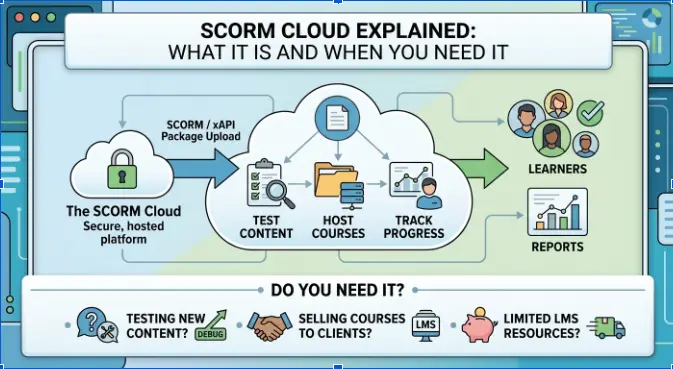
Table of Contents ▼
Quick Answer
SCORM Cloud is a cloud-based platform for hosting, delivering, and tracking SCORM and other e-learning content. This article explains how SCORM Cloud works, its key features, how it integrates with learning management systems, and when organizations may benefit from using it for online training.
Key Takeaways
- SCORM Cloud is a hosted eLearning service from Rustici Software that supports course testing, hosting, and learner tracking
- It helps course developers check whether content reports completion, scores, and other learning data correctly before launch.
- SCORM Cloud supports multiple eLearning standards, including SCORM, xAPI, cmi5, and AICC.
- It is particularly useful for teams distributing courses across different LMS platforms or developing content regularly.
- Organizations with an established LMS can use SCORM Cloud as a complementary testing and content delivery solution rather than a full LMS replacement.
What Is SCORM Cloud and When Do You Need It?
If you build online courses, you have probably heard the term SCORM Cloud. It comes up often in discussions about eLearning, LMS platforms, and course testing. But what does it actually do? And more importantly, do you really need it?
This article breaks down SCORM Cloud in plain language. We will look at how it works, who uses it, and when it makes sense for your training programs. By the end, you will know whether SCORM Cloud LMS fits into your eLearning strategy.
What Is SCORM Cloud
SCORM Cloud is a hosted service built by Rustici Software. It lets you test, host, and track eLearning content without building your own system from scratch. In simple terms, it checks whether your course content works properly before you launch it to real learners.
Many instructional designers use it as a testing ground. For example, before pushing a course into a company LMS, they first upload it to SCORM Cloud. This step confirms that the content tracks progress correctly and reports scores as expected. As a result, teams catch errors early, which saves time later.
SCORM Cloud supports several eLearning standards. These include SCORM 1.2, SCORM 2004, xAPI, cmi5, and AICC. Because of this wide support, it works well as a universal testing hub for almost any type of course package.
How SCORM Cloud Works
The process is fairly straightforward. First, you create your course using an authoring tool. Then, you export it as a SCORM or xAPI package. After that, you upload the file to SCORM Cloud.
Once uploaded, the platform runs the content the same way a real LMS would. It tracks completion, quiz scores, and time spent. In addition, it shows a detailed report so you can see exactly how the course behaves.
This matters because course content sometimes breaks when moved between systems. A quiz might fail to save scores. A video might not mark a lesson as complete. SCORM Cloud helps you catch these issues before learners ever see them.
Key Features of SCORM Cloud
SCORM Cloud offers a mix of testing and hosting tools. Here are the main ones worth knowing.
Course testing. You can dispatch test courses and watch exactly how they perform. This helps developers debug tracking issues quickly.
Content hosting. SCORM Cloud can host your course content directly, so you do not always need a full LMS just to deliver training.
Reporting and analytics. It generates reports on learner progress, scores, and completion status. Therefore, you get visibility without extra tools.
API access. Developers can connect SCORM Cloud to their own systems through its API. This makes it flexible for custom-built platforms.
Dispatch packages. You can package your course for distribution to third-party LMS platforms. This is especially useful if you sell courses to multiple clients.
When Do You Need SCORM Cloud
Not every course creator needs SCORM Cloud. However, certain situations make it especially useful.
You are testing new content. If you just built a course and want to confirm it tracks correctly, SCORM Cloud is the fastest way to check.
You sell courses to other companies. Many businesses in the USA use SCORM Cloud to package and dispatch training content to client LMS systems. This avoids compatibility headaches down the line.
You do not have an LMS yet. Since SCORM Cloud can host content, small teams sometimes use it as a lightweight delivery tool while deciding on a permanent LMS.
You need standards compliance checks. If your organization requires strict SCORM or xAPI compliance, SCORM Cloud gives you a reliable way to confirm everything works as intended.
On the other hand, if you already run full corporate training programs with an established LMS, you may only need SCORM Cloud occasionally for testing. Meanwhile, larger teams with ongoing content development often keep it as a permanent part of their workflow.
If you are working with authoring tools and thinking about how AI fits into course production, our guide on AI versus traditional instructional design walks through how modern teams are adjusting their build process. This pairs well with SCORM testing, since better built content usually means fewer tracking errors later.
SCORM Cloud LMS Explained
People often ask whether a SCORM Cloud is the same as an LMS. The short answer is not exactly, although it can act like one.
A traditional LMS usually includes user management, course catalogs, certificates, and detailed learner dashboards. SCORM Cloud focuses mainly on testing, hosting, and reporting. It does include basic learner tracking, so smaller teams sometimes use it as a simple delivery system.
Still, most companies treat SCORM Cloud LMS features as a supplement rather than a full replacement. For instance, they might host their main training in a dedicated LMS, while using SCORM Cloud specifically for quality assurance testing.
If your training programs rely heavily on automated workflows, it also helps to understand how automation supports learner engagement. Our article on automation workflows covers similar automation concepts that many teams apply when scaling their course delivery.
Who Typically Uses SCORM Cloud
SCORM Cloud serves a wide range of users. Instructional designers use it daily to confirm content works before publishing. Developers use its API to build custom learning platforms. Corporate training teams use it to test compliance courses before rolling them out company-wide.
In addition, eLearning vendors in the USA frequently rely on SCORM Cloud when delivering courses to multiple clients who each use different LMS platforms. Since compatibility issues vary between systems, SCORM Cloud acts as a neutral testing ground that works across almost all of them.
Benefits of Using SCORM Cloud
There are several clear advantages to using this platform.
First, it saves time. Instead of guessing whether content will work inside a client system, you know beforehand. Second, it reduces support tickets. Fewer tracking errors mean fewer confused learners reaching out for help. Third, it supports multiple standards, so you are not locked into one type of content format.
Furthermore, because it is cloud-based, there is no need to install anything locally. You simply log in, upload your content, and start testing right away.
Limitations to Keep in Mind
Even though SCORM Cloud is useful, it does have some limits. It is not designed to replace a complete corporate LMS with deep reporting, gamification, or certification management. Also, larger organizations may find the free tier too limited, which means moving to a paid plan for full features.
Because of this, many teams use SCORM Cloud alongside their main LMS rather than instead of it. This combination usually gives the best results.
Final Thoughts
SCORM Cloud plays an important role in the eLearning world. It helps teams test content, host lightweight courses, and confirm standards compliance before launch. Whether you need it depends on how often you build or distribute training content.
If you regularly create courses or work with multiple LMS platforms, SCORM Cloud is worth adding to your toolkit. However, if you only publish content occasionally, you might just need it for quick testing rather than daily use.
For teams also refining their broader course strategy, our resource on digital product creation offers additional context on building and organizing learning content from start to finish.
Building custom SCORM or xAPI courseware? Explore our custom eLearning development services for fully compliant SCORM 1.2, SCORM 2004 4th Edition, and cmi5 learning modules.
Frequently Asked Questions
How does SCORM Cloud test SCORM packages?
SCORM Cloud functions as a reference LMS test bench. You upload a SCORM 1.2, SCORM 2004, or xAPI zip package, launch it in a sandbox window, and inspect a live console debugger that logs API communication calls (LMSInitialize, LMSSetValue, cmi.core.lesson_status, LMSFinish) to identify tracking bugs before production deployment.
What are the best alternatives to SCORM Cloud?
Leading alternatives include Rustici Engine for self-hosted enterprise SCORM playback, Moodle sandbox environments, and native LMS staging portals with built-in SCORM validation debuggers.
Need Help Building or Scaling Your Online Learning Program?
Whether you are launching an academy on Kajabi, modernizing corporate LMS modules, or converting raw expertise into accredited curriculum, our senior instructional designers provide a complimentary architecture evaluation.
Frequently Asked Questions
QWhat is the best SCORM cloud platform for corporate e-learning delivery?
Cloud by Rustici Software is widely considered the standard choice for corporate eLearning testing and delivery, mainly because it supports multiple standards and integrates easily with most LMS systems.
QSCORM Cloud vs TalentLMS: which is better for tracking training progress?
Cloud is stronger for testing and standards compliance, while TalentLMS offers a fuller LMS experience with course catalogs and learner management. The right choice depends on whether you need testing tools or a complete training platform.
QWhat Is SCORM Cloud and Do I Actually Need It?
SCORM Cloud is a hosted service used to test, host, and track eLearning content. You need it if you build courses regularly, distribute them to multiple systems, or want to confirm compliance before launch.
QWhich SCORM cloud service should I choose for integrating with LMS systems?
SCORM Cloud itself is usually the go-to option, since its API and dispatch features are built specifically for LMS integration across different platforms.
QRecommendations for SCORM cloud solutions that support mobile learning effectively.
SCORM Cloud supports mobile-friendly content as long as the course itself is built responsively. Pairing it with a mobile-optimized authoring tool gives the best results.
QWhat are the best SCORM cloud providers with robust analytics and reporting features?
SCORM Cloud offers solid built-in reporting, and many teams pair it with their main LMS analytics for a more complete picture of learner performance.
