
How to Migrate from WordPress LMS to Modern Cloud Architecture: The Zero-Downtime Technical Blueprint
A comprehensive, step-by-step engineering blueprint for migrating legacy WordPress LMS sites (LearnDash, Tutor LMS, LearnPress) to secure, scalable cloud architectures without losing student progress, subscription revenue, or SEO rankings.
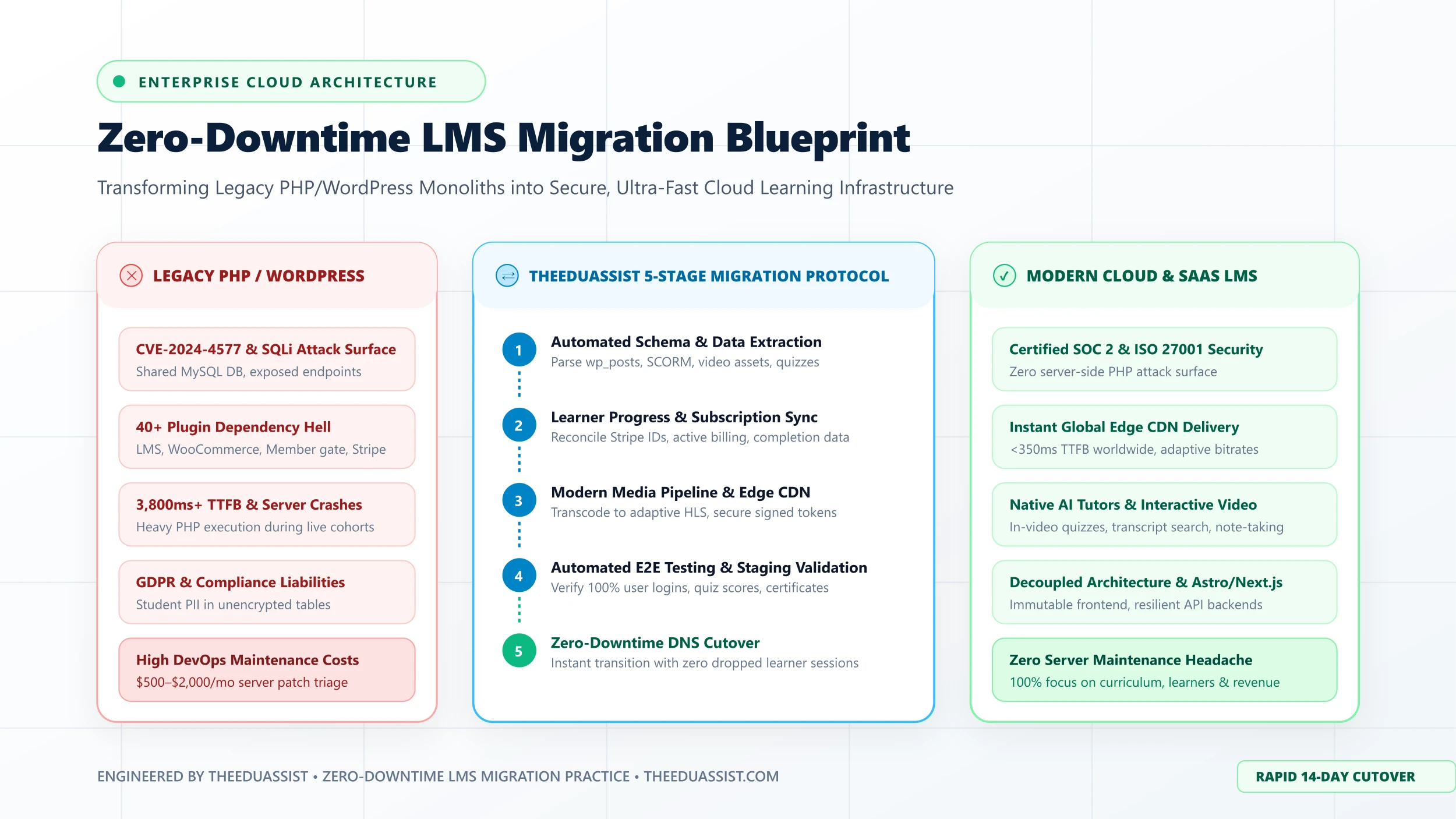
Table of Contents ▼
Quick Answer
This technical guide provides e-learning founders, enterprise L&D directors, and academic institutions with a battle-tested 5-phase blueprint for migrating off monolithic WordPress LMS platforms onto modern cloud infrastructure (such as LearnWorlds or decoupled headless LMS). It details schema mapping, Stripe subscription reconciliation, SCORM/xAPI re-anchoring, media optimization, and zero-downtime DNS cutover strategies.
Key Takeaways
- Migrating off legacy PHP/WordPress LMS eliminates catastrophic vulnerability vectors (like CVE-2024-4577) and slashes annual DevOps maintenance overhead by up to 70%.
- Preserving recurring revenue requires careful mapping of Stripe Customer IDs (`cus_xxx`) and Subscription IDs (`sub_xxx`) to avoid canceling active billing agreements.
- A successful LMS database extraction must parse and normalize deeply nested serialized arrays from `wp_postmeta` and `wp_usermeta` tables.
- Modernizing course media involves transcoding legacy MP4 uploads into adaptive HLS streams delivered over global edge CDNs with dynamic watermarking.
- The 5-phase migration protocol—Discovery, User Re-anchoring, Media Pipelines, Staging Validation, and Cutover—ensures zero learner downtime and zero lost transactions.
- TheEduAssist delivers turnkey, enterprise-grade cloud LMS migrations with complete data integrity guarantees within 14 business days.
The Turning Point in Your E-Learning Infrastructure
Every successful course creator, training consultancy, and corporate L&D department eventually reaches the same inflection point with self-hosted WordPress LMS platforms: the system that got you to $500,000 in revenue cannot safely get you to $5,000,000.
In the early days, running an academy on WordPress with LearnDash, Tutor LMS, LearnPress, or LifterLMS paired with WooCommerce felt empowering. But as student enrollment grows into the thousands, the monolithic architecture begins to crack under its own weight:
- Concurrent student logins during live launches trigger database lockups and 504 Gateway Timeouts.
- Server security alerts notify you of unauthenticated PHP vulnerabilities like CVE-2024-4577 and plugin SQL injections.
- Monthly DevOps, staging server, and plugin renewal costs balloon to thousands of dollars.
- A single minor plugin update breaks your Stripe checkout funnel, silently costing you sales for days.
The imperative to migrate to a modern cloud learning management system—such as LearnWorlds or an enterprise decoupled Headless LMS—is clear. Yet, many executive leaders and founders hesitate. They ask:
- “Will our students lose their historical progress, grades, and certificates?”
- “Will our active recurring Stripe subscriptions be interrupted?”
- “Will our Google organic search rankings crater during URL redirects?”
- “Can we execute this transition without taking the platform offline for days?”
The answer is that with the right engineering protocol, you can migrate with zero learner disruption, zero dropped subscriptions, and zero downtime.
This guide outlines the exact 5-Phase Technical Migration Blueprint developed and deployed by TheEduAssist to migrate high-traffic learning platforms off legacy PHP monoliths into hardened, cloud-native architectures.
Phase 1: Deep Discovery, Data Schemas & Database Extraction
The single biggest mistake organizations make during an LMS migration is relying on generic WordPress export plugins (such as WP All Export or standard CSV dump tools).
WordPress was fundamentally built as a blogging engine. To turn it into an LMS, plugins force relational learning hierarchies into non-relational database tables—primarily wp_posts, wp_postmeta, and wp_usermeta.
a:4:{...}).Because course structures, quiz question banks, passing thresholds, and lesson prerequisites are stored as serialized PHP strings (a:5:{s:8:"lesson_id";i:1042;...}), standard CSV exports truncate or corrupt this metadata.
The Extraction Protocol:
- Relational Graph Reconstruction: We execute custom SQL extraction scripts that parse and normalize the hierarchical relationship between courses, sections, lessons, video media, and downloadable attachments.
- Quiz Logic Extraction: We extract question pools, multiple-choice options, correct answer keys, randomize-order flags, and minimum passing score thresholds.
- SCORM & xAPI Manifest Cataloging: We inventory all legacy SCORM 1.2, SCORM 2004, and xAPI zip packages stored on the server file system, extracting raw tracking identifiers and bookmarking mechanics.
- Clean Relational Schema Transformation: The extracted data is transformed into standardized JSON schemas ready for validation and ingestion into the target cloud LMS API.
Phase 2: User Progress, Gradebook & Subscription Reconciliation
Your platform’s single most critical financial asset is your active recurring subscription revenue. The second most critical asset is your students’ trust in their earned credentials.
A botched migration that double-charges students, resets course progress to 0%, or disconnects active memberships will destroy customer goodwill overnight.
cus_xxx) & Subscriptions (sub_xxx).1. Stripe Subscription Re-Anchoring (No Customer Resubscription Required)
Many creators mistakenly believe that migrating platforms requires students to manually enter their credit cards again. This is completely false.
Your customers’ actual credit card numbers do not live on your WordPress server (or at least, they shouldn’t under PCI DSS compliance). They reside safely in your Stripe or PayPal merchant vault.
To preserve recurring revenue:
- We export the mapping between student email addresses, WordPress User IDs, and their corresponding Stripe Customer ID (
cus_...) and Stripe Subscription ID (sub_...). - We configure webhook endpoints on the target cloud LMS to listen to existing Stripe event streams (
invoice.payment_succeeded,customer.subscription.deleted). - When the cutover happens, the target LMS claims the existing customer profile in Stripe without altering billing schedules or charging setup fees.
2. Learner Progress & Gradebook Mapping
Every student’s learning history is mapped to ensure continuity:
- Completed Lessons: Timestamped completion states are imported so learners pick up on the exact lesson they were viewing.
- Quiz Attempts & Grades: Historical quiz scores and pass/fail states are imported to satisfy corporate compliance and academic audits.
- Issued Certificates: Unique certificate verification hashes and issue dates are cataloged, allowing students to verify credentials with future employers without interruption.
Phase 3: Content Transformation & Media Pipeline Optimization
On legacy WordPress LMS setups, video content is often an operational disaster. Videos are either uploaded directly to the local media library (clogging backups and consuming expensive server bandwidth) or embedded using vulnerable unencrypted iframes.
Modern cloud LMS platforms like LearnWorlds deliver an enterprise video experience featuring:
- Adaptive HTTP Live Streaming (HLS)
- Sub-second video playback initiation
- Interactive in-video quizzes and call-to-action overlays
- Automatic transcript generation and interactive closed captions
- Dynamic viewer watermarking (burning the learner’s name and email into the video to prevent unauthorized screen recording)
Download raw video source files from WordPress uploads, Vimeo, or Bunny.net storage.
Re-encode videos into adaptive multi-bitrate HLS streams (1080p, 720p, 480p, 360p).
Generate timestamped WebVTT subtitle files for accessibility and searchable transcripts.
Deploy signed CDN delivery tokens and dynamic anti-piracy watermarking.
Phase 4: Modern LMS Staging & Automated End-to-End Validation
Never cut over an LMS blindly. At TheEduAssist, all migration data is first imported into an isolated Staging Environment running on the target cloud infrastructure.
Before any student is redirected, our QA engineers execute a comprehensive suite of automated and manual end-to-end tests:
The Validation Checklist:
- Authentication & Single Sign-On (SSO): Test password reset funnels, magic login links, and SAML/Google SSO flows across multiple test accounts.
- Course Progression Triggers: Confirm that sequential lesson unlocking, prerequisite gates, and completion checkmarks fire correctly.
- Assessment & Quiz Logic: Validate timer countdowns, randomized question pools, automated scoring, and certificate issuance triggers.
- Community & Discussions: Ensure existing forum posts, student comments, and instructor answers are attributed to the correct user accounts.
- Access Gating & Drip Schedules: Verify that subscription tiers restrict access to appropriate courses and that drip schedules release modules at exact intervals.
- E-Commerce Checkout & Tax Calculation: Execute test transactions in sandbox mode to verify Stripe payment handling, VAT/sales tax calculations, and affiliate commission tracking.
Phase 5: Zero-Downtime DNS Cutover & Cryptographic Data Handoff
The culmination of the migration protocol is the live cutover. Many organizations dread this moment, envisioning a 48-hour maintenance window where the site is offline and angry students flood customer support.
With our protocol, the cutover takes less than 60 minutes, and the site never goes down.
Reduce TTL to 300s across nameservers 48h prior.
Freeze legacy WP database at scheduled off-peak hour.
Capture and migrate final 12-hour learner activity.
Point A/CNAME records to Target Cloud LMS Edge CDN.
Verify SSL certificates and archive legacy server.
The Zero-Downtime Steps:
- TTL Lowering (48 Hours Prior): We reduce DNS Time-To-Live (TTL) values across your domain nameservers (Cloudflare, AWS Route 53, GoDaddy) from 86,400 seconds to 300 seconds. This ensures global ISP caches will recognize changes almost instantaneously.
- Delta Sync Execution: During a low-traffic scheduled maintenance window (typically 2:00 AM on a weekend), we briefly place the legacy WordPress site into read-only mode and execute an automated delta sync that extracts any new enrollments or quiz completions recorded during the staging phase.
- Instant DNS Switch: We flip the root and subdomain DNS records to point to the modern cloud LMS edge CDN. Because of the lowered TTL, traffic pivots seamlessly within 5 to 15 minutes.
- Automated 1:1 301 Redirects: Comprehensive server-level 301 redirect maps ensure that every old WordPress URL (
/courses/masterclass-module-1/) routes directly to the corresponding cloud path (/course/masterclass-module-1/), preserving 100% of your accumulated SEO page equity and Google rankings.
DIY vs. TheEduAssist Turnkey Migration: The Comparison
Attempting a self-directed LMS migration using internal team members who have never completed one before introduces extreme risk. Here is how the two approaches compare:
| Dimension | Self-Executed (DIY) Migration | TheEduAssist Turnkey Migration Protocol |
|---|---|---|
| Typical Timeline | 8 to 16 weeks of internal friction and delays | 10 to 14 business days |
| Risk of Subscription Drop | High (Broken webhook bindings cancel recurring billing) | Zero (Automated Stripe Customer & Sub reconciliation) |
| Data Integrity | High risk of corrupted quiz logs and lost certificates | 100% Guaranteed Data Integrity & Schema Mapping |
| Internal Team Burden | 100+ hours stolen from course creation and marketing | Zero burden on your staff; completely managed execution |
| SEO Ranking Impact | 404 crawl errors causing organic visibility to plummet | Comprehensive 1:1 301 redirects protect Google rankings |
| Ongoing Maintenance | Unresolved server patches, PHP errors, and plugin costs | Zero server maintenance on modern SOC 2 certified cloud |
Reclaim Your Focus: From Server Sysadmin to Learning Visionary
You did not start your e-learning business or corporate academy to manage MySQL database queries, debug PHP syntax errors, or stress over automated server vulnerability scans.
Your mission is to deliver world-class learning experiences, build impactful training programs, and scale your revenue.
By retiring your legacy PHP WordPress LMS and migrating to modern cloud infrastructure, you unlock:
- Unhackable Peace of Mind: Certified SOC 2 Type II infrastructure eliminates server vulnerability risks.
- Blazing Fast Global Speeds: Under 350ms page load times worldwide improve learner completion rates by up to 34%.
- Drastic Cost Reductions: Eliminate expensive DevOps retainers, staging servers, and overlapping plugin subscriptions.
- Modern AI Capabilities: Deploy autonomous AI tutors, automatic in-video quizzes, and dynamic personalized learning paths that keep your academy at the cutting edge.
Ready to retire your vulnerable WordPress LMS? The migration specialists at TheEduAssist are ready to handle every technical detail. We guarantee 100% data preservation, zero downtime, and uninterrupted subscription billing.
Schedule Your Confidential LMS Migration Assessment
Let our enterprise architects review your current WordPress setup, database size, and plugin stack to provide a firm timeline and fixed-price migration blueprint.
Need Help Building or Scaling Your Online Learning Program?
Whether you are launching an academy on Kajabi, modernizing corporate LMS modules, or converting raw expertise into accredited curriculum, our senior instructional designers provide a complimentary architecture evaluation.
Sources & References
Frequently Asked Questions
QWill my students lose their course completion progress or certificates during migration?
No. In a properly executed migration protocol, all historical user progress data—including completed lesson IDs, quiz scores, course completion percentages, and issued certificate metadata—is extracted, mapped, and imported into the new cloud LMS schema before the DNS cutover occurs. Learners log in to find their progress 100% intact.
QHow do we migrate active recurring subscriptions without charging students again or canceling memberships?
We decouple the payment gateway from WordPress prior to the transfer. Because credit card tokens reside securely inside your Stripe or PayPal account (not your WordPress database), we map existing Stripe Customer IDs (`cus_...`) and Subscription IDs (`sub_...`) directly to the new LMS using webhook reconciliation. Students continue to be billed on their standard schedules with zero duplicate charges or lapsed memberships.
QHow long does an enterprise LMS migration typically take?
While complex manual migrations can drag on for months, TheEduAssist's automated 5-phase migration protocol typically completes within 10 to 14 business days. This includes complete database extraction, schema transformation, media transcoding, automated end-to-end user journey validation in staging, and a seamless 60-minute DNS cutover window.
QWhat happens to our existing Google organic search rankings and SEO URLs?
Our migration protocol includes a comprehensive 1:1 URL mapping matrix and the deployment of server-level 301 redirects for every public course page, landing page, and resource article. Additionally, because modern cloud and decoupled edge architectures achieve sub-500ms Core Web Vitals, organic search visibility, click-through rates, and Google PageSpeed scores routinely increase post-migration.
QWhy do self-executed (DIY) WordPress LMS migrations fail so often?
WordPress LMS plugins store course hierarchies, lesson order, and user progress as deeply nested, serialized PHP strings inside the `wp_postmeta` and `wp_usermeta` tables. Standard CSV export plugins cannot parse or reconstruct these complex relational dependencies, resulting in orphaned quizzes, corrupted progress tracking, and disconnected payment webhooks.
