
How Do Real Course Creators Use Kajabi Day-to-Day?
Discover how course creators use Kajabi daily to update lessons, support students, market courses, automate tasks, manage payments, and track business performance.
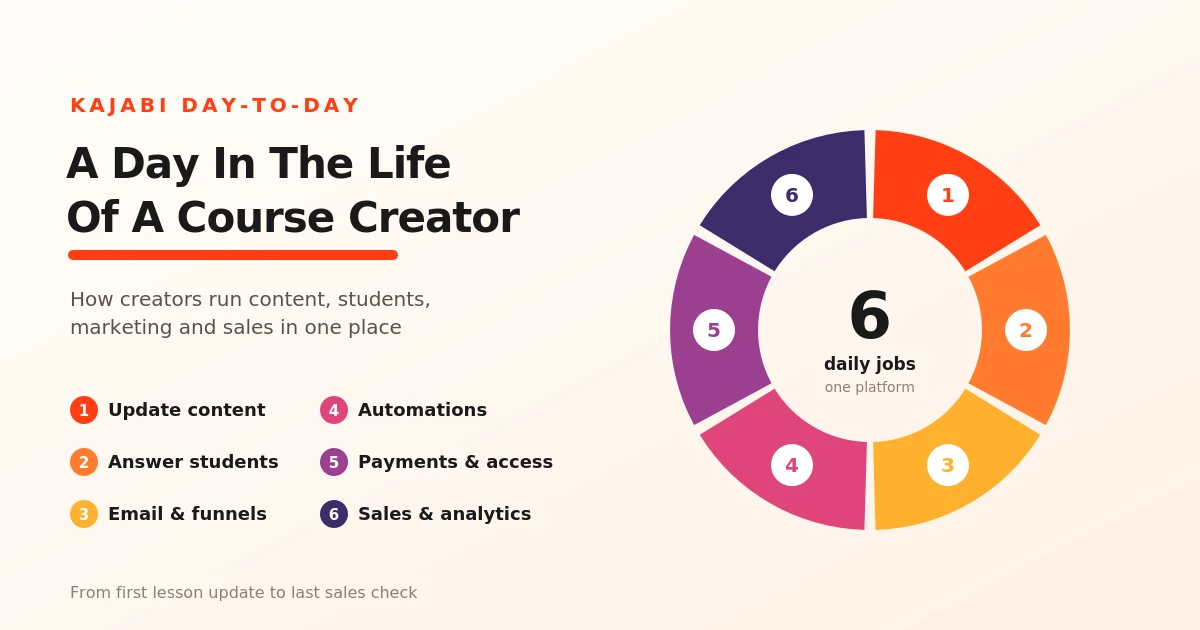
Table of Contents ▼
Quick Answer
This guide explores how online course creators use Kajabi to manage their daily responsibilities. It covers course content updates, student communication, email marketing, sales funnels, automation, payment management, course access, analytics, and long-term business growth.
Key Takeaways
- Creators can update lessons, organize modules, and improve learning materials based on student feedback.
- Kajabi helps creators respond to lesson comments and manage customer information.
- Email campaigns, sales funnels, automations, payment management, and course access tools help reduce repetitive work.
- Sales and engagement analytics help creators evaluate performance, improve course content, and plan for long-term growth.
Course creators have several responsibilities to manage throughout the day, from updating lessons and answering students’ questions to marketing their products and tracking sales. Kajabi brings many of these tasks together in one platform, helping creators organize their work and manage their online businesses more efficiently. Here’s how they use Kajabi in their day-to-day routines:
Creating and Updating Course Content
For course creators, creating and updating lessons is an important part of their daily routine. Kajabi allows them to organize course materials into modules and other resources, and make changes whenever needed.
For example, a creator might upload a new video lesson, update an outdated resource, or reorganize lessons based on student feedback. These updates help keep course content relevant and make it easier for students to follow their learning journey.
Managing Students and Answering Questions
Course creators also need to stay connected with their students and help them when they have questions. Kajabi allows creators to enable comments on course lessons, giving students a place to ask questions and share their thoughts. Creators can review these comments and respond to help students understand the material.
They can also manage student information through Kajabi’s Contacts tab, making it easier to keep track of customers and their accounts. By responding to questions and checking in on student feedback, creators can provide a better learning experience and identify areas where their course content may need improvement.
Marketing Courses Through Emails and Sales Funnels
Course creators use Kajabi’s email marketing tools and sales funnels to promote their courses and reach potential students. They can send email campaigns to announce new lessons, share helpful resources, or promote an upcoming course launch.
Kajabi also lets creators build sales funnels that guide potential customers from discovering a course to signing up or making a purchase. For example, a creator might offer a free guide in exchange for an email address, then send a series of emails introducing their course and explaining its benefits. These tools help creators stay connected with their audience and manage marketing tasks more efficiently.
Automating Repetitive Tasks
As their course business grows, creators may find themselves spending too much time of routine tasks. Kajabi’s automation tools can handle many of these tasks automatically, saving creators time and reducing manual work.
For example, a creator can set up an automation to send an email when a student completes a lesson or grant course access after a purchase. They can also use tags to organize contacts based on their actions. This allows creators to spend less time on repetitive tasks and more time improving their courses and supporting their students.
Managing Payments and Course Access
Managing payments and student access is another part of running an online course business. Kajabi allows creators to set prices, offer payment plans or subscriptions, and manage transactions through their dashboard.
When a customer purchases a course, Kajabi can provide access to the product linked to their offer. Creators can also review payments, handle refunds, and manage subscriptions when needed. These tools help keep sales organized and ensure customers can access the content they’ve purchased.
Tracking Sales and Student Engagement
Course creators can use Kajabi’s analytics tools to monitor sales and understand how students interact with their content. The dashboard provides insights into revenue, purchases, subscriptions, and customer activity, helping creators see how their business is performing.
They can also review video engagement data, such as play rates and where viewers stop watching. For example, if students frequently stop watching a lesson halfway through, a creator can review the content and consider making it more engaging. By regularly checking these insights, creators can identify areas for improvement and make more informed decisions about their courses and marketing strategies.
Balancing Daily Tasks With Long-Term Business Growth
Running a course business involves more than creating lessons and managing students. Creators also need to make time for improving their products, planning future launches, and finding new ways to reach their audience.
Kajabi brings tools for course delivery, marketing, payments, and analytics into one platform, helping creators manage these responsibilities in one place. By reviewing business performance and setting aside time for future planning, creators can handle daily tasks while continuing to work toward their long-term goals.
Final Thoughts
Running an online course business involves more than creating and selling courses. From managing students and marketing products to tracking sales and updating lessons, creators have several tasks to handle each day. Kajabi brings many of these responsibilities together in one platform, helping creators stay organized and manage their work more efficiently. By using its tools effectively, course creators can spend less time on routine tasks and more time improving their content and growing their businesses.
Need Help Building or Scaling Your Online Learning Program?
Whether you are launching an academy on Kajabi, modernizing corporate LMS modules, or converting raw expertise into accredited curriculum, our senior instructional designers provide a complimentary architecture evaluation.
Sources & References
Frequently Asked Questions
QCan course creators manage Kajabi from their phones?
Yes. Kajabi's Creator mobile app lets creators check analytics, review transactions, manage contacts, and add videos to course lessons while on the go.
Q Do course creators need coding skills to use Kajabi?
No. Creators can build courses, organize lessons, and create website pages using Kajabi's built-in tools. More advanced customization or integrations may require additional technical knowledge.
QCan creators manage multiple courses through one Kajabi account?
Yes. Creators can manage multiple courses from their Kajabi dashboard, although the number of products they can create depends on their subscription plan.
QCan course creators work with a team on Kajabi?
Yes. Kajabi supports additional admin users, allowing creators to give team members access to help manage their business. The number of admin users available depends on the subscription plan.
