
4 Stages to Implement xAPI in E-Learning for Course Revolution
A practical guide to implementing xAPI in e-learning, covering tracking requirements, LRS selection, system integration, testing, analytics, and common implementation mistakes.
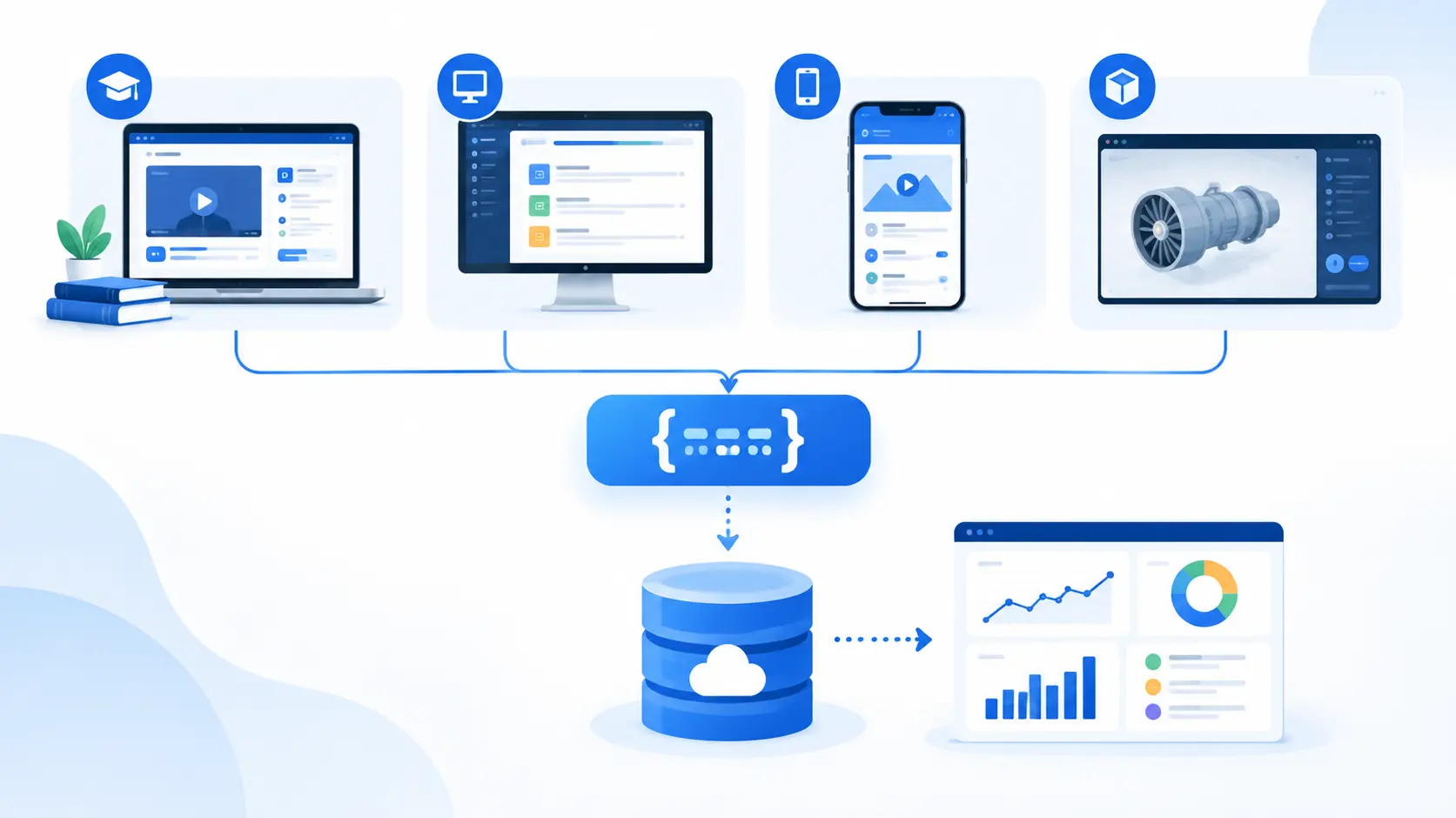
Table of Contents ▼
Quick Answer
This guide explains the four key stages of implementing xAPI in e-learning. It covers how to define learning activities to track, design xAPI data, choose a Learning Record Store (LRS), connect learning systems, test xAPI statements, and use learning data for meaningful analysis. It also explains the differences between xAPI and SCORM and provides a practical implementation checklist for e-learning teams.
Key Takeaways
- xAPI can capture learning experiences beyond traditional LMS reporting.
- A successful implementation starts with clear learning or business objectives.
- An LRS stores xAPI learning records from connected systems.
- Consistent xAPI statements improve data quality and reporting.
- Testing should cover complete learner journeys and system integrations.
- xAPI data becomes valuable when it supports meaningful learning questions.
- SCORM and xAPI serve different learning technology requirements.
xAPI can help e-learning teams capture learning experiences that traditional LMS reporting may not fully describe. Instead of limiting tracking to course completion, assessment scores, and time spent inside an LMS, xAPI can record a wider range of learning activities and send those records to a Learning Record Store (LRS).
For organizations building or improving their learning technology stack, understanding how xAPI fits alongside the LMS, course content, assessments, applications, and reporting systems is important. TheEduAssist covers connected e-learning technologies and learning platforms to help organizations understand how different systems can work together.
The key to a successful xAPI implementation is not simply collecting more data. Teams first need to identify what learning activity matters, define how that activity should be recorded, connect learning systems to an LRS, validate the data, and then use the resulting information for meaningful analysis.
This guide explains the four major stages of implementing xAPI in e-learning and provides a practical framework for planning an implementation.
What Is xAPI in E-Learning?
xAPI, or Experience API, is a technical specification for describing and communicating learning experiences between technologies.
A basic xAPI statement describes an experience using an actor, verb, and object.
For example:
Maria completed Workplace Safety Training.
In this example:
- Actor: Maria
- Verb: completed
- Object: Workplace Safety Training
An xAPI statement can also contain additional information such as the result, context, timestamp, duration, authority, and other properties.
This structure allows organizations to record different types of learning experiences instead of relying only on information generated inside an LMS.
For example, an organization could potentially record activities such as:
- Completing an online course
- Watching a training video
- Completing a simulation
- Participating in an assessment
- Practicing a workplace task
- Using a mobile learning application
- Completing an interactive activity
- Attending a learning event
- Performing an activity in another connected system
Unlike traditional LMS-only tracking, xAPI can support learning experiences that occur across different applications and environments.
For readers comparing learning standards, TheEduAssist also provides resources on xAPI and SCORM, including a detailed xAPI vs. SCORM comparison that explains how the two approaches differ.
Why Is xAPI Important for Modern E-Learning?
Traditional LMS reporting can be useful for understanding basic course activity. However, organizations sometimes need information about learning experiences that happen outside the LMS.
For example, imagine an employee completes an online course, practices a skill in a simulation, watches a related video, and later completes a workplace activity.
If all of these experiences happen in different systems, a conventional LMS report may not provide a complete picture.
xAPI can help connect these learning records through a common data structure.
This can support organizations that want to understand:
- Which learning activities learners complete
- How learners interact with different learning resources
- Where learners experience difficulty
- How learning activities are distributed across systems
- Which activities are associated with particular outcomes
- How learners progress through different learning experiences
However, collecting more information does not automatically create better learning. The value comes from deciding what information is useful and creating a clear process for analyzing it.
The 4 Stages of xAPI Implementation
A successful implementation can be organized into four practical stages:
- Define what you need to track
- Design your xAPI data and choose an LRS
- Connect learning experiences and test xAPI statements
- Analyze xAPI data and improve learning
Let’s examine each stage in detail.
Stage 1: Define What You Need to Track
Before selecting an LRS or changing your LMS configuration, determine what you actually want to measure.
This is one of the most important steps because technical implementation should support a clear learning or business objective.
Start by asking:
- What learning problem are we trying to understand?
- Which learner activities are currently difficult to measure?
- What information is missing from existing LMS reports?
- Which learning experiences happen outside the LMS?
- What decisions will be made using the data?
- Who will use the reports?
- How frequently will the information be reviewed?
For example, an organization may discover that its LMS shows course completion but does not explain why employees perform poorly on a particular practical task.
Instead of tracking every possible learner action, the team could identify the activities directly related to that problem.
Create a Tracking Plan
A tracking plan can define:
| Learning Activity | Data to Capture | Purpose |
|---|---|---|
| Course completion | Learner, course, completion status | Monitor progress |
| Assessment | Score, result, assessment ID | Measure knowledge |
| Simulation | Scenario, attempt, result | Evaluate practical skills |
| Video | Video, learner, completion | Understand content engagement |
| Practice activity | Activity, result, timestamp | Monitor skill development |
This approach helps prevent unnecessary data collection.
The objective should be to answer meaningful questions rather than collect information simply because the technology allows it.
Define Your xAPI Statements
xAPI statements generally use an actor, verb, and object.
For example:
Actor: Employee A
Verb: completed
Object: Cybersecurity Awareness Course
Another statement might describe an assessment:
Actor: Employee A
Verb: passed
Object: Cybersecurity Assessment
More complex statements can include additional information such as scores, timestamps, context, and duration.
Before implementation, document the verbs, activities, identifiers, and data elements your systems will use. Consistency becomes increasingly important when multiple applications contribute information.
Stage 2: Design Your xAPI Data and Choose an LRS
Once you know what you want to measure, determine how that information should be represented and where it should be stored.
What Is a Learning Record Store?
A Learning Record Store (LRS) is a system designed to receive and store xAPI learning records.
A simplified architecture looks like this:
Learner → Learning Experience → xAPI Statement → LRS → Reporting/Analytics
The LRS can act as a central location for records generated by different learning technologies.
When selecting an LRS, consider:
- xAPI version support
- API capabilities
- Authentication and security
- Integration options
- Data storage requirements
- Reporting capabilities
- Export functionality
- Scalability
- LMS compatibility
- Application compatibility
- Vendor support
- Data governance requirements
The right choice depends on the organization’s technical environment and use case.
Consider the Existing LMS
xAPI does not necessarily mean replacing an LMS.
An organization may continue using its LMS for course delivery, enrollment, assessments, and learner administration while using xAPI and an LRS to capture additional learning experiences.
This means teams should consider how the LRS will communicate with existing systems.
TheEduAssist’s LMS implementation guide can also be useful when planning platform configuration, integration, testing, and implementation requirements.
Plan Your Data Architecture
Before implementation, document how information will move between systems.
For example:
LMS → xAPI-enabled activity → LRS → Analytics Platform
Or:
Mobile App → xAPI → LRS → Reporting Dashboard
The architecture should clearly identify:
- Data sources
- xAPI endpoints
- Authentication
- LRS
- Reporting tools
- Data users
- Integration points
- Security controls
A clear architecture can make testing and troubleshooting easier later.
Stage 3: Connect Learning Experiences and Test xAPI Statements
After defining your tracking model and selecting an LRS, connect the systems that generate learning activity data.
These systems may include:
- LMS platforms
- E-learning authoring tools
- Mobile applications
- Simulations
- Video platforms
- Assessment tools
- Virtual learning environments
- Custom web applications
- Workplace performance systems
Each system can potentially contribute relevant learning data.
Test Before Going Live
Testing is particularly important when several learning technologies are connected.
A course may launch successfully while still generating incomplete or incorrectly structured records.
During testing, check whether:
- Statements are generated correctly
- Actor information is accurate
- Verbs are used consistently
- Activity identifiers are correct
- Results are recorded correctly
- Timestamps are present where required
- Data reaches the LRS
- Authentication works correctly
- Duplicate records are handled appropriately
- Errors are logged
- Reports display the expected information
Create test scenarios before launching the system to real learners.
For example, test a learner who:
- Starts a course
- Completes a module
- Takes an assessment
- Fails the assessment
- Repeats the assessment
- Passes the assessment
- Completes a simulation
Then verify that the expected statements appear in the LRS.
Validate Data Quality
Data quality is just as important as data collection.
If different systems use inconsistent activity names or verbs, reporting can become difficult.
For example, one system might use:
completed
while another uses:
finish
If these represent the same learning action, analytics teams may need additional data mapping or normalization.
A consistent data model makes the information easier to analyze.
Stage 4: Analyze xAPI Data and Improve Learning
The final stage is turning collected information into useful learning insights.
An LRS can store learning records, but storing data alone does not improve a course.
Your reporting and analytics process should answer meaningful questions.
For example:
- Where are learners struggling?
- Which activities are completed most often?
- Where do learners abandon a learning experience?
- Which assessment questions produce the most incorrect responses?
- Which simulations require repeated attempts?
- How does learner activity differ between learning environments?
- Are learners completing required practice activities?
Suppose employees repeatedly struggle with the same simulation scenario.
The learning team can investigate the instructions, feedback, assessment design, interface, or prerequisite knowledge associated with that activity.
The goal is to use evidence to identify potential improvements.
This data-informed approach is also relevant to broader learning analytics and LMS technology topics covered by TheEduAssist, where technology should be evaluated according to actual learning and training requirements.
xAPI Analytics Requires Context
A common mistake is assuming that more data automatically produces better decisions.
An xAPI dataset may contain thousands or millions of records. Without clear questions, the information can become difficult to interpret.
Analytics should therefore be connected to specific objectives.
For example:
Question: Why are learners failing the final assessment?
Useful data: Assessment attempts, scores, module completion, relevant practice activities, and potentially simulation performance.
Possible action: Review the learning materials associated with consistently missed concepts.
This is more useful than simply reporting the total number of xAPI statements collected.
xAPI vs. SCORM: What’s the Difference?
SCORM and xAPI are both used in e-learning, but they address different tracking and interoperability needs.
| Feature | SCORM | xAPI |
|---|---|---|
| Course completion | Yes | Yes |
| Assessment scores | Yes | Yes |
| LMS-based tracking | Strong | Supported |
| Experiences outside an LMS | More limited | Designed for broader experiences |
| Mobile applications | More constrained | Can support application-based experiences |
| Simulations | Possible | Flexible |
| Learning Record Store | Not a core requirement | Central to xAPI architecture |
| Custom learning events | More constrained | More flexible |
| Cross-system learning data | More limited | Designed for broader interoperability |
Neither approach should automatically be treated as the right solution for every organization.
SCORM can remain useful when an organization primarily needs traditional LMS-based course delivery and tracking.
xAPI becomes particularly relevant when the organization needs to capture learning experiences across multiple systems or environments.
For a more detailed comparison, readers can explore TheEduAssist’s guide to xAPI vs. SCORM.
Common xAPI Implementation Mistakes
Implementing xAPI without a clear strategy can create technical and analytical problems.
1. Tracking Everything
Collecting every possible learner action can create large amounts of data without providing useful insight.
Start with specific questions and track the activities needed to answer them.
2. Starting With Technology Instead of Objectives
Choosing an LRS before defining the learning problem can result in an architecture that does not support the organization’s actual requirements.
Define the use cases first.
3. Inconsistent xAPI Statements
Different systems may use inconsistent identifiers, verbs, or activity names.
Create clear data conventions before integrating multiple systems.
4. Ignoring Data Governance
Learning records can contain information associated with individual learners.
Organizations should therefore consider privacy, access control, retention, security, and applicable data protection requirements when designing their architecture.
5. Skipping Testing
A technically connected system can still generate incorrect records.
Test representative learner journeys before launching the implementation.
6. Collecting Data Without an Analysis Plan
If nobody knows how the information will be used, the organization may spend resources collecting records that do not support meaningful decisions.
Define reporting requirements before finalizing the tracking architecture.
Practical xAPI Implementation Checklist
Use this checklist before launching an xAPI implementation.
Planning
- Define the learning or business objective
- Identify the activities that need tracking
- Identify existing reporting gaps
- Define who will use the data
Data Design
- Define actors
- Define verbs
- Define activities
- Define identifiers
- Define results and context where necessary
- Document data conventions
Technology
- Select an appropriate LRS
- Check xAPI compatibility
- Review LMS integration
- Review application integrations
- Plan authentication and security
- Document the system architecture
Testing
- Test xAPI statements
- Verify data reaches the LRS
- Test learner journeys
- Check data consistency
- Test error handling
- Validate reports
Analytics
- Define key learning questions
- Build relevant reports
- Identify useful patterns
- Review findings with learning teams
- Use evidence to improve learning experiences
Frequently Asked Questions About xAPI in E-Learning
What does xAPI stand for?
xAPI stands for Experience API. It is a technical specification used to describe and communicate learning experiences between systems.
What is an LRS in xAPI?
An LRS, or Learning Record Store, is a system designed to receive and store xAPI records. It can serve as a central repository for learning experiences generated by different applications.
Is xAPI better than SCORM?
xAPI and SCORM serve different purposes. SCORM is widely associated with LMS-based e-learning content, while xAPI is designed to support a broader range of learning experiences and systems. The appropriate approach depends on the organization’s requirements.
Can xAPI work with an LMS?
Yes. xAPI can be used alongside an LMS. An organization may use an LMS for course delivery and administration while using xAPI and an LRS to capture additional learning experiences.
What can xAPI track?
xAPI can describe many types of learning experiences, including course activities, assessments, simulations, mobile learning, videos, and activities generated by connected applications.
Why is testing important in an xAPI implementation?
Testing helps verify that systems generate accurate statements and that the records reach the LRS correctly. It can also identify inconsistencies in identifiers, verbs, results, and other data elements before the system is used at scale.
Conclusion
Implementing xAPI in e-learning is not simply a matter of connecting a course to an LRS. A useful implementation starts with a clear learning or business question and then builds the technical architecture around that requirement.
The four stages provide a practical framework:
- Define what you need to track.
- Design your xAPI data and select an LRS.
- Connect learning experiences and validate the data.
- Analyze the records and use the findings to improve learning.
For organizations planning a modern learning ecosystem, TheEduAssist provides resources covering LMS technology, e-learning standards, implementation, and related learning solutions. The important step is to choose technology based on actual learning requirements rather than collecting data without a clear purpose.
Sources & References
Frequently Asked Questions
QWhat does xAPI stand for?
xAPI stands for **Experience API**. It is a technical specification used to describe and communicate learning experiences between systems.
QWhat is an LRS in xAPI?
An LRS, or Learning Record Store, is a system designed to receive and store xAPI records. It can serve as a central repository for learning experiences generated by different applications.
QIs xAPI better than SCORM?
xAPI and SCORM serve different purposes. SCORM is widely associated with LMS-based e-learning content, while xAPI is designed to support a broader range of learning experiences and systems. The appropriate approach depends on the organization's requirements.
QCan xAPI work with an LMS?
Yes. xAPI can be used alongside an LMS. An organization may use an LMS for course delivery and administration while using xAPI and an LRS to capture additional learning experiences.
Q What can xAPI track?
xAPI can describe many types of learning experiences, including course activities, assessments, simulations, mobile learning, videos, and activities generated by connected applications.
Q Why is testing important in an xAPI implementation?
Testing helps verify that systems generate accurate statements and that the records reach the LRS correctly. It can also identify inconsistencies in identifiers, verbs, results, and other data elements before the system is used at scale.