
LearnWorlds SCORM Support: Can You Import Courses?
LearnWorlds supports compatible SCORM packages, letting you import existing e-learning courses without rebuilding them. Learn how SCORM uploads, tracking, graded assessments, and plan limits work.
Table of Contents ▼
Quick Answer
LearnWorlds supports SCORM 1.2 and SCORM 2004 packages, allowing you to import existing e-learning content into your courses. This guide explains how to upload SCORM files, track completion and time, use graded SCORM, manage updates, and troubleshoot common upload issues.
Key Takeaways
- LearnWorlds supports compatible SCORM 1.2 and SCORM 2004 packages.
- You can import existing SCORM courses without rebuilding them.
- SCORM supports completion, time tracking, and graded results.
- Check file size, plan limits, and compatibility before uploading.
If you already have SCORM courses, you do not need to rebuild them from scratch to use them in LearnWorlds. LearnWorlds supports compatible SCORM packages, allowing you to bring existing e-learning content into your courses.
You can upload SCORM packages, track learner completion and time, and collect assessment results with graded SCORM. However, compatibility, file size, plan limits, and tracking requirements can affect how your content works after import.
This guide explains how LearnWorlds SCORM support works, which formats it supports, how to upload a package, and what to check before importing your courses.
What Is SCORM?
SCORM stands for Shareable Content Object Reference Model. It is a set of technical standards that helps e-learning content work with compatible learning management systems.
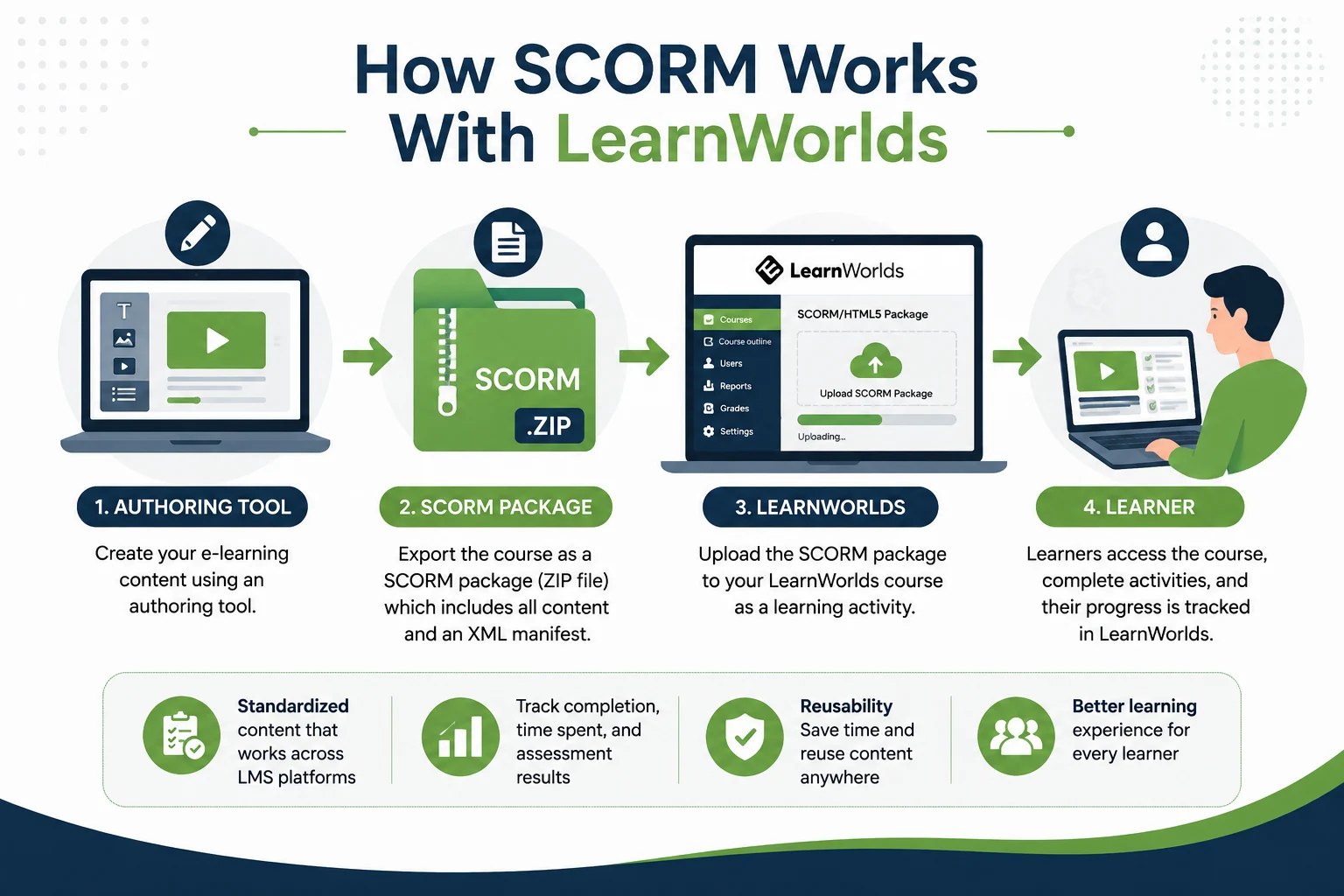
A SCORM course is usually packaged as a ZIP file. It contains the files needed to run the course and an XML manifest that describes the course structure. This format is useful when content is created in an authoring tool and then delivered through an LMS.
For instance, a company can develop an employee safety course by employing an e-learning authoring tool. The company can export this course as a SCORM package and upload it to a platform that supports SCORM, rather than rebuild it within a new LMS. That is where LearnWorlds SCORM support becomes useful.
Does LearnWorlds Support SCORM?
Yes. LearnWorlds supports SCORM packages as learning activities. According to the LearnWorlds Help Center’s SCORM upload guide, supported formats include:
- SCORM 1.2
- SCORM 2004 3rd Edition
- SCORM 2004 4th Edition
- Captivate CAM 1.3 ZIP packages
- HTML5 packages
LearnWorlds also supports SCORM completion rules and student time tracking. These features are available for SCORM packages, but not for HTML5 files. This means you can bring compatible interactive courses into LearnWorlds without rebuilding every lesson or activity.
However, you should test your SCORM package before publishing it. A course that worked correctly in another LMS may behave differently after being imported into LearnWorlds.
Can You Import SCORM Courses Into LearnWorlds?
Yes, you can import SCORM courses into LearnWorlds through a dedicated SCORM/HTML5 learning activity. The process is straightforward. Open the course where you want to add the content. From the Course Outline, select Add Activity under the relevant section.
Next, select SCORM/HTML5 Package under Multimedia. Give the activity a title and save it. You can then open the activity settings and upload your SCORM package.
How to upload a SCORM package
- Open your LearnWorlds course.
- Go to Contents → Course Outline.
- Click Add Activity.
- Select SCORM/HTML5 Package.
- Enter the activity title.
- Save the activity.
- Open its settings.
- Upload your SCORM ZIP file.
- Configure completion or time-tracking settings.
- Preview the course before publishing.
LearnWorlds’ current quick-start documentation also identifies SCORM/HTML5 as an option for importing interactive learning packages.
What Do You Need Before Uploading SCORM to LearnWorlds?
Before you upload SCORM to LearnWorlds, check a few important details to avoid compatibility or upload problems.
Check the file format
Your SCORM course should use one of the supported formats. The package should also contain an XML manifest file. LearnWorlds requires this manifest for a valid SCORM package.
Check the file size
Each SCORM package can be up to 400 MB. If you have a larger package, check the contents of the media within the package. The size of a package may be quickly escalated with large videos, audio files, and high-resolution graphics. Compressing unnecessary media before exporting the course can help.
Test the original package
Before uploading, open the course in the authoring tool where it was created. Check:
- Navigation
- Videos
- Interactive elements
- Quizzes
- Completion settings
- Audio
- Links
- Assessments
This provides you with a handy reference point. When something fails to work following upload, it may be possible to know if it is a problem with the original package or the LMS.
Are There SCORM Upload Limits?
Yes. Your LearnWorlds plan affects how many SCORM packages you can upload. The current LearnWorlds Help Center lists these limits:
| Plan | SCORM allowance |
| Trial | Up to 3 packages |
| Pro Trainer | Up to 20 packages |
| Learning Center and higher | Unlimited uploads |
Each package can be up to 400 MB. The Pro Trainer plan has a 2 GB combined SCORM size limit, while Learning Center and higher plans allow unlimited SCORM uploads under LearnWorlds’ fair-use policy.
This matters if you are planning a large migration. A creator with three existing courses may have no problem with the available allowance.
How Does SCORM Tracking Work in LearnWorlds?
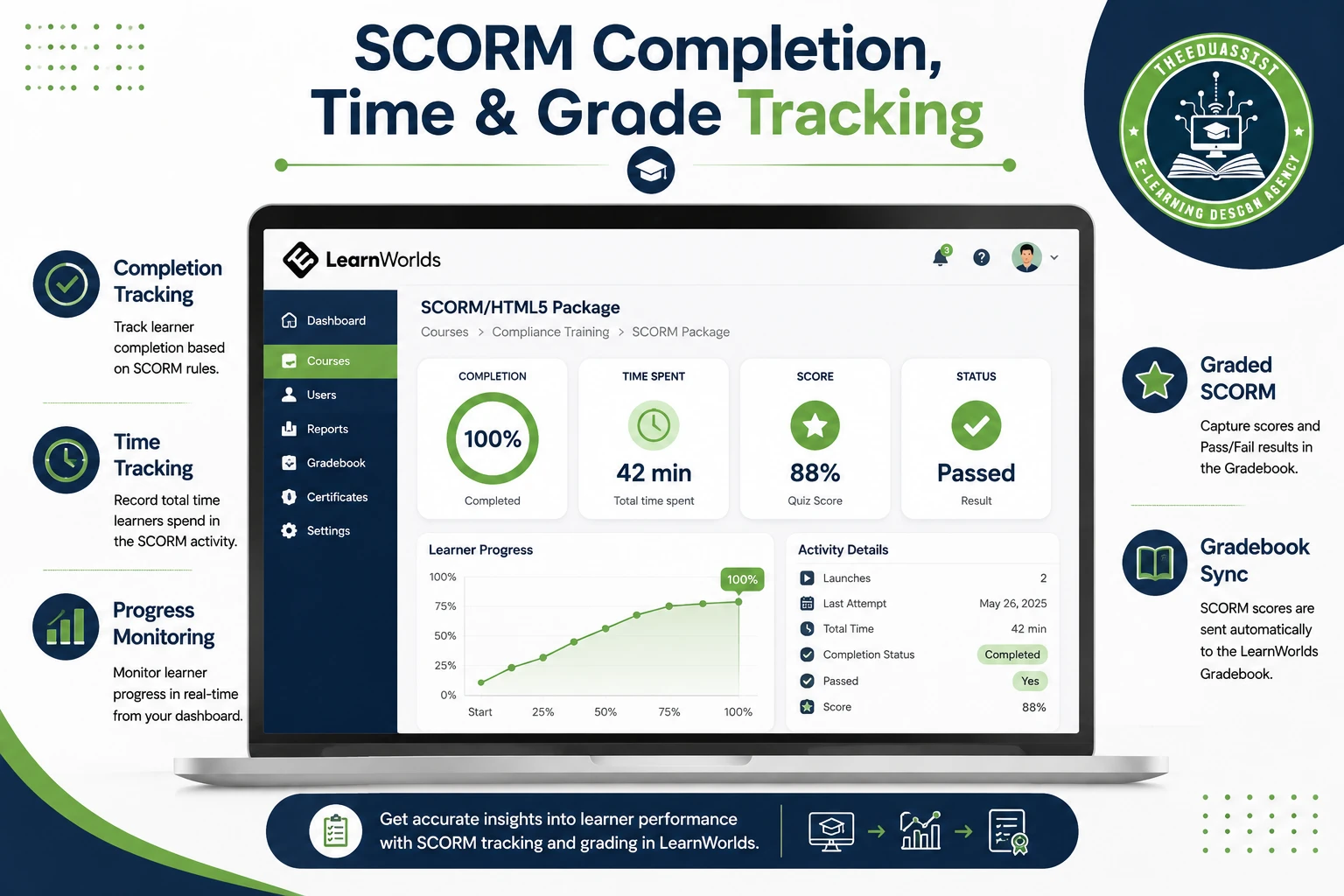
One of the main benefits of SCORM in LearnWorlds is the ability to track learning activity. LearnWorlds lets you use SCORM completion rules to determine whether the learning unit has been completed according to the rules included in the SCORM package.
An additional option is to allow time tracking by students so that the total time spent in the SCORM activity will be recorded. These two features rely on proper setting of the SCORM package.
There is an important limitation, though. LearnWorlds tracks the SCORM package as a whole. It does not provide separate tracking for individual sub-modules or assignments inside that package.
For example, suppose your SCORM course contains five internal lessons. LearnWorlds can monitor the total SCORM activity, but this won’t always be seen as five separate LearnWorlds activities. That distinction matters if you need detailed reporting.
What Is Graded SCORM in LearnWorlds?
If your course contains assessments, you may need more than basic completion tracking. This is where Graded SCORM can help.
A graded SCORM package can send score and Pass/Fail information to the LearnWorlds Gradebook. The package must contain the appropriate scoring or pass/fail values for this information to be collected.
For example, imagine you are delivering an employee compliance course. The learner completes training and works through the final assessment. A graded package can report the assessment result to the Gradebook, instead of just stating that the learner completed the SCORM activity.
You can also use a passing score when appropriate. This makes graded SCORM particularly useful for:
- Employee training
- Compliance courses
- Certification programs
- Product training
- Knowledge assessments
Graded SCORM can send Score and/or Pass/Fail results from the SCORM package directly to the LearnWorlds Gradebook.
What Happens When You Update a SCORM Course?
This is an important consideration if your course will change regularly. When you replace a non-graded LearnWorlds SCORM package, LearnWorlds treats the replacement as a new file. As a result, learner progress is reset.
Graded SCORM packages give administrators more control. If you do make updates to a graded package, you can select Keep Scores or Reset Scores in LearnWorlds.
Learners will maintain their Gradebook scores if you continue to keep existing scores. But if they return to the updated activity, their SCORM progress resets. If you reset scores, LearnWorlds creates a new Gradebook entry and resets the scores.
Practical tip
Before replacing a live SCORM course, check whether any learners are currently taking it. If employees are halfway through mandatory training, an update could affect their progress. Test significant changes first and decide how existing scores should be handled.
What If Your SCORM Upload Fails?
A failed upload does not always mean the SCORM package is broken. Start by checking the basics:
- Is the package under 400 MB?
- Does the ZIP contain the required XML manifest?
- Is the SCORM version supported?
- Does the original package work correctly?
- Is your LearnWorlds plan suitable for the number of packages?
- Are there custom-domain or Cloudflare settings affecting the upload?
LearnWorlds specifically notes that Cloudflare can interfere with large SCORM uploads on custom domains. If this happens, disabling the Cloudflare proxy and switching to DNS-only mode may resolve the issue. Testing the package before troubleshooting the LMS can also save time.
When Should You Use SCORM in LearnWorlds?
LearnWorlds SCORM integration is most useful when you already have compatible e-learning content that you want to reuse. It can be a good option if you:
- Have existing SCORM courses
- Want to avoid rebuilding old content
- Use interactive training materials
- Need completion tracking
- Need assessment scores
- Are migrating from another LMS
- Have courses created with an external authoring tool
SCORM is especially useful when preserving existing content matters. However, you do not have to use SCORM for every new course. If you are creating content specifically for LearnWorlds, native learning activities may offer more flexibility. You can build videos, assessments, ebooks, live sessions, and other activities directly within the platform.
LearnWorlds currently lists SCORM/HTML5 packages alongside these other learning activities. The better choice depends on your content, workflow, and reporting requirements.
Final Verdict: Can You Import Courses Into LearnWorlds?
Yes, LearnWorlds supports SCORM course imports. It is a practical choice if you already have SCORM content and want to reuse it without rebuilding your courses. Before uploading, check the SCORM version, package size, plan limits, and tracking requirements.
Sources & References
Frequently Asked Questions
QDoes LearnWorlds support SCORM?
Yes. LearnWorlds supports compatible SCORM packages, including SCORM 1.2 and SCORM 2004 editions.
QCan I import SCORM courses into LearnWorlds?
Yes. You can upload a compatible SCORM package through the SCORM/HTML5 Package learning activity.
QWhat is the maximum SCORM file size in LearnWorlds?
Each SCORM package can be up to 400 MB.
QDoes LearnWorlds track SCORM completion?
Yes. LearnWorlds can track SCORM completion and student time when the package and settings support these features.
QDoes LearnWorlds support graded SCORM?
Yes. Graded SCORM can send scores and Pass/Fail results to the LearnWorlds Gradebook.
QCan I update an existing SCORM course in LearnWorlds?
Yes. You can replace a SCORM package, but updating it can affect learner progress and scores depending on whether the package is graded.
QDoes LearnWorlds track individual SCORM lessons?
LearnWorlds tracks the SCORM package as a learning activity rather than providing separate LearnWorlds tracking for every internal SCORM module.