
How Does Kajabi Track Student Progress and Completion Rates?
Learn how Kajabi tracks student progress, lesson completion, quiz results, and video engagement using its Product Progress Report, and how creators can use these insights to improve their courses.
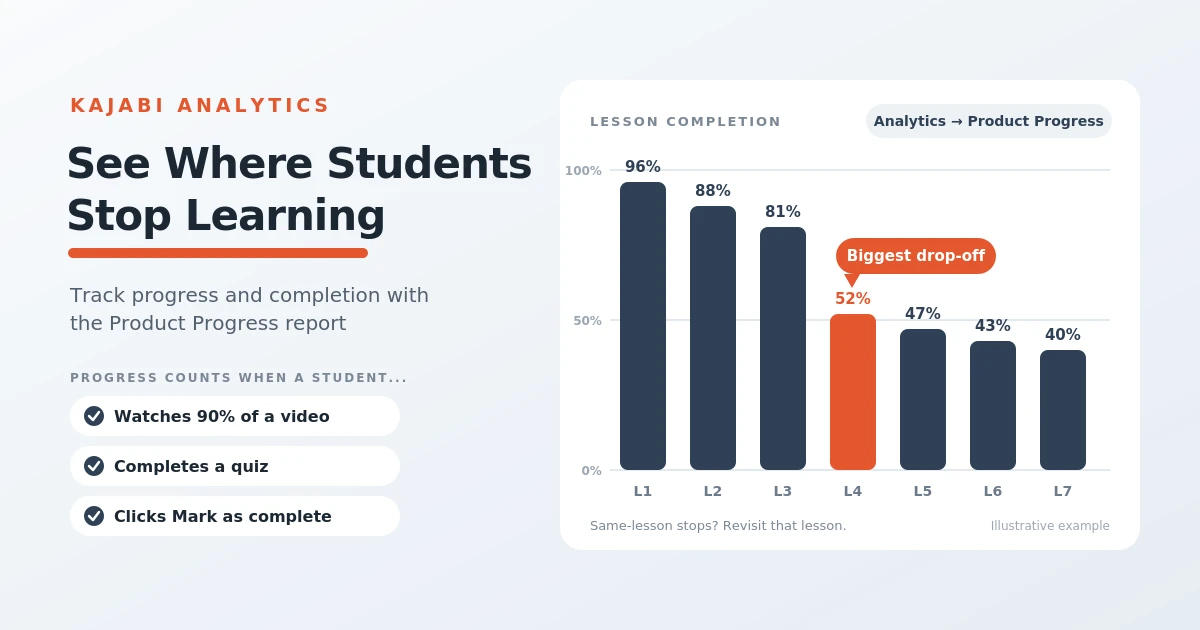
Table of Contents ▼
Quick Answer
This guide explains how Kajabi tracks student progress and course completion through its Product Progress Report. It covers how to access individual learner records, monitor lesson and quiz completion, identify where students stop progressing, export reports, and use learner activity data to improve course content and engagement.
Key Takeaways
- Kajabi's Product Progress Report helps creators review student activity, course completion, and lesson progress.
- Progress can depend on completed lessons, assessments, quizzes, video engagement, and manually marking lessons as complete.
- Reviewing where students stop progressing can reveal lessons that may need clearer explanations, shorter sections, or additional examples.
- Completion reports, quiz results, and engagement insights can help creators refine course content and provide targeted support to students.
What Is Kajabi’s Product Progress Report?
‘In Kajabi’s system, reporting refers to the features that allow users to track and analyze various metrics; this can include their data on sales, customer engagement, product performance, and much more. These tools are designed to be user-friendly, offering a range of reports which can be customized based on time periods, products, or offers. The platform also provides visual representation of data, making it easier to understand current trends and learner patterns.
How to Check Student Progress in Kajabi?
Through Kajabi’s Product Progress Report, you can track your learners’ progress through the product, the number of times they log in, the day they start, and the date they stopped joining. This report allows you to display 1000 learners at a time, putting more emphasis on giving you as much insight into the progress of each customer. The learner’s progress is mainly tracked on the Video, Assessment uploaded into the lesson, or by Quiz completion; it can also be tracked if the Mark as completed button is clicked.
These metrics can help you identify students who may be struggling to finish a course. For example, if a student has completed only a small portion of the material and hasn’t logged in recently, you could send them a reminder or offer additional support. Kajabi calculates overall progress using completed lessons and quizzes, along with video lessons where at least 90% of the video has been played. Lessons without a video or assessment require students to click Mark as complete for their progress to be recorded.
You can access these details through Analytics → Product Progress in your Kajabi dashboard
Can You Track Individual Student Progress?
Yes, Kajabi allows you to track each student’s progress through your course using the Product Progress Report. You can see how much of the course a student has completed, their login count, start date, and last activity.
To view an individual student’s progress:
- Open Analytics in your Kajabi dashboard.
- Find Product Progress and select the course you want to review.
- Search for the student by name or email.
- Click the student’s name to view their progress across individual modules and lessons.
This report helps you identify students who have stopped progressing or are struggling to complete certain lessons. You can use these insights to follow up with students, offer additional support, or improve parts of your course where learners frequently drop off.
Kajabi also lets you export the progress report as a CSV file, making it easier to review student activity and keep records.
How to Identify Where Students Stop Completing Lessons?
Kajabi’s Product Progress Report helps course creators identify where students stop progressing through their lessons. By reviewing individual student reports, you can see which lessons have been completed and compare progress across learners. If several students stop at the same lesson or module, it may indicate that the content is confusing, too lengthy, or needs more explanation. You can also check students’ last activity dates to identify those who have stopped engaging with the course. Use these insights to review the lessons, add practical examples, simplify difficult concepts, or ask students for feedback so you can improve the learning experience.
How to Use Student Progress Data to Improve Your Course
Student progress data can help you understand which parts of your course are working well and where students may need additional support. Review completion rates, lesson activity, and quiz results to identify areas that could be improved. If students repeatedly stop at a particular lesson, consider simplifying the content, adding practical examples, or breaking a lengthy lesson into smaller sections. You can also use video engagement data to see where viewers lose interest and adjust your videos accordingly. By reviewing these insights regularly and making improvements based on student behavior, you can create a more engaging learning experience and help more students complete your course.
Final Thoughts
Tracking student progress in Kajabi helps you understand how learners engage with your course and where they may need additional support. By reviewing completion rates, lesson activity, and quiz results, you can identify areas for improvement and make informed changes to your content. Regularly checking your Product Progress Report also helps you follow up with inactive students and encourage them to continue learning. Using these insights to improve your lessons can create a better learning experience and help more students complete your course.
Need Help Building or Scaling Your Online Learning Program?
Whether you are launching an academy on Kajabi, modernizing corporate LMS modules, or converting raw expertise into accredited curriculum, our senior instructional designers provide a complimentary architecture evaluation.
Sources & References
Frequently Asked Questions
QCan you export Kajabi student progress reports?
Yes. Kajabi allows creators to export supported Product Progress Report data as a CSV file. This can help you review learner activity, organize records, and analyze progress outside the Kajabi dashboard. Check the current report options in your account to confirm which fields are included in the export.
QDoes Kajabi automatically mark lessons as complete?
Not in every situation. Video lessons and lessons containing assessments or quizzes can use completion criteria, while lessons without these elements may require students to click Mark as complete. Video completion may depend on the percentage watched, so creators should check Kajabi's current tracking rules when setting up their courses.
QCan Kajabi show which videos students stop watching?
Kajabi offers video engagement insights for supported video content, which can help creators understand viewing behavior and identify points where engagement drops. The availability and level of detail may vary by report and content type. These insights can help you decide whether a video needs editing, clearer explanations, or a more engaging introduction.
QCan Kajabi automatically remind students who have stopped progressing?
Kajabi's automation tools can support follow-up workflows based on available triggers and conditions. However, automatically identifying inactive students and sending a reminder depends on the specific automation options available in your account and how the workflow is configured. Review the current automation settings before promising a fully automatic inactivity reminder.
