
How Many Online Courses Can You Host on Kajabi?
Learn how many online courses you can host on Kajabi, how product limits differ by subscription plan, and how other digital products affect your available slots.
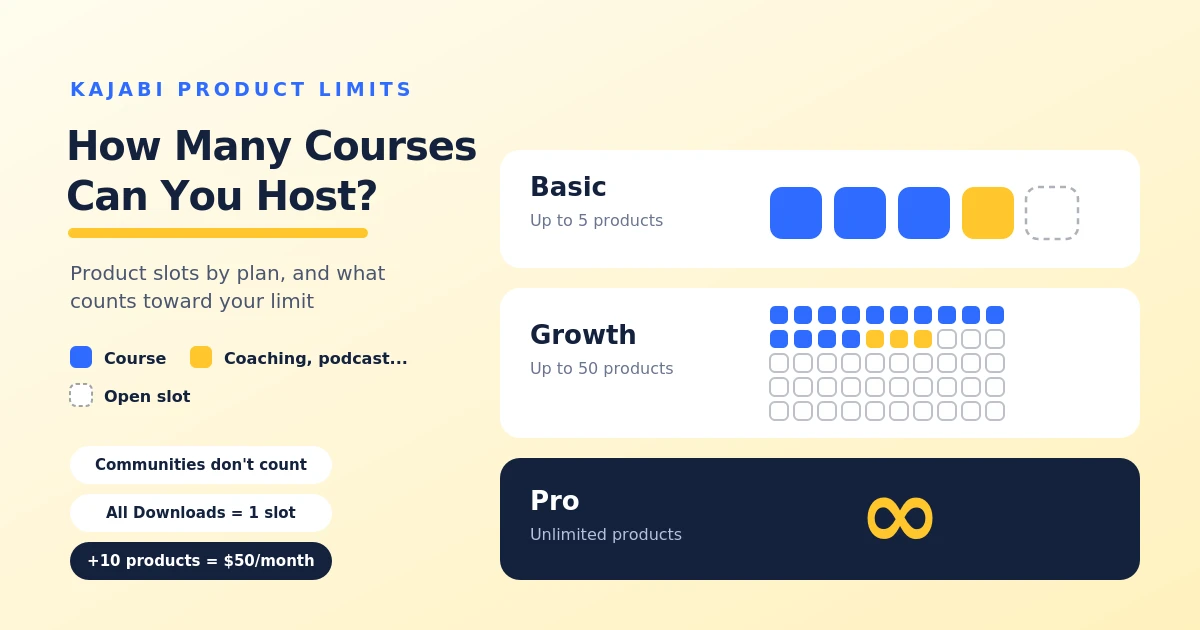
Table of Contents ▼
Quick Answer
This guide explains Kajabi's course and product limits across the Basic, Growth, and Pro plans. It covers which products count toward the limit, managing multiple courses under one account, options when you reach your limit, plan selection, and frequently asked questions about additional product capacity and memberships.
Key Takeaways
- Each course generally counts as one product, with the article outlining different allowances for Basic, Growth, and Pro.
- Coaching programs, podcasts, and newsletters can count toward the limit, while Communities don't and Downloads share one slot.
- Eligible users may be able to purchase additional product capacity, upgrade their plan, or remove an existing product.
- Consider your expected course library, other digital products, and additional plan limits before choosing a subscription.
How Kajabi’s Product Limits Work
Kajabi limits the number of products you can create based on your subscription plan. Each online course counts as one product, so the number of courses you can host depends on your plan and how many other products you offer.
For example, if your plan allows five products, you could use all five for courses or combine courses with other products, such as coaching programs and newsletters. Communities don’t count toward the product limit, while all your Downloads products together use just one product slot.
Before choosing a plan, consider how many courses you want to create and whether you’ll offer other digital products. You can check your current usage in your Kajabi account settings and upgrade or increase your product limit as your business grows.
How Many Courses Can You Create on Each Kajabi Plan?
The number of courses you can create on Kajabi depends on your subscription plan. Each course counts as one product, so your limit also includes other products you create, such as coaching programs.
- Basic: Up to 5 products, including courses.
- Growth: Up to 50 products, including courses.
- Pro: Unlimited products, allowing you to create as many courses as you need within the platform’s other limits.
For example, if you’re on the Basic plan and have already created three courses and one coaching product, you’ll have room for only one more product. If you plan to offer several courses alongside other digital products, consider how quickly you’ll use your available product slots before choosing a plan.
Do Other Products Count Toward Your Kajabi Limit?
Kajabi’s product limit applies to more than just online courses. Coaching programs, podcasts, and newsletters also count toward your product allowance, so creating these alongside courses can use up your available slots.
However, not every product type counts in the same way. All your Downloads products combined use just one product slot, regardless of how many individual downloads you create. Communities don’t count toward the product limit. Before choosing a plan, consider the different types of content you want to offer. This will help you estimate how many product slots you’ll need as your online business grows.
Can You Host Multiple Courses Under One Kajabi Account?
Kajabi lets creators manage their entire course library from a single account, making it easier to organize and update different learning products in one place. You can organize each course separately, add lessons and quizzes, and offer different courses to different audiences.
The number of courses you can create depends on your subscription plan. Each course counts as one product, so if you offer coaching programs or other products as well, these will also use some of your available slots.
For creators planning to expand their course library, choosing a plan with enough product slots can make it easier to manage multiple courses as their business grows.
What Happens When You Reach Your Course Limit?
If you reach your Kajabi product limit, you may no longer see the option to create a new course. What happens next depends on your subscription plan and its available features.
You have two main options: upgrade to a plan with a higher product limit or delete an existing product to free up a slot. However, deleting a product permanently removes its content and any customer access connected to it, so make sure to back up your materials before doing so.
If you’re planning to expand your course library, check your product usage in your account settings and consider whether your current plan can support your future needs.
How to Choose the Right Kajabi Plan for Your Courses
Choosing the right Kajabi plan depends on how many courses you want to offer and whether you plan to sell other digital products. If you’re starting with just a few courses, the Basic plan may be enough. The Growth plan offers more room to expand, while the Pro plan provides unlimited products for creators with larger course libraries.
Before choosing, consider your plans as well as your current needs. If you expect to launch more courses or add coaching programs, make sure your plan has enough product slots. You should also compare other limits, such as contacts, websites, and admin users, to find the option that best fits your business.
You can compare the available plans and features on Kajabi’s official pricing page. You can also check your current product usage under Settings → Subscription & Billing in your Kajabi account.
Final Thoughts
Kajabi offers different product limits depending on your subscription plan, so the number of courses you can host depends on your current plan and the other products you offer. Before choosing a plan, consider your current needs and how much you expect your course library to grow. By choosing the right plan, you can manage your courses more easily and expand your online business as needed.
Need Help Building or Scaling Your Online Learning Program?
Whether you are launching an academy on Kajabi, modernizing corporate LMS modules, or converting raw expertise into accredited curriculum, our senior instructional designers provide a complimentary architecture evaluation.
Sources & References
Frequently Asked Questions
QCan I increase my Kajabi course limit without upgrading my plan?
Yes. Kajabi lets eligible users purchase additional product capacity through Settings → Subscription & Billing. Additional capacity is available in increments of 10 products for $50 per month.
QDo Kajabi communities count toward the product limit?
No. Kajabi Communities don't count toward your product limit, so you can create communities without using up your course product slots.
QCan I sell multiple courses through one Kajabi membership?
Yes. You can connect multiple courses and other products to a single recurring membership offer, allowing members to access several products through one subscription.
Q Where can I check how many Kajabi products I've used?
Go to Settings → Subscription & Billing in your Kajabi dashboard and look at the Plan Usage section to see your current product usage and limits.++[](https://help.kajabi.com/en/articles/17174339-manage-subscription)++
