
Articulate Frontline: A Complete Guide for Businesses
Learn what Articulate Frontline is, how its AI-powered training kits work, its key features, and how businesses can use it to create practical employee training.
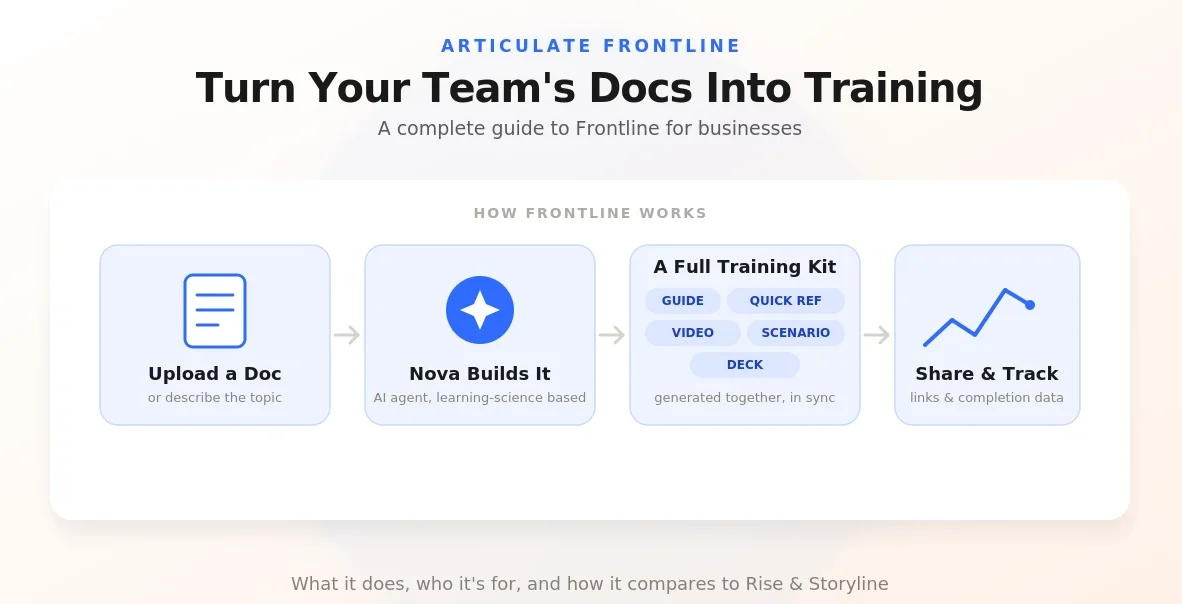
Table of Contents ▼
Quick Answer
This guide explains Articulate Frontline and how it helps organizations turn existing documents, videos, decks, and other resources into multi-format training kits. It covers AI-powered training creation, reusable content, automatic updates, interactive scenarios, and how Frontline supports teams outside L&D while maintaining organizational training standards.
Key Takeaways
- Articulate Frontline helps teams turn existing content into structured, multi-format training materials.
- Its AI-powered approach can create training kits containing guides, decks, interactive videos, scenarios, and quick-reference materials.
- Frontline can help keep connected training materials updated when the original source information changes.
What is Articulate Frontline:
Frontline employees are often the first point of contact between a business and its customers, yet providing them with consistent, accessible training can be challenging. Traditional training methods may require employees to step away from their daily responsibilities, making it difficult to keep everyone informed and prepared.
Articulate Frontline addresses this challenge by helping organizations turn existing knowledge and resources into practical training materials. By using AI-powered tools to develop and deliver learning content, businesses can make training more accessible, engaging, and relevant to employees’ everyday tasks.
What Is Articulate Frontline?
Training is already being created across organizations, even when L&D teams aren’t involved. However, L&D may not always know what training is being created, whether it follows the organization’s standards, or whether it is actually effective.
This is where Articulate Frontline comes in. It allows teams outside L&D to create training while still following the standards and practices set by L&D. Teams also don’t have to start from scratch. Frontline comes in. Teams also don’t have to start from scratch. Frontline can use existing content and organize scattered information into a structured outline before turning it into training.
How Does Articulate Frontline Work?
As we know, Articulate Frontline creates these training kits built around a single task and composed of different artifacts in different formats. These artifacts are basically individual pieces of training content created as part of a multi-format learning kit. Every artifact in a kit comes from the same source, meaning that they are consistent with each other and with the training goals we set.
So how do you generate a kit? First, you open your frontline dashboard; this is where you will upload your source material by either choosing a file, attaching a doc, recording a video, or attaching a link. You then enter a prompt on the content you wish to make, for example Turn this lunch deck into training that prepares my reps to talk to customers about our new security product. Finally, add or select a brand theme if you have it and then click Let’s go.
Key Features of Articulate Frontline
Multi-format training kits:
Frontline can create a complete training kit from one source. A kit can include guides, training decks, interactive videos, scenarios, and quick reference materials.
AI-powered training creation:
Frontline uses Articulayes AI agent, Nova, to turn existing content and prompts into training. It guides users through the creation process instead of requiring them to build everything manually.
Use existing content:
You can start with content you already have, such as documents, decks, videos, or links, rather than creating training from scratch.
Keep training updated:
If the information in the source changes, Frontline can update the connected training assets
So they stay consistent.
Benefits of Using Articulate Frontline for Employee Training
Rapid Training Creation:
Business requirements can change faster than centralized teams can keep up with. Frontline allows teams to create different types of training and support materials without having to wait a long time for L&D to build everything
Keeps Training Up to Date
Business information can change quickly, whether it is a new product, procedure, customer need, or system update. Frontline helps teams create and update training quickly, so employees don’t have to rely on outdated information.
More hands-on experience
Frontline can make training more practical instead of simply giving employees information to read. With features such as interactive videos and AI-powered scenarios, employees can practice situations they may actually face at work.
Articulate Frontline vs. Other E-Learning Solutions:
Unlike traditional e-learning solutions that often require L& D teams to build training from scratch, Frontline helps teams turn existing content into training using AI.
It can create different formats, such as guides, videos, scenarios, and training decks, while keeping them connected to the same source. This also makes it easier to update training when information changes.
Is Articulate Frontline Right for Your Business?
Articulate Frontline can be useful for organizations where training needs to be created quickly and updated often. It is especially helpful for teams that already have a lot of existing information but need an easier way to turn it into practical training.
It can also be useful for organizations that want teams outside L&D to create training while still following L&D’s standards and guidelines.
Final Thoughts:
Articulate Frontline makes it easier for teams to create practical training without always relying on L&D to build everything from scratch. By using existing content, AI, and different training formats, teams can create and update learning materials faster while keeping them consistent with their training goals.
Need Help Building or Scaling Your Online Learning Program?
Whether you are launching an academy on Kajabi, modernizing corporate LMS modules, or converting raw expertise into accredited curriculum, our senior instructional designers provide a complimentary architecture evaluation.
Sources & References
Frequently Asked Questions
QCan Articulate Frontline create different training formats from one source?
Yes. Frontline can turn a single source into a multi-format training kit, including guides, interactive videos, training decks, scenarios, and quick-reference materials.
QWhat type of content can I use as a source in Frontline?
You can provide source material through files, documents, videos, or links. Frontline uses this information as the foundation for creating the training.
QCan Frontline update multiple training materials when information changes?
Yes. When the source information is updated, Frontline can propagate those changes across the connected training artifacts.
QCan employees practice real workplace situations in Frontline?
Yes. Frontline can create AI-powered scenarios where learners practice conversations and receive feedback before handling similar situations at work.
QCan teams outside L&D use Articulate Frontline?
Yes. Frontline is designed to help teams across an organization create training while still working within the standards and practices established by L&D.
