
Can I use my own Domain with Kajabi?
Learn how to connect your own domain to Kajabi using nameservers or CNAME records, configure DNS settings, and troubleshoot common connection issues.
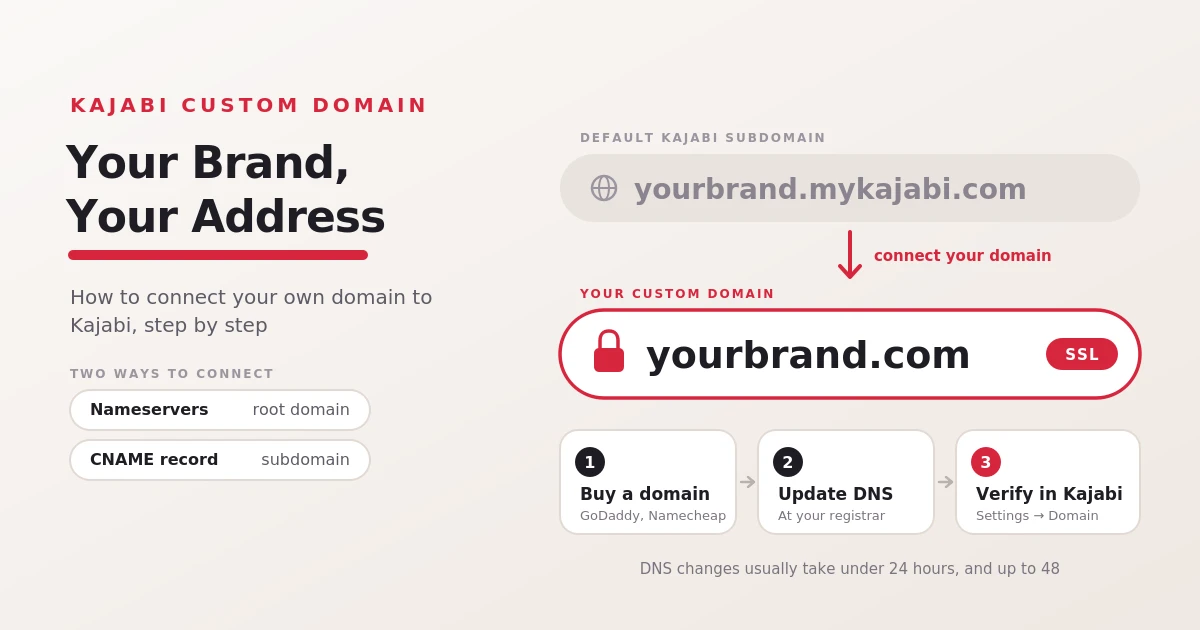
Table of Contents ▼
Quick Answer
This guide explains how to connect a custom domain to Kajabi, including the benefits of branded URLs, setup instructions, and the differences between root domains and subdomains. It also covers existing domains, DNS propagation, common connection problems, SSL, and email configuration considerations.
Key Takeaways
- Use a domain you've already purchased through a registrar or buy a new one to establish a branded web address.
- Kajabi supports nameserver and CNAME-based setups, depending on whether you're connecting a root domain or subdomain.
- Connections may take up to 48 hours to propagate, so verify your settings before making repeated changes.
- Before changing nameservers, preserve the DNS records required for business email and other connected services.
Why Do You need to connect a Custom Domain to Kajabi?
A custom domain makes it easier for people to recognize and remember your business. Instead of sharing a long platform-based web address, you can direct visitors to a URL that reflects your brand.
Here are a few benefits of connecting your own domain:
- Build brand recognition: Use your business name in your website address.
- Create a professional appearance: Give customers a consistent experience when they visit your website.
- Make links easier to share: Use a memorable address in emails, social media posts, and marketing materials.
- Support business growth: Keep your web address aligned with your brand as you introduce new courses, coaching programs, or memberships.
How to Connect Your Own Domain to Kajabi?
Before connecting a domain, make sure you’ve purchased it and can access its DNS settings through your domain registrar. Kajabi supports two main connection methods: changing nameservers or adding a CNAME record.
Follow these general steps:
- Log in to your Kajabi account and open Settings then Domain.
- Select Set up custom domain.
- Choose the connection method that matches your domain setup.
- Follow Kajabi’s instructions to obtain the required nameservers or CNAME details.
- Sign in to your domain registrar and update the relevant DNS settings.
- Return to Kajabi and verify your domain.
The method you choose matters. Nameservers are used to connect a root domain, such as yourbrand. While a CNAME record can connect a subdomain, such as courses. your brand.com. A CNAME may also be an option when you cannot change your nameserver and want to connect a www subdomain.
What if you already have a Domain?
Then, you don’t need to purchase a new domain if you already have an existing one. Connect your existing domain to Kajabi as long as you can access its DNS settings and configure the required records.
Such as, if you purchased yourbrand.com through GoDaddy or Namecheap, you can connect it to your Kajabi website by following the platform’s setup instructions. Keep in mind that connecting your domain may change where its DNS settings are managed. If you change your nameservers to the ones provided by Kajabi, DNS management moves to Kajabi. If you use the CNAME method for a subdomain, your registrar generally continues to manage the remaining DNS records.
Kajabi Custom Domain vs. Default Kajabi Subdomain
Kajabi gives you a default subdomain when you create your account. You can use it to get started, or connect a custom domain for a more branded web address.
Here’s how the two options compare:
| Feature | Default Kajabi subdomain | Custom domain |
| Example | yourbrand.mykajabi.com | yourbrand.com |
| Purchase required | No separate domain purchase required | Yes, you need to own a domain |
| Branding | Includes Kajabi’s domain | Uses your chosen domain |
| Setup | Available with your account | Requires domain configuration |
| Best for | Getting started or testing | Building a consistent business brand |
You can begin with the default subdomain and connect a custom domain later. Kajabi says visitors can continue accessing your site through both addresses after you connect your custom domain.
How Long Does it Take to Connect a Custom Domain?
Connecting a custom domain usually can take less than 24 hours, but DNS changes can sometimes take up to 48 hours to fully propagate. The exact timing depends on the connection method and how quickly the updated records are recognized across the internet.
If your domain doesn’t connect immediately, avoid repeatedly changing your DNS settings. First, confirm that you’ve entered the exact values shown in Kajabi and saved the changes with your registar. If the domain still isn’t connected after 48 hours, check the connection status in Kajabi and review your DNS settings. You can also contact your domain registrar support for help.
Common Issues When Connecting a Domain to Kajabi
Although connecting a domain is usually straightforward, a few issues can delay the process.
Incorrect DNS records: A typo in a nameserver or CNAME value can prevent Kajabi from verifying your domain. Compare your records with the values displayed in your Kajabi account.
DNS propagation delays: Your domain may take time to work across different networks after you update its settings. Allow up to 48 hours before treating a delay as a persistent issue.
Email disruptions: Changing nameservers can affect a custom email address if its MX and other required DNS records aren’t preserved. Save your existing records before making changes.
Cloudflare configuration errors: If you connect a subdomain through a CNAME while using Cloudflare, Kajabi’s instructions may require the record to use DNS Only rather than the proxy setting.
Domain already connected elsewhere: If Kajabi reports that the domain is being used elsewhere, you may need to disconnect the existing setup or contact Kajabi Support.
If the problem continues, consult Kajabi’s custom domain troubleshooting guide before making further changes.
Final Thoughts
You can use your own domain with Kajabi by connecting a domain you’ve already purchased or registering a new one through a domain provider. A custom domain helps you build a recognizable brand, share memorable links, and create a consistent experience for your audience.
The setup involves updating DNS settings and verifying the connection, so it’s important to choose the correct method and preserve any existing email records. If you’re just getting started, you can use Kajabi’s default subdomain and connect your own domain when you’re ready to establish your brand.
Need Help Building or Scaling Your Online Learning Program?
Whether you are launching an academy on Kajabi, modernizing corporate LMS modules, or converting raw expertise into accredited curriculum, our senior instructional designers provide a complimentary architecture evaluation.
Frequently Asked Questions
QCan I use my custom domain for both my website and email?
You can use the same domain name for your website and a business email address, but these services require separate configuration. Connecting your website domain doesn't automatically set up your email service. If you change nameservers, make sure your email's required DNS records are preserved or recreated.
QDoes Kajabi provide SSL for custom domains?
Yes. Kajabi provides SSL for connected custom domains through Cloudflare. SSL helps secure the connection between your website and its visitors.
QCan I use a subdomain with Kajabi?
Yes. You can connect a subdomain such as `courses.yourbrand.com` using a CNAME record. This is useful if you want your main website hosted elsewhere while using Kajabi for courses or other offerings.
QDo I need to buy a domain separately for Kajabi?
Yes. Kajabi doesn't register domain names, so you'll need to purchase one through a domain registrar if you want to use a custom domain. You can also start with the default Kajabi subdomain without buying a separate domain.
