
The Complete Guide to Creating Engaging IT Classes for Ohio Teenagers
Learn how to create engaging IT classes for Ohio teenagers using modern curriculum, projects, interactive lessons, and LMS platforms.
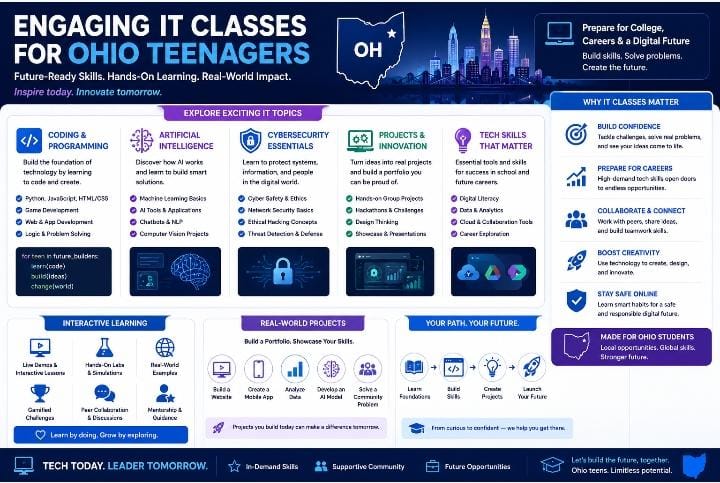
Table of Contents ▼
Quick Answer
This guide explains how schools, academies, and course creators can develop engaging IT classes for Ohio teenagers. It covers skills-first curriculum design, project-based learning, interactive lessons, career awareness, supportive delivery teams, LMS platforms, program costs, and ways to build students’ confidence alongside technical skills.
Key Takeaways
- Modern IT classes should focus on practical technology skills rather than outdated theory.
- Teen learners respond well to projects, challenges, interactive content, and career-relevant activities.
- A skills-first curriculum can include digital literacy, coding, website creation, AI, cybersecurity, and team projects.
- Project-based learning helps teenagers develop technical skills, creativity, communication, and confidence.
- Interactive lessons can make IT education more engaging than traditional slide-based teaching.
- Career awareness helps teenagers understand where their technology skills can lead.
- A strong IT program may require curriculum designers, technical trainers, mentors, and student support.
- LMS platforms can help manage lessons, assignments, certificates, attendance, and learner progress.
- Successful teen IT programs should develop confidence and problem-solving skills alongside computer knowledge.
The Complete Guide to Creating Engaging IT Classes for Ohio Teenagers
Teenagers today are growing up in a world shaped by automation, coding tools, cloud platforms, AI, cybersecurity, and digital entrepreneurship. Yet many traditional IT classes still focus on outdated software skills or passive theory-based teaching. That creates a major opportunity for schools, academies, and course creators in Ohio to focus on modern IT curriculum development specifically for teenagers.
Across Columbus, Cleveland, Cincinnati, Toledo, Akron, and Dayton, demand is growing for classes that teach practical technology skills in ways young learners actually enjoy.
However, many institutions face common challenges:
- Outdated curriculum models
- Low student engagement
- Lessons disconnected from real careers
- Weak hands-on practice
- No progression from beginner to advanced skills
Creating updated IT classes in 2026 requires more than adding new topics. It requires instructional design, learner psychology, structured curriculum development, and interactive content delivery.
This guide explains how to build IT classes that teenagers actually want to join and complete.
Why Old IT Classes No Longer Work
Many legacy programs teach technology as static knowledge:
- Memorizing terms
- Watching demonstrations
- Repeating basic software tasks
But teenagers learn differently.
Modern learners expect:
- Active participation
- Project-based learning
- Visual and interactive content
- Clear relevance to future careers
Educational research consistently shows that active, problem-solving environments improve motivation and retention more effectively than passive instruction.
That means a modern IT class must feel less like a lecture and more like a challenge, workshop, or creator lab.
Start With the Teen Mindset, Not the Subject
A common mistake is building curriculum around technology categories instead of learner interests.
Instead of asking: “What should we teach?”
Ask: “What would motivate a teenager to keep learning this?”
Teen learners are often drawn to:
- Building apps or websites
- Gaming technology
- Robotics and automation
- Content creation tools
- Cybersecurity challenges
- AI tools and prompts
- Digital entrepreneurship
When curriculum connects IT skills with identity and future opportunity, engagement rises dramatically.
For more guidance on solving learner problems through effective instructional design, explore Instructional Design in Action: Practical Solutions for Learner Problems.
Build a 2026 Skills-First Curriculum Framework
Rather than long theory-heavy modules, organize classes around real outcomes.
Recommended Curriculum:
Module 1: Digital literacy and online safety
Module 2: Coding basics and logic thinking
Module 3: Website creation and design
Module 4: AI tools for productivity
Module 5: Cybersecurity fundamentals
Module 6: Team project and presentation
This structure helps teenagers see progress quickly. It also supports microlearning pathways, where each module delivers a practical win.
If you are developing technology-focused curriculum, you can also explore this guide to cybersecurity curriculum design for ideas on structuring technical learning.
For AI-focused learning, Design an AI for Everyone Course provides another relevant curriculum example.
Use Project-Based Learning to Increase Retention
Teenagers remember what they build.
Instead of only teaching concepts, create projects such as:
- Build a personal portfolio site
- Create a chatbot workflow
- Design a gaming leaderboard in spreadsheets
- Launch a mini online brand
- Make a cybersecurity awareness campaign
Project-based learning combines:
- Technical skill development
- Communication
- Creativity
- Confidence building
This approach aligns strongly with modern L&D and content development practices.
For another perspective on developing engaging educational content, see this guide to creating engaging educational content for online platforms.
Make Lessons Interactive (Not Just Slides)
If classes rely only on slide decks, motivation drops quickly.
Use:
- Live demos
- Quizzes
- Coding challenges
- Breakout teamwork
- Competitions
- Scenario tasks
- Polls and peer reviews
For online delivery, tools like Articulate Rise 360 or Articulate Storyline can help convert static lessons into interactive modules.
Interactive design is one of the biggest eLearning trends 2026.
You can also explore how to transform passive lessons into interactive courses for additional ideas.
For a broader look at interactive eLearning development, see this guide for interactive eLearning courses.
Include Career Awareness Without Pressure
Teen learners often ask:
“Where can this skill lead?”
“Can I earn from this?”
“Is coding the only path?”
Build short career spotlight sections into the program:
- UI/UX design
- IT support
- Data analytics
- Digital marketing tech
- HR tech systems
- Project management
- Cybersecurity entry roles
This gives relevance without turning the class into career pressure.
Create a Supportive Multi-Skill Delivery Team
Strong teen IT classes often need more than one instructor profile.
A high-performing program may include:
- Curriculum designer
- Technical trainer
- Community/class coordinator
- Project mentor
- Student support lead
This improves delivery quality and learner retention.
For growing academies, this is where consulting services and scalable systems can help.
Deliver Through the Right LMS
To manage teen cohorts effectively, use an LMS such as:
- Thinkific
- Kajabi
- LearnDash
These platforms help with:
- Lesson sequencing
- Assignments
- Certificates
- Attendance and progress tracking
- Parent/student communication workflows
If you are comparing LMS options, you can explore Best Learning Management Systems.
You can also read 10 Strong Reasons It’s Time to Rethink How We Use the Learning Management System to understand why LMS selection matters.
For creators deciding between different platforms, LearnWorlds vs Thinkific offers a useful comparison.
Cost Reality Check: Building a Professional Teen IT Program
Curriculum design: $2,000 – $6,000
Instructor content creation: $1,000 – $4,000
LMS tools: $39 – $199/month
Interactive assets/projects: $500 – $2,000
Programs built strategically often outperform cheaper “slides-only” models.
Unique Perspective: Teach Confidence, Not Just Computers
The most successful teen IT programs do more than teach software.
They help learners develop:
- Confidence with technology
- Problem-solving ability
- Teamwork habits
- Presentation skills
- Curiosity about future careers
That is what parents value, schools seek, and learners remember.
Final Thoughts
For creators in Ohio, launching updated IT classes for teenagers is a timely opportunity.
But success depends on modern design, not outdated teaching habits.
By combining:
- Instructional design
- Project-based learning
- Interactive delivery
- Career relevance
- LMS systems
- Consistent learner support
you can build a program that teenagers enjoy and that parents trust.
Platforms like theeduassist.com and expert theeduassist consulting services can also help schools and creators structure scalable custom eLearning IT programs built for 2026 learners.
References
https://www.learntechlib.org/p/111358/
FAQs
What should teenagers learn in modern IT classes?
Teenagers benefit from coding, AI tools, cybersecurity basics, website creation, digital literacy, and project collaboration skills.
How long should teen IT classes be?
Shorter modular formats (45–90 minute sessions with projects) often work better than long lecture-heavy classes.
Should IT classes for teens be online or in person?
Hybrid models often work best because they combine live accountability with self-paced learning resources.
Why do many teen tech programs fail?
They often use outdated curriculum, passive teaching, and no clear connection to real-world skills.
Need Help Building or Scaling Your Online Learning Program?
Whether you are launching an academy on Kajabi, modernizing corporate LMS modules, or converting raw expertise into accredited curriculum, our senior instructional designers provide a complimentary architecture evaluation.
Sources & References
Frequently Asked Questions
QWhat should teenagers learn in modern IT classes?
Teenagers benefit from coding, AI tools, cybersecurity basics, website creation, digital literacy, and project collaboration skills.
QHow long should teen IT classes be?
Shorter modular formats (45–90 minute sessions with projects) often work better than long lecture-heavy classes.
QShould IT classes for teens be online or in person?
Hybrid models often work best because they combine live accountability with self-paced learning resources.
QWhy do many teen tech programs fail?
They often use outdated curriculum, passive teaching, and no clear connection to real-world skills.
