
LMS User Adoption: 15 Proven Ways to Increase Employee Engagement
Discover 15 proven strategies to improve LMS user adoption, increase employee engagement, and encourage more effective participation in workplace training.
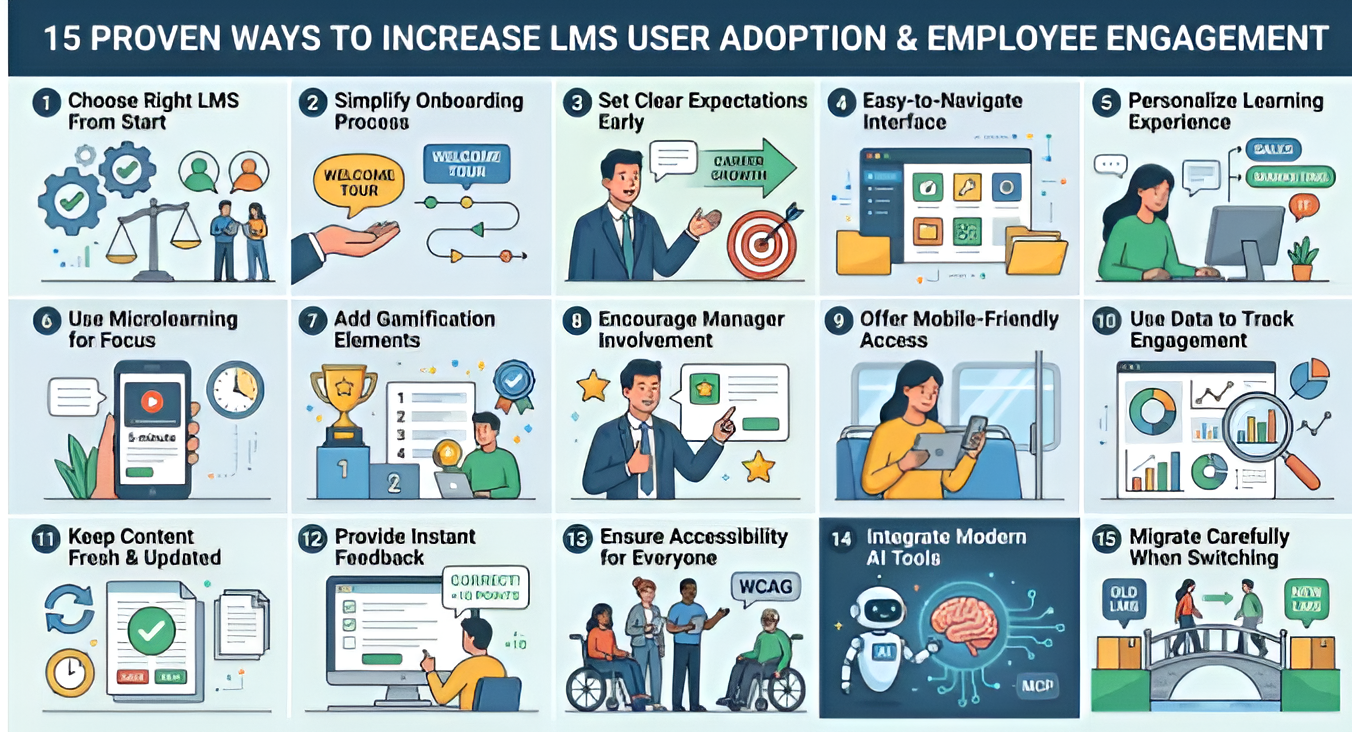
Table of Contents ▼
Quick Answer
LMS user adoption is essential to ensure employees actively participate in online training and fully use an organization’s learning platform. This article presents 15 practical strategies to increase LMS adoption, including improving the user experience, offering relevant training content, encouraging leadership support, using personalized learning, and tracking engagement. It also explains how organizations can identify adoption barriers and create a more engaging learning environment.
Key Takeaways
- LMS user adoption depends on factors such as usability, onboarding, relevant content, accessibility, and management support.
- Organizations can improve adoption by creating simple learning experiences and connecting training to employees' actual roles and goals.
- Short lessons, mobile access, personalized learning paths, and timely feedback can make training easier to fit into the workday.
- Managers and team leaders can support adoption by encouraging participation and reinforcing the value of learning.
You rolled out a brand new learning system. The dashboard looks great. The courses are ready. Then, a few weeks later, logins drop. Nobody seems to care anymore. This is a common problem for firms in the USA. It has a name: poor LMS user adoption.
In this guide, we explain why adoption fails. We also share what it costs your firm. Then we give you fifteen proven ways to fix it. Each tip is simple. Each one is easy to use. Soon, you can turn a quiet tool into one your team enjoys.
Why It Matters
A learning tool only helps when staff log in and learn. If not, it just sits there. It becomes a costly shelf item that no one opens.
Low LMS user adoption hurts more than morale. It also drains your training funds. After all, a tool with low use shows no real return. If you want to track this well, see this guide on the corporate training ROI calculator. It shows how to track results over time.
Also, poor adoption often points to a deeper flaw. Maybe the screen is hard to read. Maybe the first login feels slow. Maybe the courses feel far from real job tasks. Once you find the root cause, the fix gets much easier.
The Solution
The good news is this: LMS user adoption can be fixed. With the right mix of plan, design, and team spirit, most firms can turn things around. Here are fifteen proven ways to do just that.
1. Choose the Right LMS From the Start
Many adoption issues start with a poor tool choice. If the tool feels clunky, staff will skip it. So first, pick a tool that fits your firm size and your team’s skill level. For help with this step, read how to choose the right LMS.
2. Make Onboarding Simple
First impressions count a lot. If the first login feels long, staff may quit fast. So keep that first visit short and warm. Use a brief tour. Show only the key tools at first. Save the rest for later.
3. Set Clear Goals Early
Staff try harder when they know what is asked of them. So, leads should explain why the tool matters. They should link it to real job growth. Once staff get the point, they join in more.
4. Keep the Screen Simple
A messy screen kills drive fast. So pick a tool with a clean look and clear menus. Staff should find courses, check scores, and view due dates with ease.
5. Make Learning Feel Personal
People learn best when content feels close to their world. So, build learning paths based on each role and skill level. This piece on AI-powered learning shows how smart tools can shape content for each worker.
6. Use Short Lessons
Long courses can wear staff out. So break content into short bits that take just a few minutes each. Short lessons fit a busy day with ease. They also help staff recall facts, since small bits stick better.
7. Add Game-Style Rewards
Badges, points, and rank boards can turn learning into a fun task. As a result, staff often return just to check their rank or beat a past score.
8. Get Team Leads Involved
When leads back the training, staff tend to follow suit. So, ask team leads to share courses they like. Ask them to praise staff who finish a course. This builds a strong, shared mindset around learning.
9. Allow Phone Access
Many staff like to learn while on the move. So, a tool that works well on phones lets them learn during a break or a ride. This often boosts the finish rate.
10. Track Use With Real Data
When you track how staff uses the tool, you learn what works. For a closer look at this, read this piece on xAPI Learning Record Store. It shows how good tracking can boost your view of results.
11. Keep Content New
Old content can feel stale fast. So, check your courses often. Add fresh facts or trends when you can. New content tells staff the tool is alive and worth a visit.
12. Give Quick Feedback
Staff try harder when they get fast feedback on quiz scores. Since fast feedback feels like a small win, staff tend to stay on track. They are less likely to quit mid-course.
13. Make It Open to All
A good tool should work for every staff member, even those with a disability. This guide on ADA and WCAG rules gives a simple list to check your site against.
14. Add Smart AI Tools With Care
New tools, like AI agents, now run in the background of many systems. This guide on Model Context Protocol for LMS breaks down how such tools can smooth out the learning flow.
15. Plan a Safe Move to a New System
At times, low use comes from a rough switch between tools. If you plan to switch soon, this full checklist on how to migrate to a new LMS walks you through each step with care.
Real Client Stories
Case One: A Mid-Size Firm in the USA
A freight firm with nearly three hundred staff had a low finish rate of just fifteen out of one hundred. After a simple onboarding fix, short lessons, and lead-led tips, the rate rose to sixty-eight out of one hundred in just ninety days.
Case Two: A Remote-First Tech Team
A fully remote tech firm found that staff rarely used the tool past set class days. Once they added phone access and short weekly game tasks, weekly use grew more than three times in just two months.
Cost Guide
You do not need a big budget to fix LMS user adoption. Costs shift based on how much help your team needs.
Basic plan: Free up to two hundred dollars. Covers a simple onboarding fix, a brief tour, and small content edits done in-house.
Full plan: Five hundred to two thousand dollars. Covers custom paths, game-style tools, phone setup, and an access check.
Large-scale plan: Set by quote, based on firm size. Covers a full system move, AI add-ons, deep stats, and an ongoing growth plan.
Note: These costs are just a guide. True costs shift based on your tool, team size, and content.
LMS or LXP: Which Fits You
Some firms ask if they need an LMS or a more open tool like an LXP. Both back learning, but each one serves a slightly different goal. This guide on LXP vs LMS shows which fits your firm best.
How AI Shapes Course Design
Course design moves fast now. Many firms blend old teaching styles with new AI led ones. This guide on AI vs old course design shows how each style shifts speed and results.
Final Thoughts
A boost in LMS user adoption rarely comes from one big fix. It comes from small steps done well. Make onboarding easy. Make content feel close to home. Praise growth. Keep things fresh. Over time, these small steps build a place where learning feels like a normal part of the day.
No matter where your firm sits, in the USA or past it, the goal stays the same. Build a tool staff like to use, and strong use will follow on its own.
Ready to boost use with less guesswork? Reach out to EduAssist for a free LMS check or a custom plan call today.
Need Help Building or Scaling Your Online Learning Program?
Whether you are launching an academy on Kajabi, modernizing corporate LMS modules, or converting raw expertise into accredited curriculum, our senior instructional designers provide a complimentary architecture evaluation.
Frequently Asked Questions
QWhat is the fastest way to get employees through onboarding?
The fast path is a short, clear, role based start. Use a brief tour. Show just the key parts. Skip extra steps that may slow new users down.
Q What is the best LMS platform to boost employee engagement in corporate training?
The best tool fits your firm size and goals. That said, tools with custom paths, phone access, and game style tools tend to win more interest than plain ones.
QComparing LMS tools, which one drives higher employee participation rates?
Tools with quizzes, badges, and score views tend to drive more use. The right fit still depends on your team size and how your staff like to learn.
Q Which LMS system offers the most effective user adoption features for remote teams?
For remote teams, look for strong phone access, offline mode, and clear score views. These let staff learn from any place, at any time.
