
How to Build a Practical Google AI Training Course for Beginner and Intermediate Learners
Learn how to create a practical Google AI training course with structured learning paths, hands-on activities, real-world workflows, assessments, and LMS support.
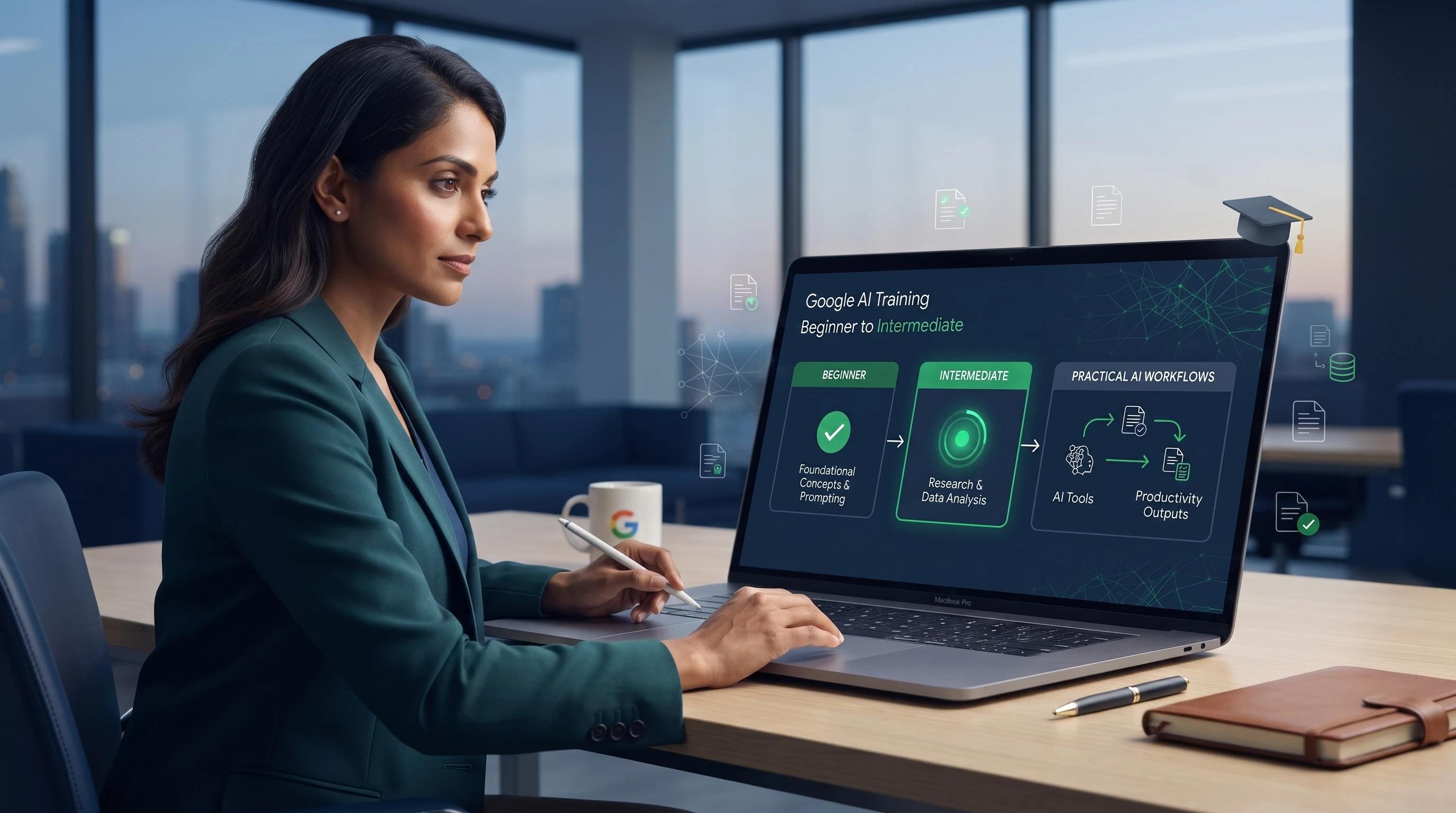
Table of Contents ▼
Quick Answer
This guide explains how to build a practical Google AI training course for beginner and intermediate learners. It covers Google AI tools, hands-on activities, real-world workflows, assessments, LMS selection, and strategies for keeping course content updated as AI technology evolves.
Key Takeaways
- Build AI skills around real workplace outcomes.
- Use hands-on activities and practical AI workflows.
- Assess learners through projects, quizzes, and capstones.
- Keep course content modular and easy to update.
Google’s AI ecosystem is transforming how organizations research, create content, analyze information, and improve workplace productivity. Tools such as Gemini, NotebookLM, Google AI Studio, Google Workspace AI features, Google Colab, Vertex AI, Google Vids, and Google Labs offer valuable opportunities for structured AI learning.
However, effective AI training requires more than software tutorials. Learners need to understand which tool fits a specific task, how to combine tools into workflows, and how to evaluate AI-generated results.
For organizations and training providers across the United States, including Orlando, Florida, Google AI training course development should focus on practical skills, measurable outcomes, hands-on activities, and maintainable content.
A successful course should turn complex AI capabilities into a clear learning journey that beginners can follow and intermediate learners can apply.
Why Google AI Training Needs More Than Tutorials
AI tools may be easy to demonstrate but harder to teach effectively. Showing learners how to enter a prompt in Gemini does not necessarily teach them when to use it, how to improve the prompt, or how to evaluate the response.
Focus on Skills, Not Features
A practical course should develop transferable skills such as:
- Writing effective prompts
- Conducting AI-assisted research
- Analyzing information
- Evaluating AI outputs
- Improving workplace productivity
- Building AI-supported workflows
- Using AI responsibly
These skills remain useful even when products, interfaces, or features change.
Connect Lessons to Real Outcomes
Each lesson should have a clear purpose. Instead of simply teaching Gemini features, learners could use Gemini to research a business topic and prepare a structured brief.
This shifts the focus from learning a tool to solving a problem with AI.
Avoid Tool Overload
Google offers AI tools for different audiences and use cases. Introducing too many at once can overwhelm beginners.
A better progression is to start with accessible tools such as Gemini, NotebookLM, and Google Workspace AI features. Intermediate learners can then explore Google AI Studio, Google Colab, or Vertex AI when these tools support their learning objectives.
The goal is not to teach every product. It is to teach learners how to choose the right AI tool for the right task.
What Should a Google AI Course Include?
A strong course should combine AI fundamentals, practical tool use, business applications, and hands-on learning. Instead of creating a separate tutorial for every product, instructional designers should introduce tools according to learner needs and course objectives.
Beginner-Level Google AI Tools
Gemini can introduce prompting, brainstorming, research, content creation, and everyday AI assistance. A Google Gemini training course can help learners build confidence before they move to more complex workflows.
NotebookLM can develop source-based research skills through document analysis, summarization, and information discovery. This makes a NotebookLM training course useful for researchers, educators, and knowledge workers.
Google Workspace AI features can connect AI training to familiar workplace tasks involving documents, communication, presentations, and productivity.
Intermediate-Level Google AI Tools
Google AI Studio can introduce prompt experimentation and more advanced AI applications. This provides a strong foundation for focused Google AI Studio training.
Google Colab can support data analysis, coding, and technical exercises for learners who need greater technical depth.
Vertex AI can introduce enterprise AI concepts and application-development workflows for more technical learners. This creates opportunities for specialized Vertex AI course development for technical and enterprise learners..
Creative and Emerging Google AI Tools
Google Vids can support AI-assisted video and training-content creation, while Google Labs can expose learners to emerging AI experiences.
These tools should support specific learning objectives rather than become disconnected product lessons.
Building a Beginner-to-Intermediate Learning Journey
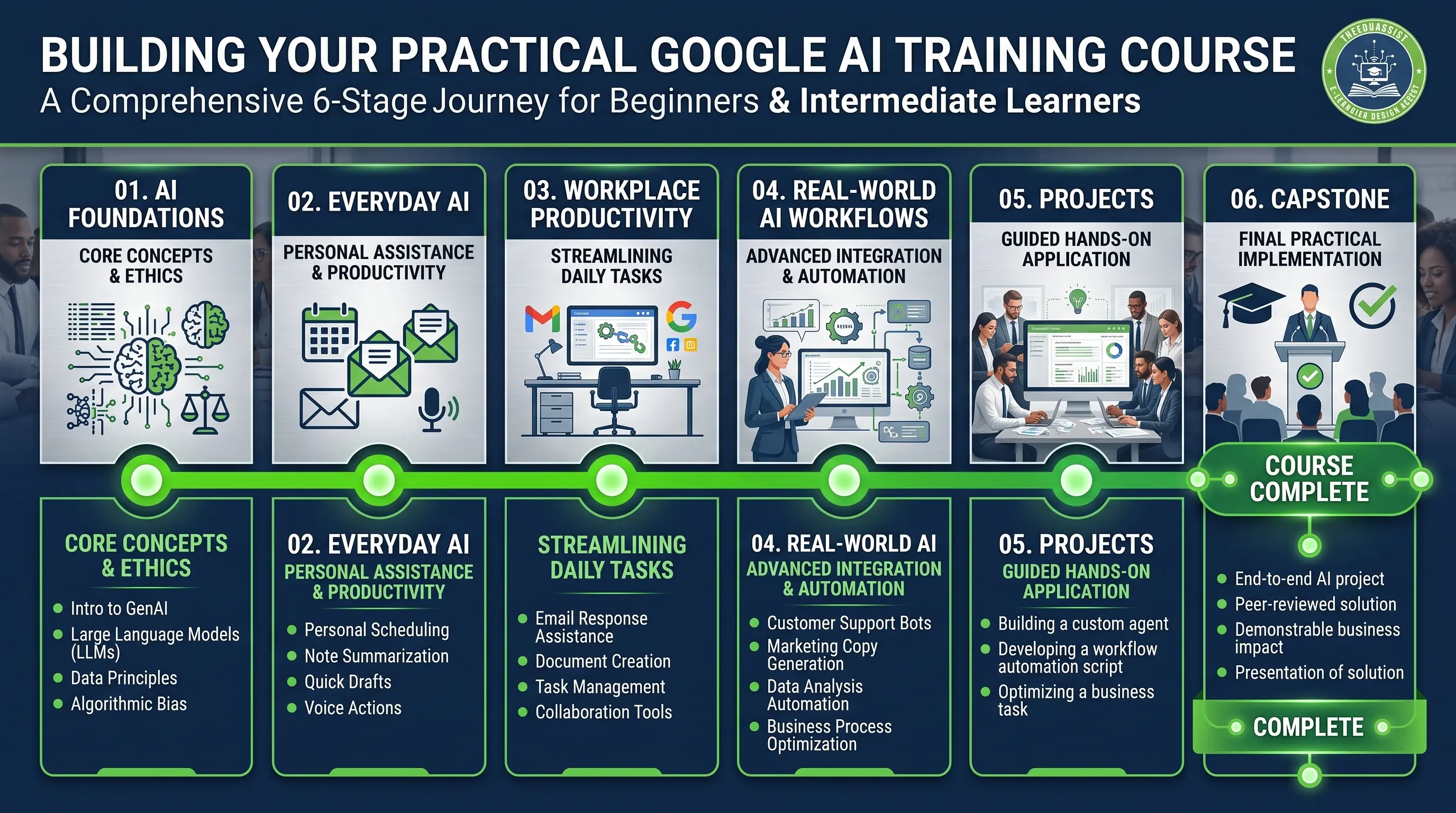
A practical curriculum should gradually increase both tool complexity and task difficulty. A useful progression is:
AI Foundations → Everyday AI → Workplace Productivity → Real-World Workflows → Projects → Capstone
Start With AI Foundations
The first module can cover:
- Generative AI basics
- Common AI applications
- AI strengths and limitations
- Prompting fundamentals
- Output evaluation
- Accuracy and verification
- Responsible AI practices
The purpose is not to turn beginners into AI specialists. It is to give them enough knowledge to use AI confidently and responsibly.
Progress From Tasks to Workflows
Learners should gradually move from individual tasks to multi-step workflows. For example:
Research → Analyze → Organize → Create → Review
A learner might use NotebookLM to examine source material, Gemini to organize findings, and Google Workspace tools to create a report or presentation.
This progression helps learners understand how different AI capabilities can work together to achieve a specific outcome.
Create Clear Learning Objectives
Every module should have a measurable objective, such as:
By the end of this module, learners will be able to select an appropriate AI tool, create an effective prompt, evaluate the output, and improve the result.
The objective should guide the content, demonstration, practice, and assessment. This alignment is central to effective instructional design for AI courses.
Module 1: Everyday Google AI Tools
The first practical module should make AI approachable. Focus on Gemini, NotebookLM, and Google Workspace AI features rather than introducing the entire Google AI ecosystem.
Practical Learning Activity
Give learners a realistic workplace scenario and a set of source documents. Ask them to:
- Review the source material.
- Use NotebookLM to identify key information.
- Use Gemini to organize the findings.
- Create a concise business summary.
- Review the result for accuracy and relevance.
One exercise can therefore develop research, prompting, analysis, and evaluation skills.
Module Outcome
By the end of the module, learners should be able to select appropriate everyday AI tools, complete basic AI-assisted tasks, write effective prompts, and evaluate AI-generated content.
Most importantly, they should understand that AI assists, but humans remain responsible for reviewing and improving the final result.
Module 2: AI for Workplace Productivity
Once learners understand everyday AI, the next step is applying it to business tasks. This module should focus on measurable workplace value rather than additional product features.
Research and Analysis
Learners can use AI to organize research questions, analyze source materials, summarize information, identify themes, and prepare research briefs.
For example, they could use NotebookLM to review business documents, identify important findings, and use Gemini to organize those findings into a structured brief.
They should also learn to verify important information before using it in business decisions or communications.
Reports and Dashboards
Learners can practice turning information into executive summaries, reports, recommendations, and presentation content.
For more technical learners, Google Colab can support data analysis and visualization. The activity should remain focused on answering a business question rather than learning technical features without context.
Customer-Support Automation
AI can assist with drafting customer responses, summarizing issues, creating response templates, and organizing support information.
Learners should evaluate outputs for accuracy, tone, relevance, privacy, and appropriate escalation. This reinforces the importance of human oversight when using AI in customer-facing workflows.
Workplace Productivity and Learning
AI can also support emails, documents, presentations, meeting materials, practice questions, learning summaries, and skill-development activities.
These use cases help learners identify where AI can create meaningful value in their daily work and support broader corporate AI training development.
Module 3: Real-World AI Workflows
Real workplace problems rarely involve a single AI tool. Learners should therefore practice combining tools according to the desired outcome.
Research-to-Report Workflow
NotebookLM → Gemini → Google Docs → Google Slides
Learners can review source materials, identify findings, organize information, create a report, and turn key insights into presentation content.
Data-to-Insight Workflow
Google Colab → Data Analysis → Visualization → Business Insight
Technical learners can analyze sample data, identify patterns, and explain the results for decision-makers.
The emphasis should remain on interpreting information and communicating useful insights, not simply completing technical steps.
Content-to-Video Workflow
Gemini → Video Script → Slide Content → Google Vids
Learners can develop an idea, create and refine a script, prepare visuals, and produce a short instructional or business video.
This workflow can also help organizations develop internal training, product demonstrations, and educational content.
Training-Content Workflow
Research → Instructional Design → Script → Slides → Exercise → Assessment → LMS
This demonstrates how AI can support learning-content development while instructional expertise remains essential.
The main objective is workflow thinking. Learners should understand how to combine AI capabilities to achieve a specific outcome rather than simply memorize what individual tools can do.
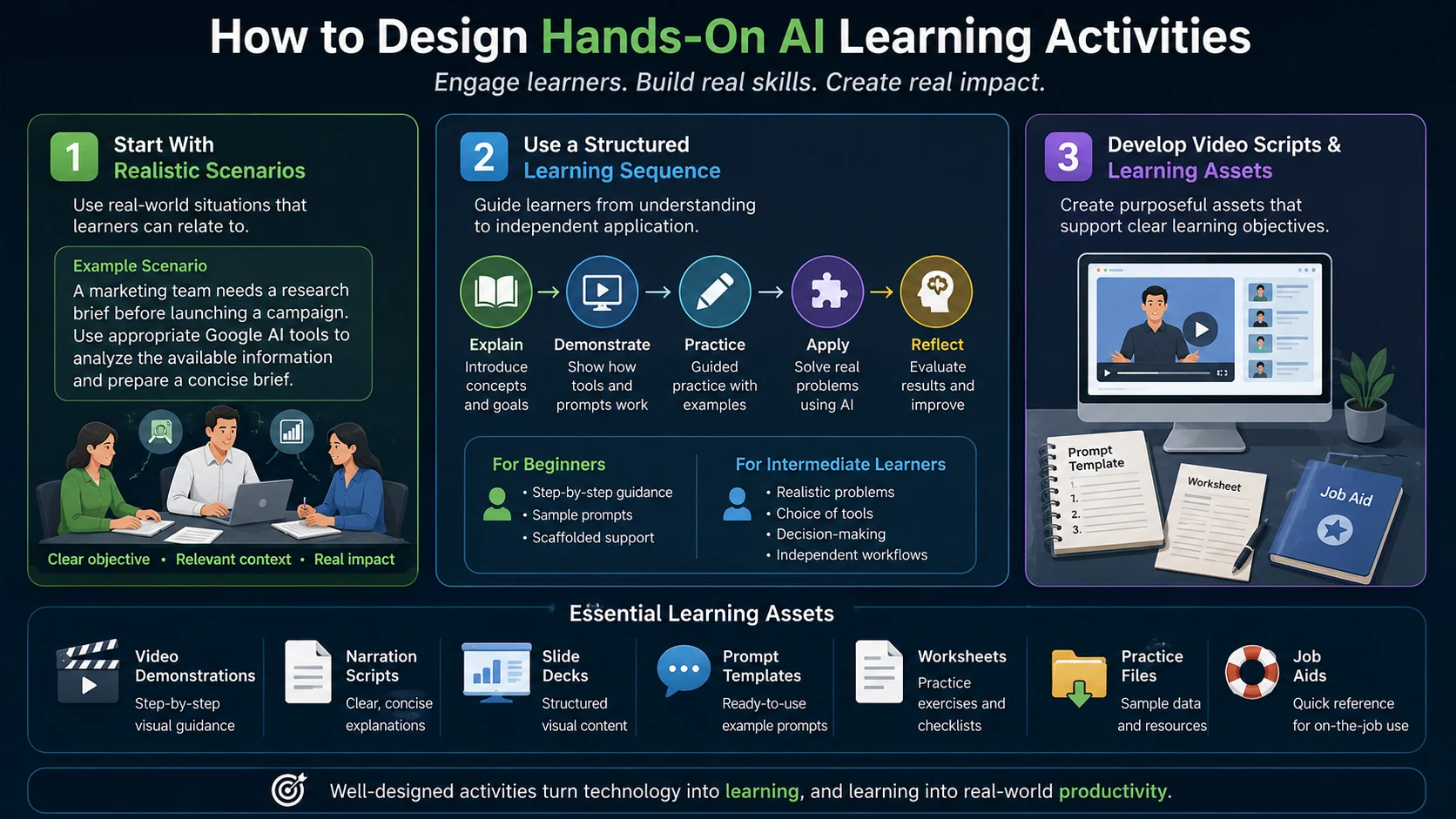
How to Design Hands-On AI Learning Activities
AI skills cannot be developed through passive tutorials alone. Learners need opportunities to experiment, make decisions, evaluate outputs, and improve their work.
Start With Realistic Scenarios
Instead of asking learners to simply practice Gemini, create a realistic scenario:
A marketing team needs a research brief before launching a campaign. Use appropriate Google AI tools to analyze the available information and prepare a concise brief.
This gives learners a clear objective and makes the technology part of the solution.
Use a Structured Learning Sequence
A practical activity can follow this sequence:
Explain → Demonstrate → Practice → Apply → Reflect
Beginners can receive step-by-step instructions and sample prompts. Intermediate learners can receive realistic problems and decide which tools, prompts, and workflows to use.
This gradual increase in independence helps learners develop practical AI judgment.
Develop Video Scripts and Learning Assets
A complete AI course may include:
- Video demonstrations
- Narration scripts
- Slide decks
- Prompt templates
- Worksheets
- Job aids
- Practice files
Each asset should support a specific learning objective rather than simply add more content.
Using Quizzes, Projects, and Capstone Assessments
Assessments should measure whether learners can apply AI skills, not simply remember definitions or product features.
Knowledge Checks
Short quizzes can reinforce:
- AI fundamentals
- Prompting
- Tool selection
- Responsible AI
- Output evaluation
- Workflow design
These checks can also give learners immediate feedback.
Practical Assignments
Learners could receive a business scenario and be asked to select a Google AI tool, create a prompt, evaluate the result, and explain how they would improve it.
This tests judgment and practical application rather than simple recall.
Module Projects
Projects could include:
- Research briefs
- AI-assisted reports
- Customer-support workflows
- Presentations
- Training videos
These deliverables allow learners to demonstrate how AI can support real workplace outcomes.
Capstone Project
The final project can require learners to:
- Identify a business problem.
- Select appropriate AI tools.
- Design an AI-supported workflow.
- Create a final deliverable.
- Evaluate the AI output.
- Explain their decisions.
This demonstrates whether learners can apply AI strategically and responsibly.
Choosing the Right LMS for AI Training
An effective Google AI course also needs an LMS that can deliver the learning experience. Platforms such as Kajabi, Thinkific, and Teachable can support online training, but the right choice depends on the organization’s audience, content strategy, and delivery requirements.
Organize the Learning Journey
The LMS should reflect the curriculum:
Foundations → Everyday AI → Productivity → Workflows → Projects → Capstone
This gives learners a clear path through the course.
Support Multiple Learning Formats
The course may include:
- Videos
- Slides
- Guides
- Prompt templates
- Exercises
- Quizzes
- Assignments
- Projects
These elements should work together as one learning experience.
Track Learner Progress
Organizations may need to monitor course completion, lesson progress, quiz results, assignments, and assessment performance.
The LMS should therefore support the instructional strategy rather than determine it.
How to Keep an AI Course Updated
AI technology changes quickly. Google can introduce new capabilities, modify interfaces, update workflows, or retire features.
This makes AI course development USA an ongoing process rather than a one-time project.
Teach Durable AI Skills
Focus on skills such as:
- Prompting
- Critical thinking
- Research
- Output evaluation
- Problem-solving
- Workflow design
- Human-AI collaboration
These skills remain valuable even when individual tools evolve.
Separate Stable and Changing Content
For example:
Stable: How to evaluate AI-generated information.
Changing: The location or appearance of a specific product feature.
Keeping these elements separate makes future updates easier.
Make Content Modular
Separate videos, scripts, screenshots, slides, exercises, quizzes, and examples.
If Google changes an interface, the organization can update the affected material without rebuilding the entire course.
Establish a Regular Review Process
Training teams should regularly review:
- Product demonstrations
- Screenshots
- Exercises
- Assessments
- Links
- Examples
- Learning resources
Learner feedback should also inform course updates.
The goal is to build the course for change rather than attempt to predict every future AI update.
How TheEduAssist Supports AI Course Development
Developing a practical Google AI course requires more than technical knowledge. Organizations need curriculum architecture, instructional design, learning assets, assessments, LMS implementation, and ongoing content support.
TheEduAssist can support AI training companies and educational organizations across these stages.
Curriculum Architecture and Instructional Design
TheEduAssist can help structure:
- Learning pathways
- Module sequences
- Learning objectives
- Beginner-to-intermediate progression
- Projects and capstones
The instructional approach can align:
Objectives → Content → Demonstration → Practice → Assessment
This helps transform a complex AI subject into a structured learning experience.
AI Course Development and Video Scripting
Support can include AI-focused lessons covering:
- AI fundamentals
- Google AI tools
- Prompting
- Workplace applications
- AI workflows
- Responsible AI
TheEduAssist can also develop:
- Video scripts
- Narration scripts
- Screen-recording scripts
- Demonstration content
Each asset can be built around a defined learning objective.
Slide and Learning Asset Development
A complete course may require:
- Slide decks
- Worksheets
- Prompt guides
- Templates
- Job aids
- Practice materials
These resources can reinforce lessons and give learners practical tools they can continue using after course completion.
Interactive Exercise and Assessment Development
TheEduAssist can support scenario-based exercises that require learners to select tools, develop prompts, evaluate outputs, and solve realistic workplace problems.
Assessment support can include:
- Quizzes
- Knowledge checks
- Practical assignments
- Module projects
- Capstone assessments
These assessments can measure application rather than simple recall.
LMS Setup and Course Migration
TheEduAssist can help organize courses within an LMS, including lessons, modules, assessments, resources, and learner pathways.
For organizations moving existing training content, course migration can involve reviewing and restructuring lessons, videos, assessments, and learning resources for the new platform.
Course Updates and Ongoing Learning-Content Support
AI training requires continuous maintenance. As Google’s products evolve, organizations may need to update demonstrations, screenshots, scripts, exercises, quizzes, and examples.
TheEduAssist can provide ongoing learning-content support to help keep courses accurate, relevant, and maintainable. This positions TheEduAssist as a learning-content and eLearning development partner for organizations building and maintaining AI training programs in the United States.
For organizations seeking an eLearning development company in the USA, this type of support can connect curriculum strategy, content production, LMS delivery, and ongoing course maintenance.
Conclusion
A practical Google AI training course should do more than teach individual tools. It should help learners understand when to use AI, how to combine tools, and how to apply AI to real workplace challenges.
A structured beginner-to-intermediate journey, realistic workflows, hands-on activities, meaningful assessments, and a flexible LMS can turn AI training into a practical business capability.
As Google’s AI ecosystem evolves, modular content and strong instructional design can keep the course relevant. With the right development and ongoing support, organizations can build AI training that teaches lasting skills rather than short-lived software tutorials.
Sources & References
Frequently Asked Questions
QWhat should a Google AI training course include?
A practical Google AI training course should cover AI basics, prompting, tool selection, workplace applications, and responsible AI use. It should also include hands-on activities, realistic scenarios, projects, and assessments so learners can apply what they learn.
QIs Google AI training suitable for beginners?
Yes. Beginners can start with accessible tools such as Gemini, NotebookLM, and Google Workspace AI features. The course can then gradually introduce more advanced tools as learners build confidence and practical skills.
QWhich Google AI tools should beginners learn first?
Gemini, NotebookLM, and Google Workspace AI features are good starting points. They can help learners practice prompting, research, summarization, content creation, and everyday workplace tasks before moving to more advanced tools.
QHow can AI training improve workplace productivity?
AI training can help employees research information, summarize documents, draft emails, create reports, prepare presentations, and organize tasks. Training becomes more valuable when learners practice these skills through realistic workplace scenarios.
QWhat is a real-world AI workflow?
A real-world AI workflow combines different tools and steps to achieve a specific outcome. For example, learners might use NotebookLM for research, Gemini to organize findings, and Google Docs and Slides to create a report and presentation.
QHow should Google AI skills be assessed?
AI skills should be assessed through practical assignments, projects, quizzes, and a final capstone. Learners should demonstrate that they can choose the right tool, create effective prompts, evaluate AI outputs, and apply AI to a realistic business problem.
QHow can organizations keep Google AI training courses updated?
Organizations should regularly review product demonstrations, screenshots, exercises, assessments, links, examples, and learning resources. Modular course content also makes it easier to update individual materials when Google's AI tools or interfaces change.