
How Do You Create Your First Course on LearnWorlds?
Learn how to create your first course on LearnWorlds, from defining learning outcomes and structuring lessons to adding activities, testing, launching, and improving your course.
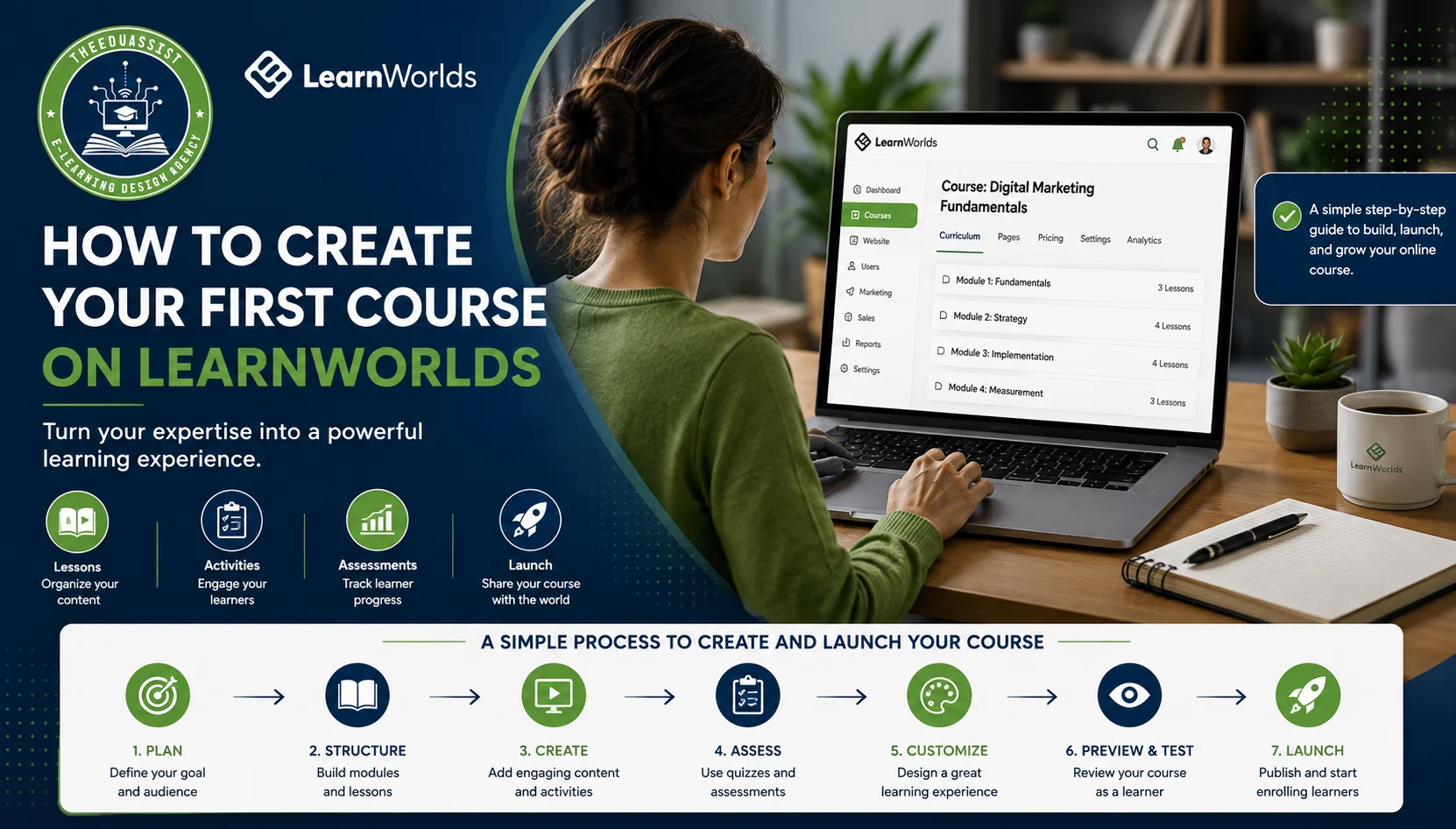
Table of Contents ▼
Quick Answer
Create a focused LearnWorlds course around one clear learner outcome. Use structured lessons, practical activities, and assessments to support learning. Test, launch, gather feedback, and continuously improve the course.
Key Takeaways
- Define one clear learning outcome.
- Test the course before publishing.
- Structure content into focused sections.
- Use videos, quizzes, and assignments wisely.
- Make lessons interactive and practical.
- Launch, collect feedback, and improve.
Creating your first online course can feel overwhelming. The challenge isn’t just uploading content to LearnWorlds. It’s turning your expertise into a clear learning experience that learners can actually complete.
LearnWorlds provides tools to organize lessons, add activities, assess learners, customize your course, and prepare it for launch. But the platform is only part of the process.
Here’s how to create your first LearnWorlds course without overcomplicating it.
1. Start With a Clear Course Goal
Before opening LearnWorlds, define your learner and their desired outcome.
Ask:
- Who is this course for?
- What problem does it solve?
- What should learners achieve?
- Which skills should they develop?
- How will you measure progress?
For example, instead of creating a broad Digital Marketing course, create: Digital Marketing Fundamentals for Small Businesses
Then define a measurable outcome: By the end, learners will be able to create a basic digital marketing plan.
Your goal should guide every lesson, activity, and assessment. Start with the outcome, not the content.
2. Plan Your Course Structure
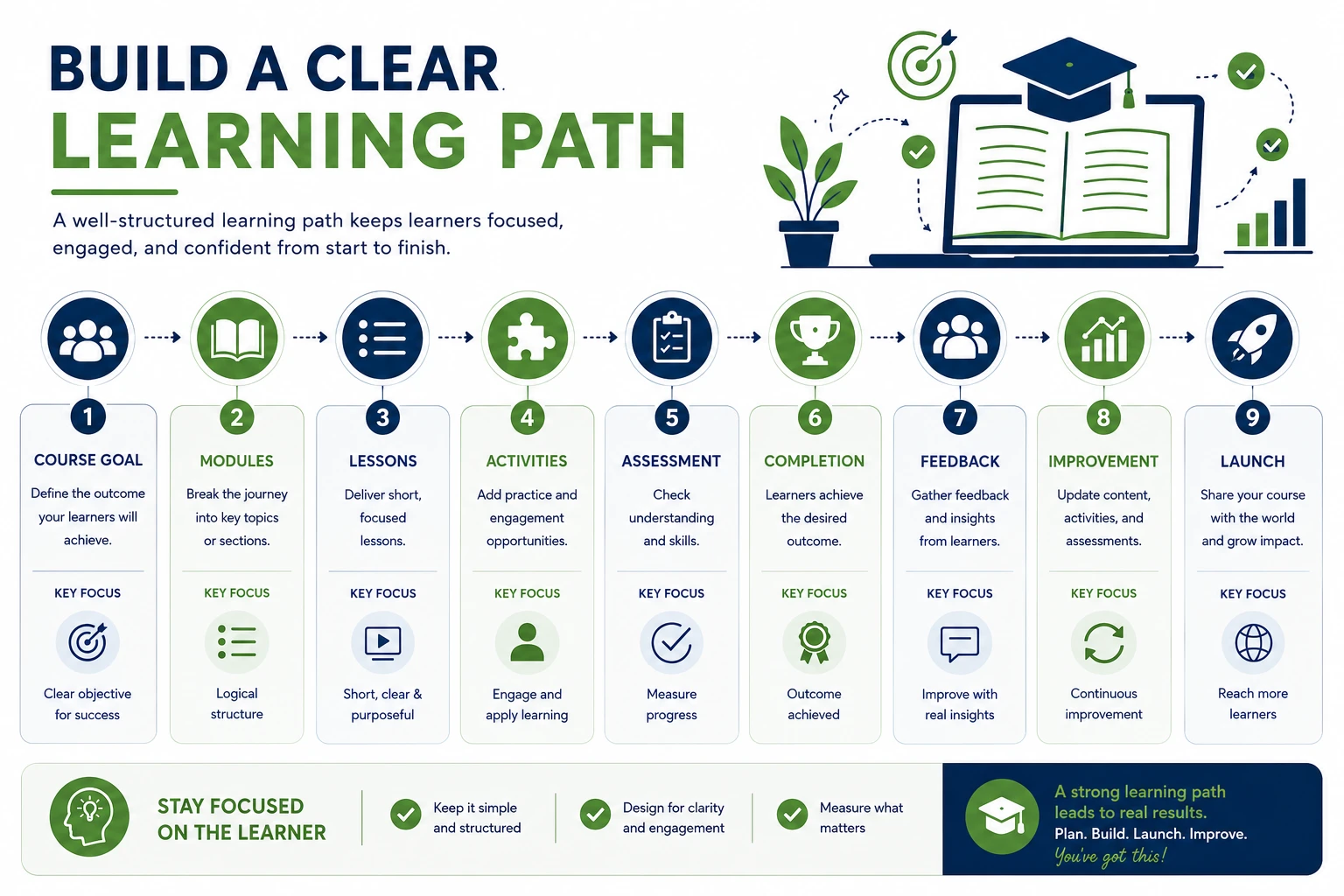
Turn your main outcome into a simple learning path.
For example:
Module 1: SEO Fundamentals
- What is SEO?
- How search engines work
- Search intent
Module 2: On-Page SEO
- Keyword research
- Title tags
- Meta descriptions
- Internal linking
Module 3: Apply SEO
- Optimize a blog post
- Create an SEO checklist
- Measure basic results
Each module should move learners closer to the outcome. Don’t create lessons simply because you have information to share. Teach what learners need, not everything you know.
3. Create Your Course in LearnWorlds
LearnWorlds lets you create courses through its Course Creation Wizard. You can build from scratch, use AI to help create an outline, import an existing course, or use content available through Course Hub.
For a first course, starting from scratch can give you greater control over the learning experience.
Start with the basics.
Choose a Clear Title
Your title should quickly tell learners what they will gain.
Too broad:
Digital Marketing
More specific:
Digital Marketing Fundamentals for Small Businesses
Clarity matters more than creativity.
Write an Outcome-Focused Description
Don’t simply list your topics.
Instead of:
This course covers SEO, keywords, content, and analytics.
Try:
Learn how to choose keywords, optimize content, build an SEO strategy, and measure basic search performance.
The first version describes the content. The second explains the value. Sell the outcome, not the syllabus.
4. Add Your Course Image and Details
Your course experience starts before the first lesson. Choose a clean, relevant course image that fits your brand. Avoid clutter and unnecessary text. Keep your course URL simple too.
For example:
/seo-for-beginners
is easier to understand than a long URL filled with unnecessary words. These details may seem minor, but they help create a professional first impression.
5. Choose How Learners Access the Course
Decide how learners should access your course based on your goals.
Common options include:
- Draft: Build and test privately.
- Free: Offer the course at no cost.
- Paid: Sell the course to learners.
- Coming Soon: Build interest before launch.
- Private: Limit access to selected learners.
If this is your first course, choose the simplest option that fits your strategy.
6. Build Your Course Outline
Inside LearnWorlds, organize your content into sections and learning activities. Think of sections as milestones, not folders.
For example:
- Section 1: Get Started
- Section 2: Learn the Fundamentals
- Section 3: Practice the Skills
- Section 4: Complete a Final Project
Then ask:
Does this feel like a learning path or a list of topics?
If learners can reach the goal in 10 focused lessons, don’t create 30. Longer doesn’t mean better.
7. Add the Right Learning Content
LearnWorlds supports different learning activities and formats, including videos, PDFs, ebooks, quizzes, assessments, interactive content, SCORM/HTML5 content, and live sessions.
Don’t use every format simply because it’s available.
| Content Type | Best For |
| Video | Demonstrations and explanations |
| PDF/Ebook | Guides and references |
| Quiz | Knowledge checks |
| Assignment | Skill practice |
| Interactive content | Active learning |
| Live session | Coaching and discussion |
For example, a social media course could use:
- Video: Explain the strategy.
- Template: Provide a planning framework.
- Assignment: Create a strategy.
- Quiz: Check key concepts.
This turns information into practice. Don’t just deliver content. Design learning.
8. Make Lessons Interactive
A course full of videos can quickly become passive. Give learners opportunities to think, practice, and apply what they learn.
For example:
- Ask learners to find five relevant keywords.
- Have them write three email subject lines.
- Give them a real-world content planning task.
- Add short knowledge checks after key concepts.
LearnWorlds also supports interactive video features that can add questions and other interactions.
Use them when they improve the learning experience.
Make activities purposeful, not decorative.
9. Add Quizzes and Assessments
Assessments should show whether learners understand and can apply the material. Match each assessment to its learning objective.
If you’re teaching SEO, don’t only ask:
What is on-page SEO?
Give learners a webpage and ask them to improve its title, headings, meta description, and internal links. That tests application rather than memorization. The best assessment measures the skill you promised to teach.
10. Customize the Learning Experience
Good content can still feel difficult when a course is confusing or poorly organized. Use LearnWorlds customization options to create a clear and consistent experience.
Pay attention to:
- Lesson order
- Navigation
- Branding
- Course images
- Instructions
- Readability
- Visual consistency
Learners should always know:
- Where am I?
- What am I learning?
- What should I do next?
If those answers are obvious, your course design is working.
11. Set Your Course Price
If you’re selling your course, don’t price it based only on the number of videos or hours. Learners pay for value and outcomes.
Consider:
- Target audience
- Problem solved
- Value of the outcome
- Your expertise
- Included resources
- Support or coaching
- Comparable courses
A focused two-hour course can be more valuable than a 20-hour course filled with unnecessary information. Price the transformation, not the content volume.
12. Preview and Test Before Publishing
Don’t publish immediately after finishing the course. Experience it as a learner.
Check:
- Videos play correctly.
- Links work.
- Downloads are accessible.
- Quizzes function properly.
- Instructions are clear.
- Lessons are in the right order.
- Navigation makes sense.
- The course works across devices.
If possible, ask someone unfamiliar with the course to test it. A fresh perspective can reveal problems you’ve stopped noticing. Don’t make your first learners your testers.
13. Publish Your Course
Once everything works, publish your course and open enrollment. But remember:
Publishing is version one, not the finish line. Watch how learners interact with your course.
Look for:
- Repeated questions
- Difficult lessons
- Low engagement
- Drop-off points
- Confusing activities
Use these insights to improve the experience.
14. Improve After Launch
Your first course doesn’t need to be perfect. It needs to be useful. If learners find a lesson too long, shorten it. If they repeatedly ask the same question, explain it better. If they understand the theory but struggle to apply it, add more practice.
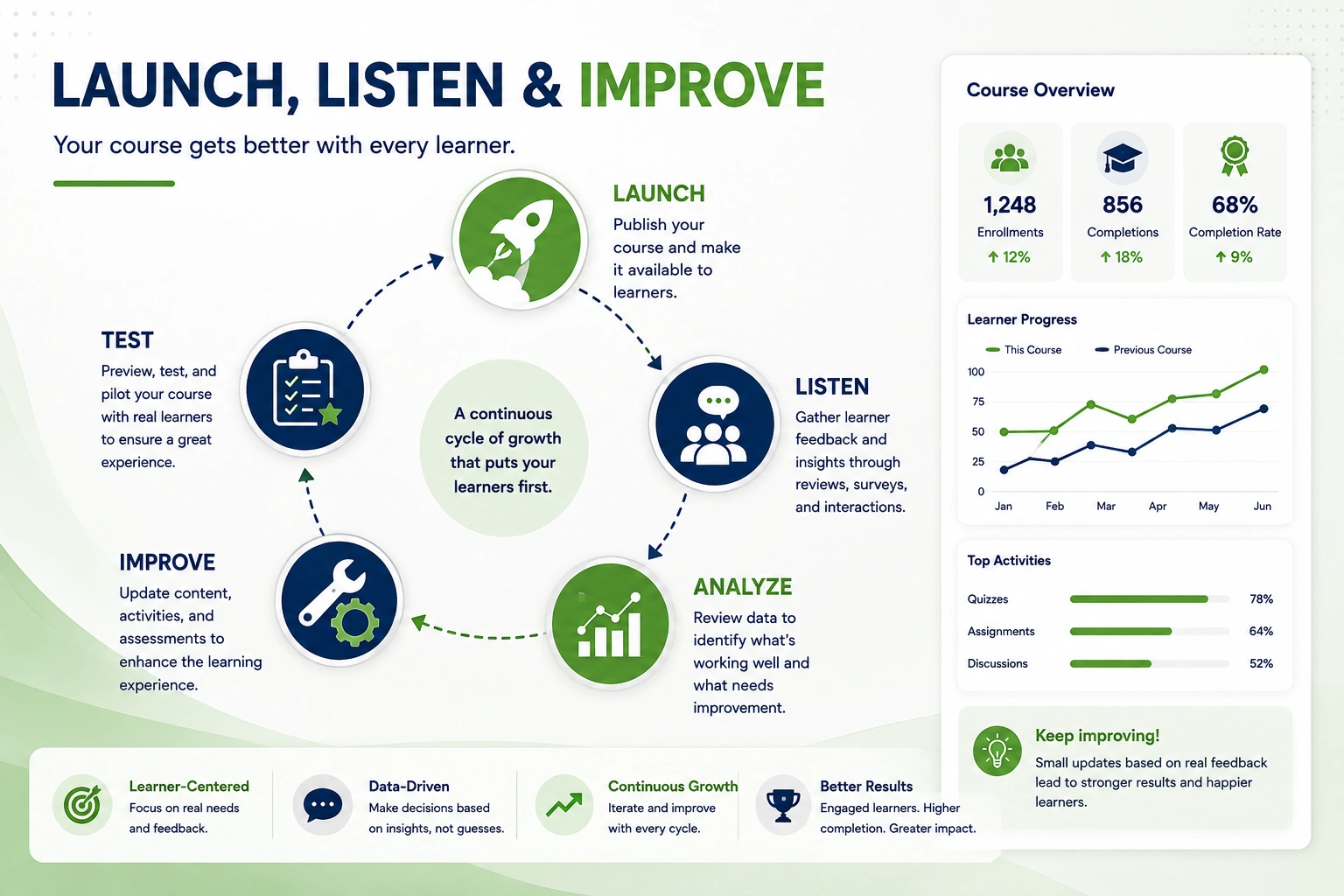
The process is simple:
Build → Launch → Listen → Improve
This approach is often better than spending months trying to create a perfect first version.
Common Mistakes to Avoid
Trying to Teach Everything
Too much information can overwhelm learners. Focus on one clear transformation.
Creating Lessons Without Outcomes
Every lesson should answer:
What will learners understand or do after this?
If there’s no clear answer, reconsider the lesson.
Making Everything a Video
Use videos where they help. Use quizzes, templates, assignments, and other formats where they work better.
Making the Course Too Long
Remove content that doesn’t support the main outcome. More content does not automatically create more value.
Skipping Testing
Your course may seem obvious because you created it. Test it from a beginner’s perspective.
Focusing Too Much on Features
LearnWorlds offers many tools. You don’t need all of them. Build around the learner—not the features.
A Simple Formula for Your First LearnWorlds Course
Use this simple, outcome-focused framework to build your first course:
- Define your target audience.
- Identify one clear problem.
- Set one measurable learning outcome.
- Create 3–5 focused sections.
- Develop short, purposeful lessons.
- Add relevant learning activities.
- Include a practical assessment.
- Test the course with learners.
- Launch, evaluate, and improve.
This approach keeps your course focused, practical, and easier to complete. Start with what learners need to achieve, then build each part of the course around that goal. You can expand and improve the course as you gather learner feedback.
Final Thoughts
Creating a LearnWorlds course isn’t about uploading as much content as possible. It’s about turning your expertise into a clear path toward a meaningful outcome. Define the learner. Set the goal. Build the path. Add useful content and practice.
Test everything before launch. Then listen to your learners and improve. Your first course doesn’t need to be perfect. It needs to help learners make progress.
Sources & References
Frequently Asked Questions
QHow do I create my first course on LearnWorlds?
Start by defining your target audience, course goal, and learning outcome. Then build your lessons around that outcome.
QHow should I structure a LearnWorlds course?
Divide your course into focused sections and lessons. Each section should help learners move closer to the main goal.
QWhat content should I add to my LearnWorlds course?
Use a mix of videos, PDFs, quizzes, assignments, and interactive activities. Choose each format based on what learners need.
QHow can I make my LearnWorlds course more interactive?
Give learners opportunities to practice, answer questions, complete assignments, and apply what they learn to real situations.
QDo I need quizzes and assessments in my course?
Yes, when they support your learning goals. Practical assessments can show whether learners can actually apply the skills.
QShould I test my course before publishing it?
Absolutely. Check your videos, links, downloads, quizzes, lesson order, navigation, and mobile experience before launch.
QHow can I improve my LearnWorlds course after launch?
Pay attention to learner questions, engagement, difficult lessons, and drop-off points. Use that feedback to make the course clearer and more useful.