
2026 Ultimate Guide to Designing an ‘AI for Everyone’ Course
Discover how to design a practical AI for Everyone course in 2026 using simple lessons, hands-on activities, no-code AI tools, interactive learning, and structured instructional design.
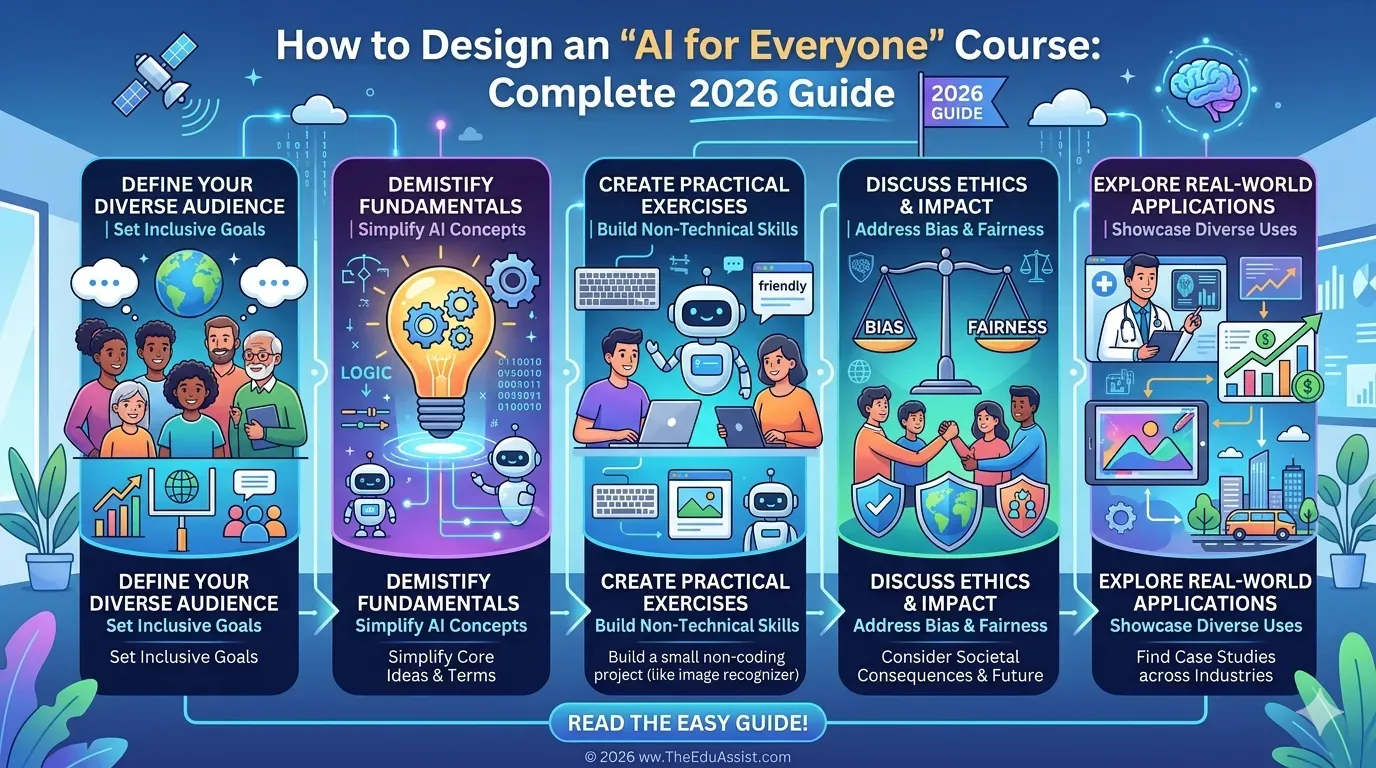
Table of Contents ▼
Quick Answer
This 2026 guide explains how to design an AI for Everyone course for non-technical learners. It covers beginner-friendly instructional design, microlearning, hands-on AI practice, no-code tools, interactive activities, LMS selection, course costs, and practical learning outcomes.
Key Takeaways
- Keep AI concepts simple and practical for non-technical learners.
- Use microlearning and hands-on activities to turn AI theory into real-world skills.
- Combine interactive content with the right LMS to create an engaging and scalable learning experience.
Artificial Intelligence is no longer limited to engineers or data scientists. In 2026, non-technical learners, entrepreneurs, and professionals are actively seeking beginner-friendly AI education.
But here’s the challenge most course creators face:
- AI is complex
- Learners are non-technical
- Courses become either too basic or too overwhelming
This creates a major gap in the market: AI courses that are simple, structured, and actionable for everyone.
Many creators are now attempting to build short programs like a 3-hour “AI for Everyone” course, but struggle with:
- Breaking down complex topics
- Structuring content effectively
- Making lessons interactive
- Designing practical learning experiences
To solve this, you need more than subject knowledge; you need instructional design, structured content development, and custom eLearning strategies aligned with eLearning trends 2026.
This guide shows you exactly how to design an AI course that works for absolute beginners while still delivering real value.
Why “AI for Everyone” Courses Often Fail
Most beginner AI courses fail for one of two reasons:
1. Too TechnicalThey include:
- Coding-heavy lessons
- Complex algorithms
- Jargon-heavy explanations
This overwhelms beginners.
2. Too SuperficialThey:
- Explain concepts without application
- Lack hands-on exercises
- Fail to show real-world use cases
This leads to low engagement and poor outcomes.
According to learning research, effective AI education should focus on:
- Conceptual understanding
- Real-world application
- Progressive skill building
The Real Goal: Make AI Practical for Non-Technical Learners
Your course should answer one question: “How can a beginner use AI in real life after this course?”
This shifts your course from:
- Information-based → Action-based learning
For example, instead of teaching: “What is machine learning?”
Teach: “How to use AI tools to automate simple business tasks”
How to “Learn AI” byu/StrickerPK inEngineeringStudents
Design the AI Course Like a Journey (Not a Lecture Series)
A 3-hour course must be structured carefully.
Suggested Structure:
| Module | Duration | Focus |
|---|---|---|
| Module 1 | 30 min | What is AI (simple explanations) |
| Module 2 | 30 min | AI tools overview |
| Module 3 | 45 min | Real-world applications |
| Module 4 | 45 min | Hands-on exercises |
| Module 5 | 30 min | Mini project |
| Module 6 | 30 min | Wrap-up + next steps |
This ensures learners move from: understanding → exploration → application
Use Microlearning to Simplify Complex Concepts
AI topics should be broken into bite-sized lessons.
Instead of long lectures:
- Create 5–10 minute videos
- Focus on one concept per lesson
- Include quick examples
This aligns with microlearning strategies and improves retention.
Add Hands-On AI Learning (This Is Non-Negotiable)
AI cannot be learned passively.
Your course should include:
- Guided exercises
- Tool-based demonstrations
- Simple workflows
Examples:
- Generating content using AI
- Automating a small task
- Creating a chatbot
Learners retain more when they actively apply concepts instead of just watching.
Keep It Tool-Focused (Not Theory-Focused)
Beginners care about what they can do with AI, not how it works internally.
Focus on tools like:
- AI writing tools
- Automation tools
- No-code AI platforms
This makes the course practical and immediately useful.
Make It Interactive and Engaging
To avoid passive learning, include:
- Quizzes after each module
- Scenario-based questions
- Reflection prompts
Interactive learning improves:
- Engagement
- Retention
- Completion rates
This is a key principle in modern instructional design and L&D practices.
Choose the Right LMS for AI Course Delivery
A good LMS ensures a smooth learning experience.
Popular platforms include:
- Kajabi
- Thinkific
- Teachable
These platforms help you:
- Organize modules
- Track learner progress
- Deliver quizzes and certificates
Cost Reality Check: Building an AI Course
Following are the estimated cost for different categories:
Instructional design: $2,000 – $6,000
Video production: $1,000 – $4,000
Content development: $500 – $2,000
LMS subscription: $39 – $199/month
While you can start small, investing in custom eLearning and structured content development significantly improves course quality.
Unique Perspective: The “No-Code AI Learning Model”
In 2026, successful beginner AI courses follow a no-code approach.
Instead of teaching:
- Programming
- Algorithms
They focus on:
- Using AI tools
- Building workflows
- Solving real problems
This aligns with eLearning trends 2026, where accessibility and practicality are key.
Final Thoughts
Designing an “AI for Everyone” course is not about simplifying AI; it’s about structuring it correctly.
By combining:
- Instructional design
- Microlearning
- Hands-on practice
- Interactive content
- LMS delivery
you can create a course that is:
- Beginner-friendly
- Engaging
- Practical
- Scalable
Platforms like TheEduAssist.com support creators through TheEduAssist consulting services, helping design structured AI courses with strong learning outcomes.
Need Help Building or Scaling Your Online Learning Program?
Whether you are launching an academy on Kajabi, modernizing corporate LMS modules, or converting raw expertise into accredited curriculum, our senior instructional designers provide a complimentary architecture evaluation.
Sources & References
Frequently Asked Questions
QWhat should an “AI for Everyone” course include?
It should include simple explanations, real-world applications, hands-on exercises, and interactive learning elements.
QDo learners need technical skills for AI courses?
No. Beginner courses should focus on no-code tools and practical applications.
QHow long should an AI beginner course be?
A 2–4 hour structured course works well for beginners.
QWhich LMS is best for AI courses?
Platforms like Kajabi, Thinkific, and Teachable are commonly used.
QHow can TheEduAssist help design an AI course?
Through consulting services and custom eLearning solutions, [TheEduAssist.com](https://www.theeduassist.com) helps create structured AI learning programs with strong instructional design and content development.
