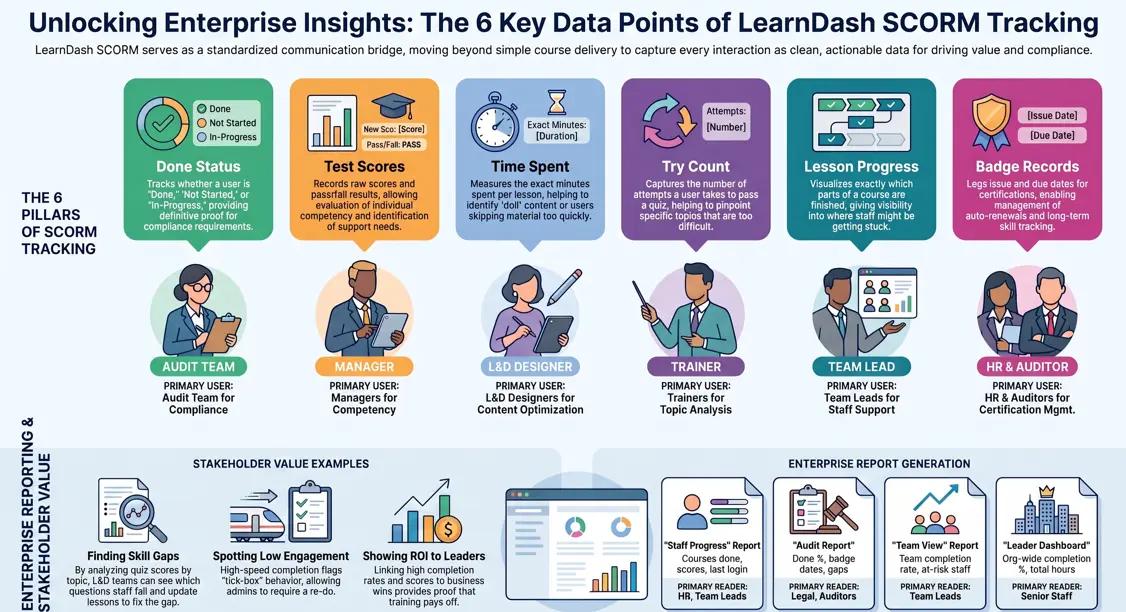
LearnDash SCORM is the backbone of enterprise learning tracking, especially when basic LMS reporting isn’t enough. Indeed, between strict regulatory compliance, HR skill gap analysis, and executives demanding proof of ROI, organizations urgently need a reliable, standardized way to monitor employee progress.
Fortunately, by combining LearnDash with the tracking power of SCORM, you get a system that works seamlessly across departments and devices. To help you get started, this guide will walk you through exactly how it works, how to set it up, and how to use SCORM data to optimize your training programs.
What Is LearnDash SCORM?
SCORM in Plain Terms
Fundamentally, SCORM is a set of rules for online learning. Simply put, it lets a course talk to an LMS. Also, it records data like scores and time. So, every team gets the same clean data. Three versions exist:
- SCORM 1.2 is the industry standard most frequently utilized by large firms.
- With SCORM 2004, you get advanced tracking that captures more detail per lesson.
- An older, rarely used legacy version is SCORM 1.1.
How It Works in LearnDash
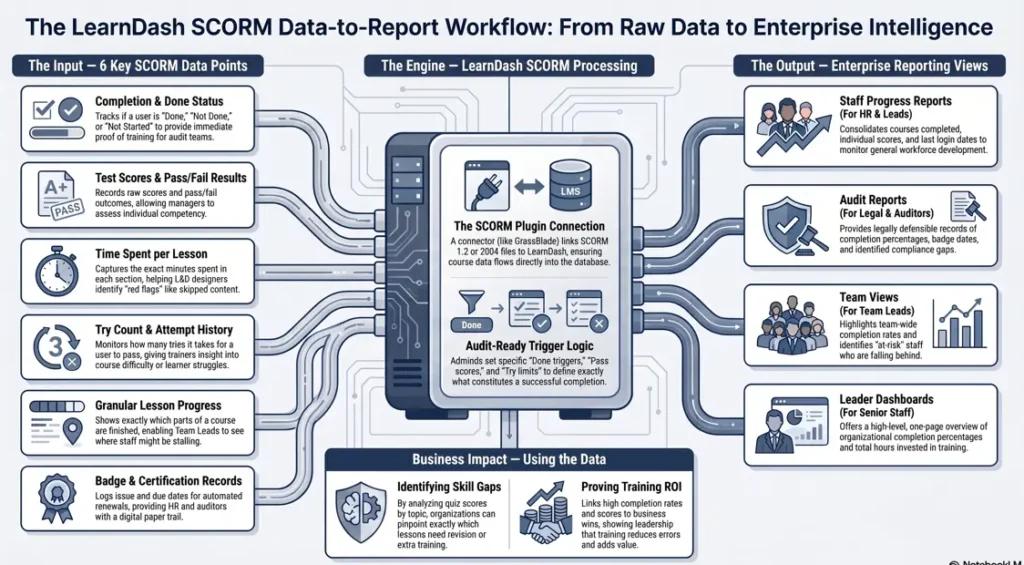
LearnDash SCORM adds this tracking to your LMS. However, it needs a plugin to run. So, tools like GrassBlade connect the two. As a result, course data flows right into your reports.
Why Firms Still Use SCORM
SCORM works with every major tool. Also, all LMS platforms can read it. For this reason, IT teams trust it. In addition, auditors accept SCORM records as valid proof.
Why Use LearnDash SCORM for Tracking?
Most firms need proof that staff did their training. So, LearnDash SCORM gives you that proof. Also, it tracks scores, time, and pass rates. For example, a health firm can show HIPAA training is done. Moreover, audit records are saved on their own.
Why It MattersWhat SCORM TracksBenefitAudit proofDone status, date, scoreNo more scramblingSkill gapsQuiz results per personFix weak areas fastTime useTime per lessonCut dull contentBadgesPass date, badge dateAuto-renew logs
How to Set Up LearnDash SCORM
Step 1: Know Your Goals
First, decide what you need to track. Also, think about who reads the reports. So, your setup will match your goals. Ask three key questions:
- Do you need done or not-done records?
- Do you need quiz scores per person?
- Can you track time spent per lesson?
Step 2: Pick a Plugin
Next, pick a plugin to link SCORM to LearnDash. However, not all plugins give deep reports. Therefore, check that it fits your SCORM version. Look for one with user views and export tools.
Step 3: Upload and Link
Then, upload your SCORM .zip file. (If you don’t have your files ready yet, you can easily build them using the best non-technical SCORM course creation tools like Rise 360 or iSpring). After that, link it to a course in LearnDash. Set these three things…
- Done trigger: what counts as done
- Pass score: the lowest score to pass
- Try limit: how many tries a user gets
Step 4: Test Before Launch
SCORM tracking in LearnDash must be on in the plugin. Finally, run a test with a fake user. Also, check that all data shows up right. Before you go live, test on your phone and desktop. Therefore, you catch bugs early.
What Data Does LearnDash SCORM Track?
LearnDash SCORM captures six key data points. Each one helps you make better choices.
DataWhat It ShowsWho Uses ItDone statusDone, not done, not startedAudit teamTest scoresRaw score, pass or failManagersTime spentMinutes per lessonL&D designersTry countHow many tries to passTrainersLesson progressWhich parts are doneTeam leadsBadge recordsIssue date, due dateHR, auditors
How to Use the Data
Find Skill Gaps
Look at quiz scores by topic. For example, if many staff fail one question, that topic needs work. Also, check where people stop the course. So, you see the exact lesson to fix. Therefore, your edits are based on real data. add more transition words to it
Spot Low Engagement
Learning data shows how long each lesson takes. However, a very short time is a red flag. Also, someone who finishes a 60-min course in ten minutes skipped parts. So, flag that person for a re-do. As a result, training stays real, not just a tick-box.
Show ROI to Leaders
Leaders want proof that training pays off. Moreover, SCORM data helps you build that case. Therefore, link done rates to business wins. For instance, teams with high scores often have fewer errors. LearnDash enterprise reports give you the numbers.
Reports You Can Build in LearnDash
First, build progress reports for HR and managers. Next, make audit reports for your legal team. Also, set up team views for leads. Finally, give senior staff a one-page dashboard.
ReportKey DataWho Reads ItStaff progressCourses done, scores, last loginHR, leadsAudit reportDone %, badge dates, gapsLegal, auditorsTeam viewTeam done rate, at-risk staffTeam leadsLeader dashOrg done %, total hoursSenior staff
Send reports on a set schedule each month. Also, share them with the right person on their own. Therefore, no one needs to ask for an update.
Common Problems and Fixes
ProblemWhy It HappensQuick FixDone not savedWrong trigger in course fileRe-export with right triggerScore not savedScore settings do not matchMatch score in plugin and fileSCORM clash1.2 file in 2004 modeSet plugin to match file versionSlow reportToo many records at onceUse date and team filtersNo badge issuedPass score not setSet pass score in both places
LearnDash SCORM vs xAPI
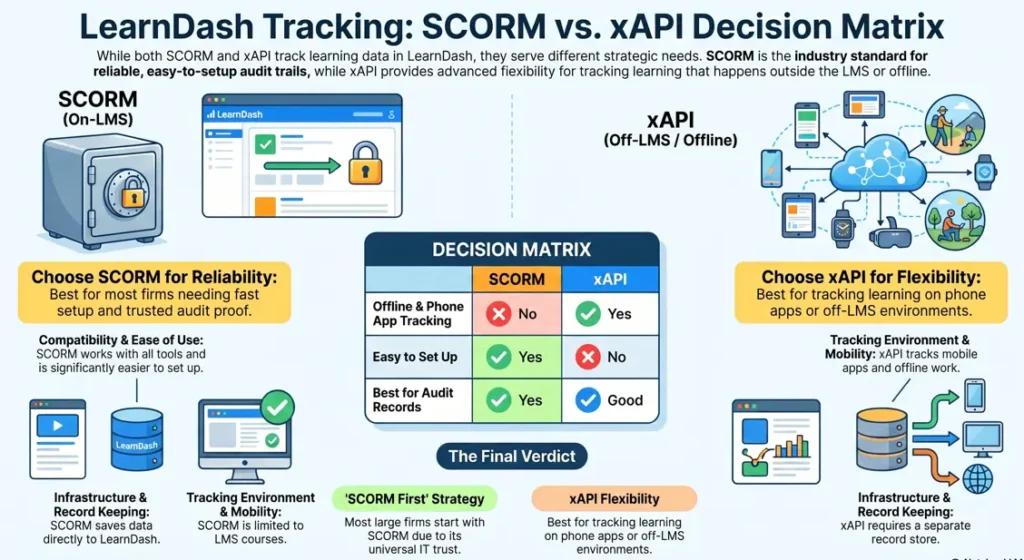
LearnDash SCORM and xAPI both track learning. However, they work in different ways. Also, each one fits a different need. Therefore, pick based on your goals. So, here is a quick look:
FeatureSCORMxAPITracks LMS coursesYesYesTracks phone appsNoYesTracks offline workNoYesNeeds a record storeNoYesWorks with all toolsYesSomeEasy to set upYesNoBest for auditsYesGood
So, use SCORM if your files are already in SCORM format. However, pick xAPI if you need off-LMS tracking. If you’re still on the fence about which path fits your long-term training infrastructure, read our full breakdown of xAPI vs SCORM to map out your technical requirements.
Best Practices for Large Teams
- Set your KPIs before you build any report.
- Use one course template for all SCORM files.
- Clean up test users and old records each month.
- Review reports with L&D leads every 30 days.
- Train admins so they can pull their own data.
Conclusion
LearnDash SCORM gives your firm clean, trusted training data. So, setup is simple with the right plugin. Moreover, reports are easy to make and share. Also, audit records are saved on their own. Therefore, your team can prove training is done at any time. As a result, employee training tracking stops being a pain.Start with your most urgent course. Then, set up tracking and run a test. After that, let the data guide your next steps.
References
1. Experience API: Flexible Data Collection Tech for Learning. British Journal of Educational Technology
2. Enhancing SCORM 2004 e-Learning Through Mining Learner Data. Educational Technology & Society.
3. Tracking Learning in a SCORM E-learning Setup. IEEE ICALT.
Frequently Ask Questions
What is SCORM in LearnDash?
LearnDash SCORM means using SCORM rules inside the LearnDash LMS. Furthermore, it lets a SCORM course send done, score, and time data to LearnDash. So, you get full tracking in one place.
Can LearnDash track SCORM “done” status?
Yes, with a SCORM plugin, LearnDash records done status, pass or fail, and dates. Also, it can issue a badge when a person passes. Furthermore, all data shows in the reports tab.
Is LearnDash SCORM good for audits?
LearnDash SCORM is widely used for audit needs. So, health, finance, and safety teams rely on it. Also, it saves records that auditors accept.
What is the gap between SCORM and xAPI?
SCORM tracks learning inside the LMS only. However, xAPI can track it anywhere, even offline. Also, xAPI needs a record store, while SCORM does not.
Do I need SCORM if I have LearnDash?
Admittedly, it is not always necessary. However, SCORM is ultimately best if you already have legacy SCORM files or strictly need robust audit records. Therefore, as a direct result, most large firms with formal training programs choose to add it to their system.
Authored by: Laiba Ayaz